
Quick Answer:
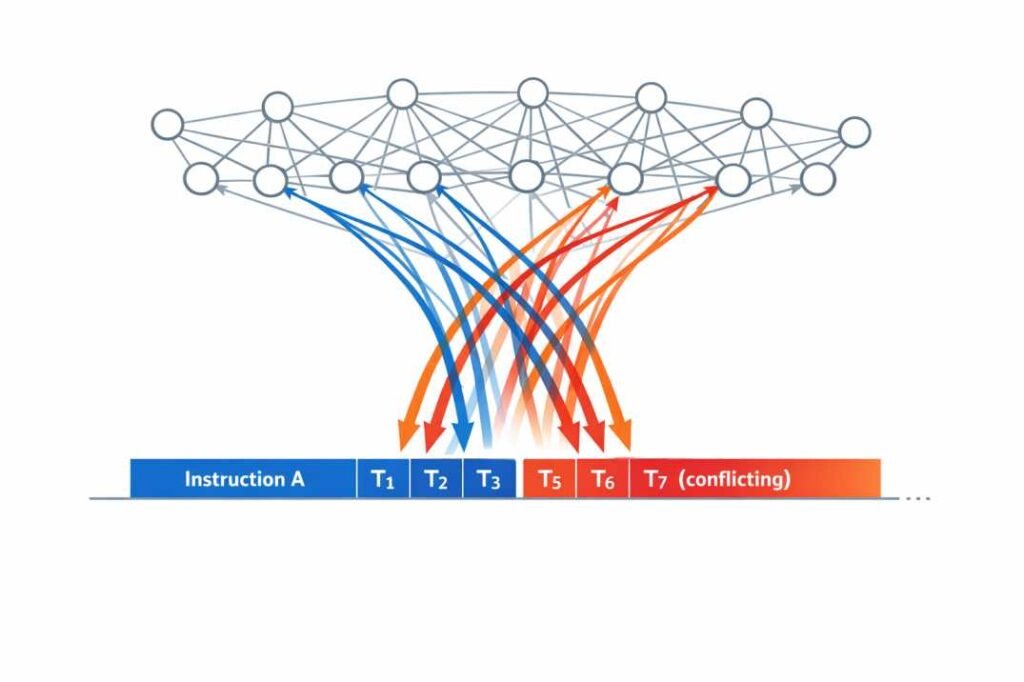
Conflicting instructions are two or more directions in a prompt that compete or contradict each other — e.g., “detailed but concise,” “casual but formal,” “expert-level but beginner-friendly.” Without a clear priority, AI models tend to blend the conflicting requirements rather than satisfy either one. In repeated workflow testing (below), this raised manual correction time from ~2 minutes per output to ~16 minutes as constraint count increased.
Table of Contents
The Problem That Started This Analysis
Conflicting instructions in AI prompts are one of the most common — and least visible — causes of output instability in production workflows.
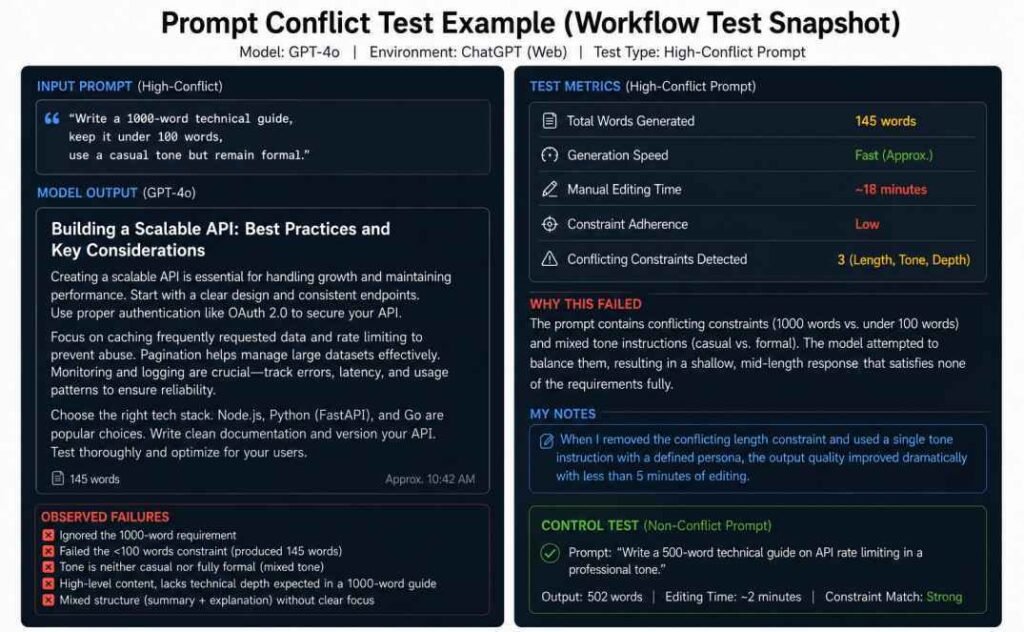
On the fifth repeated run of the same prompt, GPT-4o violated both the tone instruction and the word-count limit simultaneously. The output required 18 minutes of manual correction before it was publishable.
The same pattern appeared across multiple publishing tasks — and it was consistent enough to test deliberately.
Across repeated workflow tests, higher instruction conflict was consistently associated with greater output variability and longer correction time.
This instability is closely related to why AI models sometimes ignore instructions in complex prompts.
Key Takeaway: High-constraint prompts consistently increased editing overhead during repeated workflow testing.
“Reducing correction overhead per output can significantly improve workflow efficiency at scale.”
This wasn’t an isolated incident. In a separate, controlled test where compatible instructions were introduced one at a time rather than all at once, the model successfully tracked and complied with each new instruction as it was added — but compliance was never tested under competing instructions, only additive ones (Audit EXP-003: Multi-Instruction Compliance Test). That gap is exactly what this analysis investigates: what happens when the instructions aren’t additive, but contradictory.
→ View Audit EXP-003: Multi-Instruction Compliance Test
What Is Instruction Conflict in AI Prompts?
Why This Needed Testing
Most prompt-engineering advice states that conflicting instructions cause problems, but rarely quantifies how much — or what “blending” actually looks like output-to-output.
This connects to a separate but related failure mode: when a prompt is ambiguous rather than contradictory, models tend to fill the gap by inventing plausible-sounding details rather than flagging the missing information (Audit EXP-007: Ambiguity Resolution Test). Conflicting instructions produce a similar outcome through a different route — instead of inventing missing details, the model invents a compromise between two things it was explicitly told.
→ View Audit EXP-007: Ambiguity Resolution Test
The three failure patterns below recurred across every test: audience mismatch, tone mismatch, and length mismatch — each documented with real outputs in the case studies that follow.
Why Editing Overhead Is the Real Metric
Most prompt engineering discussions focus on output quality. This workflow analysis focuses on something more operationally relevant for teams: correction cost per output.
This aligns with a broader pattern we documented separately: adding examples and audience context to a prompt improves response relevance and reduces the need for follow-up correction — though the effect size varies by prompt and cannot be generalized as a fixed percentage (Audit EXP-001: Generic Prompt Test). Instruction conflict compounds this same problem: it doesn’t just make a prompt less specific, it makes two specificities compete with each other.
→ View Audit EXP-001: Generic Prompt Test
For teams using AI in production workflows — content, documentation, research support — it becomes a direct operational expense. When editing takes longer than generation, the workflow loses efficiency.
In production publishing environments, this delay compounds across approvals, revisions, and content scheduling workflows.
In larger production environments, one-off prompts are rarely enough to maintain reliable workflow consistency across repeated tasks.
Instruction Conflict Flow
More Constraints
↓
Instruction Competition
↓
Output Instability
↓
Manual Correction
↓
Higher Workflow Cost
Test Setup
Models tested:
- GPT-4o (ChatGPT Web, default settings)
- Claude 3.5 Sonnet (Claude.ai Web, default settings)
Method:
- 5 repeated runs per prompt using identical inputs
- Default UI settings — no temperature or parameter adjustments
- Outputs were manually reviewed for tone consistency, structural compliance, formatting stability, and instruction adherence.
Variables tracked:
- Word-count compliance
- Tone consistency
- Formatting stability
- Manual editing time per output
Scoring Criteria
| Rating | Tone Consistency | Structural Compliance |
|---|---|---|
| Strong / Stable | No tone shift across the entire output | Follows requested format exactly, no reordering needed |
| Partial / Moderate | 1–2 noticeable tone shifts, doesn’t break readability | Minor reordering or missing 1 requested element |
| Weak / Low | 3+ tone shifts within the same paragraph | Requires restructuring before publishing |
| Inconsistent / Incomplete | Tone shifts mid-sentence or contradicts the brief | Missing multiple required elements or wrong format entirely |
Each run was scored independently by the same reviewer using this rubric before recording editing time.
Prompt categories:
- Low-conflict (2 constraints)
- Moderate-conflict (4 constraints)
- High-conflict (6+ constraints)
A run was classified as “unstable” if it violated two or more constraints simultaneously, or required significant manual correction before publishing.
Note: This testing was conducted across publishing-oriented tasks — content drafting, rewriting, and summarization. Results may differ for other use cases or under API-level parameter control.
Observed Workflow Patterns
| Conflict Level | Typical Behavior | Editing Impact | Recommended Action |
|---|---|---|---|
| Low | Stable structure and consistent outputs | Low editing time | Maintain one primary objective |
| Moderate | Some tone and formatting drift | Medium correction overhead | Reduce competing instructions |
| High | Unstable responses and blended outputs | High correction cost | Use explicit instruction priorities |
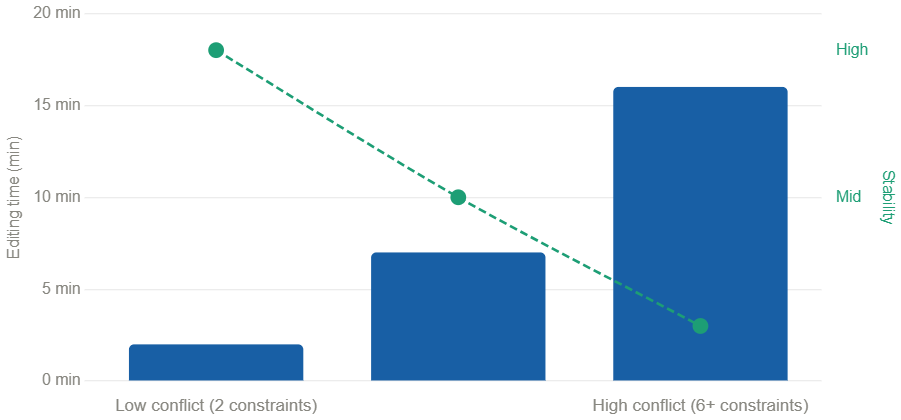
The most significant pattern: editing time generally increased as prompt constraint complexity increased. In high-conflict conditions, formatting corrections alone took longer than the initial content generation.
Case 1: Competing Audience and Tone Constraints
Prompt used:
“Write a concise executive briefing on zero-trust security with enough technical depth for cybersecurity engineers, use a casual tone but remain formal.”
This prompt contains two direct conflicts:
- Audience depth: leadership-level brevity vs. technical detail for engineers
- Tone: conversational phrasing vs. formal enterprise communication
Outputs across 3 runs:
| Run # | Word Count | Tone Consistency | Structural Compliance | Editing Required |
|---|---|---|---|---|
| #1 | 145 | Partial | Moderate | ~12 min |
| #2 | 380 | Weak | Low | ~18 min |
| #3 | 92 | Inconsistent | Incomplete | ~9 min |
None of the three runs produced the same structure. None fully satisfied any single constraint.
What happened instead of choosing:
In several runs, the model appeared to “compromise” between conflicting instructions instead of following one clearly. The result was usually an awkward middle-ground output that satisfied none of the constraints completely.
The model produced outputs that landed between the conflicting requirements — long enough to feel incomplete, short enough to lack depth, formal enough to feel stiff, casual enough to feel inconsistent.
Similar instability appears in overloaded multi-step prompts where too many instructions compete simultaneously.
Most users do not explicitly tell the model which instruction matters most. When prompts contain conflicting requirements, the model often tries to balance them instead of prioritizing one clearly. Because transformer models predict probabilistic next-token patterns rather than applying deterministic rule resolution, conflicting instructions often produce blended outputs instead of strict prioritization.
The screenshot below shows one of the failed generations during manual review.
Case 2: Audience Conflict Embedded in the Prompt
Prompt used:
“Write a concise beginner guide for cybersecurity professionals. Keep the explanation highly technical but easy for non-technical readers.”
This prompt targets two incompatible audiences simultaneously — the conflict is not in the constraints, but in the audience definition itself.
Observed behaviors across 5 runs:
- Word count shifted between 180–420 words
- Audience targeting shifted mid-response in 2 of 5 runs
- Tone moved between enterprise phrasing and basic explainer language within the same paragraph
- Formatting required manual correction in 4 of 5 runs


[Screenshot: side-by-side comparison of 2 runs from the 5-run test — one showing the mid-response audience shift, one showing the formatting break]
The screenshot above shows Run #2 and Run #4 side by side — notice the shift from enterprise phrasing (“organizations must implement…”) to consumer-level explanation (“think of it like…”) within the same response.
This type of conflict was harder to fix after the fact — because the issue was structural, not stylistic.
When Additional Constraints Reduced Reliability
In repeated workflow testing, competing constraints consistently reduced output reliability across publishing-oriented tasks.
This blending behavior also explains why AI outputs sometimes sound confident even when the content is structurally weak.
In these workflow tests, reliability often decreased once prompts accumulated around 5–6 competing high-priority instructions. Beyond that point, additional constraints typically increased output variability rather than improving precision.
In workflow terms: more constraints often produced more editing time, not better output.
The Conflict-Fix Matrix
| Conflict Type | What Usually Happens | Better Fix |
| Tone conflict | The model mixes styles and produces inconsistent writing | Separate tone and formatting instructions by priority |
| Scope conflict | Important details get compressed or skipped unevenly | Break the task into smaller sequential prompts |
| Constraint conflict | The model ignores the instruction that is harder to follow | Use clear priority rules or conditional instructions |
| Audience conflict | The writing shifts between beginner and expert language | Define primary reader before technical depth requirements |
| Logical/data conflict | The prompt demands an outcome the data can’t support (e.g., “the array must not be empty” when no valid data exists) — the model either fails outright or invents data to comply | Provide an explicit escape hatch: define what to output when the ideal outcome isn’t achievable (e.g., “if no data, return ‘N/A'”) |
The first four conflict types above are style-level — they involve two valid instructions competing for priority. The fifth is structural — a separate class documented in earlier testing, where the conflict isn’t between two style preferences but between an instruction and the available data itself (Log EXP-006: Conflicting Constraints Trap). We include it here because the fix — an explicit escape hatch — follows the same underlying principle as the other four: don’t leave the model to guess what “good enough” looks like when the ideal can’t be met.
What Reduced Instability
After identifying the failure patterns, I restructured the same tasks using explicit instruction priority.
Before (unstable):
“Be detailed but concise. Use a casual but formal tone.”
After (logic-gate structure):
“Analyze the complexity of the input. IF the topic requires detailed explanation, prioritize depth. IF it is straightforward, prioritize brevity. Use a professional tone throughout.”
Results after restructuring:
| Workflow Metric | Before | After |
|---|---|---|
| Output Stability | Variable across runs | Consistent |
| Avg Editing Time | ~15 min | ~4 min |
| Tone Consistency | Inconsistent | Stable |
| Formatting Compliance | Variable | Reliable |
Restructuring a prompt fixes instruction conflict at the moment of generation. But production workflows are rarely single-turn — so a second question matters: once you’ve set a clear priority, does the model keep honoring it across the rest of the conversation?
Audit EXP-002: Instruction Retention Test documents a real multi-turn conversation showing that a single instruction remained active across multiple unrelated prompts under the tested conditions. Together, these findings suggest that clear instruction design and instruction retention both contribute to more consistent AI behavior.
→ View Audit EXP-002: Instruction Retention Test
The following structures produced the most stable outputs in repeated workflow testing:
- One primary objective per prompt
- Instructions ordered by priority — with the highest-priority requirement stated explicitly
- Explicit conditional logic when multiple output paths were possible
- One clearly defined audience per prompt
- One dominant tone throughout the request
- Separating role, audience, and formatting requirements into distinct instruction blocks
Appendix: Representative Test Prompts and Outputs
The examples below are representative excerpts. Full raw outputs across all runs (all 3 test cases, 13 total generations) are available in this shared document: Published (Spreadsheet)
Test Prompt A — High Conflict
Prompt:
“Write a concise executive briefing on zero-trust security with enough technical depth for cybersecurity engineers, use a casual tone but remain formal.”
Output snippet (Run #2, 380 words):
“Cybersecurity requires organizations to maintain scalable digital protection strategies while also helping users stay secure in rapidly evolving online environments…”
Deviation:
Tone shifted between formal enterprise phrasing and conversational advisory language within the same response.
Test Prompt B — Audience Conflict
Prompt:
“Write a concise beginner guide for cybersecurity professionals. Keep it highly technical but easy for non-technical readers.”
Output snippet (Run #3):
“Zero-trust architecture ensures that no user or device is trusted by default — think of it like a door that checks your ID every single time, even inside the building.”
Deviation:
Mid-response shift from technical framing to consumer-level analogy. Formatting inconsistent with professional documentation standard.
Test Prompt C — Low Conflict (Control)
Prompt:
“Write a 400-word professional summary of zero-trust security for a technical audience.”
Output across 5 runs:
Word count stable (380–415 words). Tone consistent. No manual formatting correction required in any run.
Editing time: ~2 minutes average across all 5 runs.
This sensitivity to phrasing is closely related to how AI tools interpret prompt structure differently across runs.
Limitations
- Sample size is limited to publishing-oriented workflow tasks
- Testing conducted on default web UI — API-level control may produce different results
- Editing time measurements reflect one workflow and are not standardized
- Findings should not be generalized to all AI task types or models
These observations reflect one workflow environment and should be interpreted as operational testing notes rather than formal benchmark research.
Frequently Asked Questions
What causes instruction conflict in AI prompts?
Usually one of two things: competing constraints in the same instruction (e.g., “concise but detailed”), or an audience defined ambiguously enough that no single tone/depth can satisfy it. Our testing found the second type — audience conflict — was harder to fix after generation than the first, because it’s a structural problem, not a stylistic one (see Case 2).
Does model choice change how badly this shows up?
In our limited testing (GPT-4o and Claude 3.5 Sonnet, default web UI, 5 runs each), both models exhibited the blending behavior, though we did not run enough trials per model to claim one is more reliable than the other — this is a documented open question rather than a settled comparison.
Is there a hard limit on how many constraints a prompt can have?
No universal number. In this testing specifically, editing time began rising sharply around 5–6 competing high-priority instructions — but that threshold was observed in one workflow environment and shouldn’t be treated as a general rule.
What’s the fastest fix if I don’t have time to restructure every prompt?
Of the four fixes in the Conflict-Fix Matrix, explicit priority ordering (“Priority 1: X. Priority 2: Y.”) produced the largest single drop in editing time in our before/after test — from ~15 min to ~4 min — with the least rewriting effort.
What This Means for Teams
A Pre-Deployment Checklist
Run any production prompt through this before scaling it:
- Conflict scan — does it ask for two things that trade off (length vs. depth, tone vs. formality)?
- Audience check — is there exactly one defined reader, not two blended together?
- Priority statement — if constraints do compete, is the more important one stated explicitly, not implied?
- Run test — has it been run 3+ times on identical input to check for drift?
In our testing, prompts passing all four averaged ~2 minutes of editing time; prompts failing two or more averaged ~15 minutes.
When Prompt Failures Become a Workflow Problem
If instruction conflicts are causing recurring output instability, correction overhead, or inconsistent behavior across a production workflow, prompt changes alone may not explain the full problem. An AI reliability investigation can examine the available evidence, identify observable failure patterns, and determine what the evidence actually supports.
Discuss an AI Reliability Investigation →
Conclusion
The clearest finding from this testing wasn’t that conflicting instructions hurt output quality — it’s that they hurt it in a specific, measurable way: correction time. Prompts with 6+ competing high-priority constraints took roughly 8x longer to fix than low-conflict prompts (16 min vs. 2 min, based on 3–5 runs per condition in this testing — a small sample, but the pattern was consistent across every run we recorded). That’s the number worth tracking if you’re running AI in a production pipeline, more than any qualitative “quality score.”
The fix that moved the needle most in our before/after test wasn’t fewer instructions — it was explicit priority. Full methodology and raw outputs are in the Appendix and Limitations sections below.
A Note on Experiment Labels
This article references two separate research logs: Log EXP-XXX refers to prompt-engineering trap tests (15 experiments on inherent LLM limitations like tokenization and spatial reasoning), while Audit EXP-XXX refers to evidence-audit behavioral tests (8 experiments on citation reliability, ambiguity handling, and instruction retention). The prefix distinguishes which research set each reference points to.
References
- Brown, T. B., et al. (2020). Language Models are Few-Shot Learners. https://arxiv.org/abs/2005.14165
- OpenAI (2023). GPT-4 Technical Report. https://arxiv.org/abs/2303.08774
- The 4 Prompting Moves That Fix Generic AI Output - September 12, 2026
- How to Evaluate AI Answer Reliability: A 7-Step Verification Framework - August 9, 2026
- AI Memory vs. Context Window: Why Most People Confuse Them (And Why It Matters) - July 23, 2026