

Introduction
If you have ever pasted the exact same prompt into ChatGPT and Gemini but received completely different answers, you aren’t alone. Many users assume one AI is simply “smarter” than the other. But in many cases, the difference is not simply the underlying model—it can also reflect how the surrounding AI tool handles context, instructions, retrieval, safety controls, and output formatting.
As established in our analysis of AI tools vs traditional software, AI systems can produce probabilistic outputs. When users treat the interface layer (the tool) and the underlying model as the same system, it can become harder to understand why outputs differ across platforms.
In this guide, I explain how AI tools can add or modify context through memory management, retrieval, safety controls, and workflow logic. I also document a side-by-side practical test across three AI platforms to examine how the same prompts can produce different responses.
The Practical Test: Same Prompt, Different AI Models
To demonstrate how the tool layer influences the final output, we conducted our own first-hand evaluation, documented in our research logs as EXP-006: Model Comparison Test. The objective of this test was not to rank a “best” model, but to observe differences in explanation style, instruction compliance, and practical reasoning under comparable testing conditions.
We tested three identical prompts across ChatGPT, Gemini Pro, and Claude:
- Prompt 1 (Explanation task): “Explain the difference between AI tools and AI models in under 120 words. Include one practical example.”
- Prompt 2 (Instruction-following task): “Summarize the following in exactly three bullet points.”
- Prompt 3 (Practical reasoning task): “A company wants to use AI to summarize customer support emails. Should they use an AI model directly or an AI tool? Explain your reasoning in about 100 words.”
Observed Results (EXP-006 Findings): All three models successfully completed the required tasks, meaning the underlying intelligence engines were capable. However, the tool layers shaped the responses differently. We observed that ChatGPT prioritized concise, direct recommendations; Gemini provided more detailed and conditional guidance; and Claude emphasized conceptual clarity and implementation constraints.
Limitation Note: As per our evidence integrity rules, these observations are strictly limited to the tested prompts, model versions, and conversation settings at the time of the experiment. It does not establish a universal ranking, but it supports the conclusion that the tool wrapper modifies how identical model intelligence is presented to the user.
Evidence: Same Prompts, Different Model Responses
The following screenshots document the three models responding to the same explanation task from EXP-006. They are included as primary evidence for the observed differences in response style and presentation.
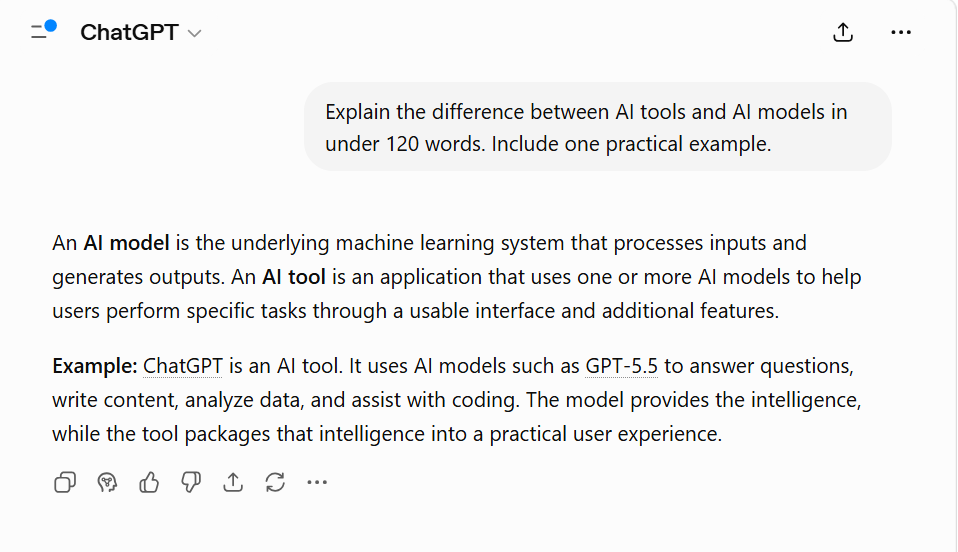
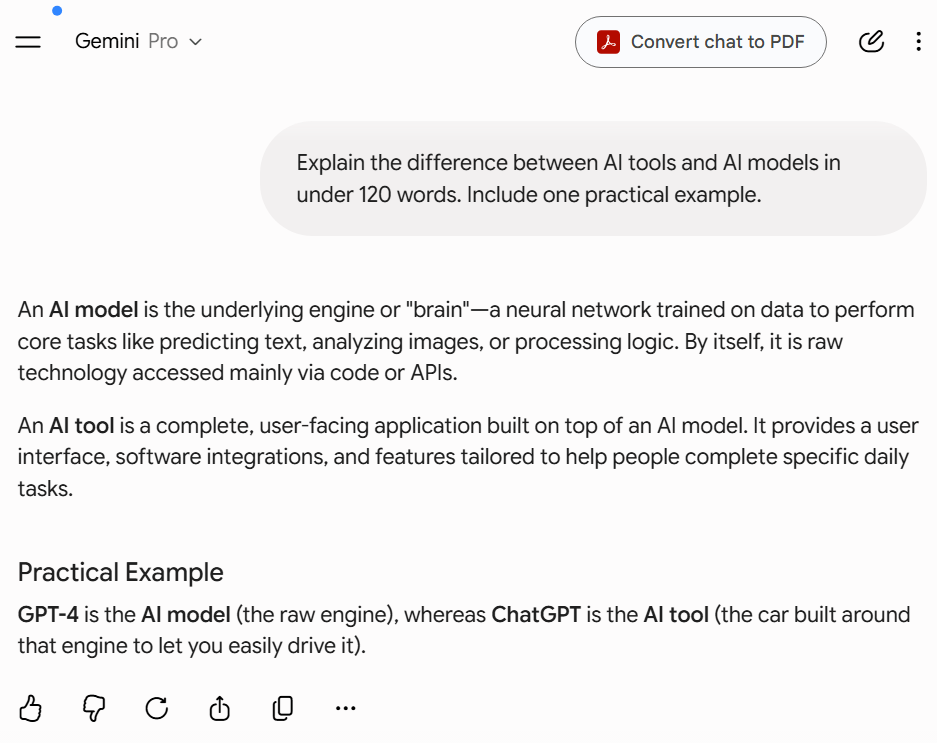
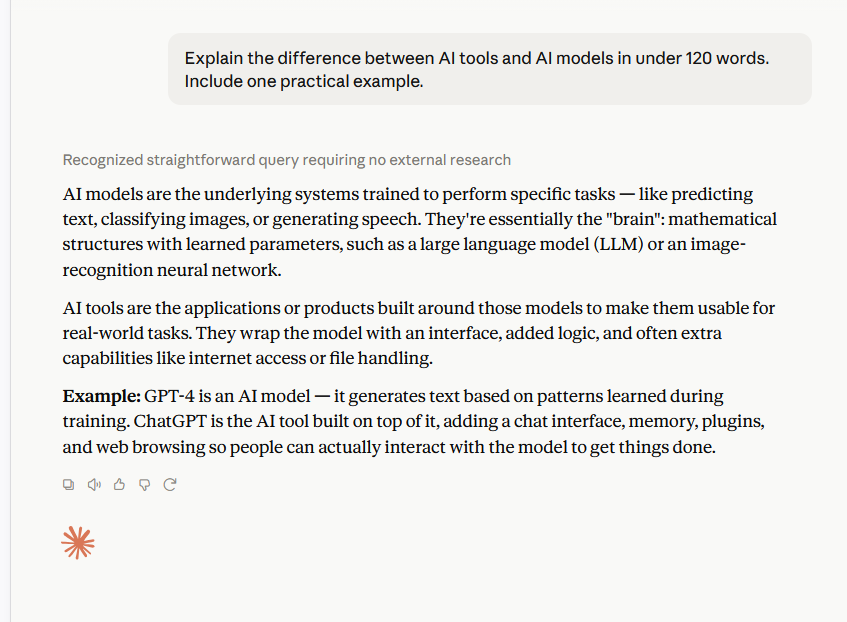
Evidence note: These screenshots document one task within EXP-006. They illustrate observable response differences; they do not establish that one model is universally better than another. The full experiment contains the remaining tasks, results, and limitations.
Practical takeaway: These results suggest evaluating AI systems at the workflow level, not just model intelligence — all three models completed the tasks, but the response style varied enough to matter for professional use. Test the actual tasks, tone, and formatting you need before choosing a tool; do not assume one model will behave identically across every use case.
AI Tools vs AI Models: The “Engine” vs. “Car” Concept
Quick Answer: An AI Model is the core mathematical algorithm or neural network trained on data to perform specific tasks (like GPT-4o or Claude 3.5 Sonnet). Conversely, an AI Tool is the complete user-facing software application built around that model, managing the user interface, memory, and safety filters (like ChatGPT or Gemini Advanced).
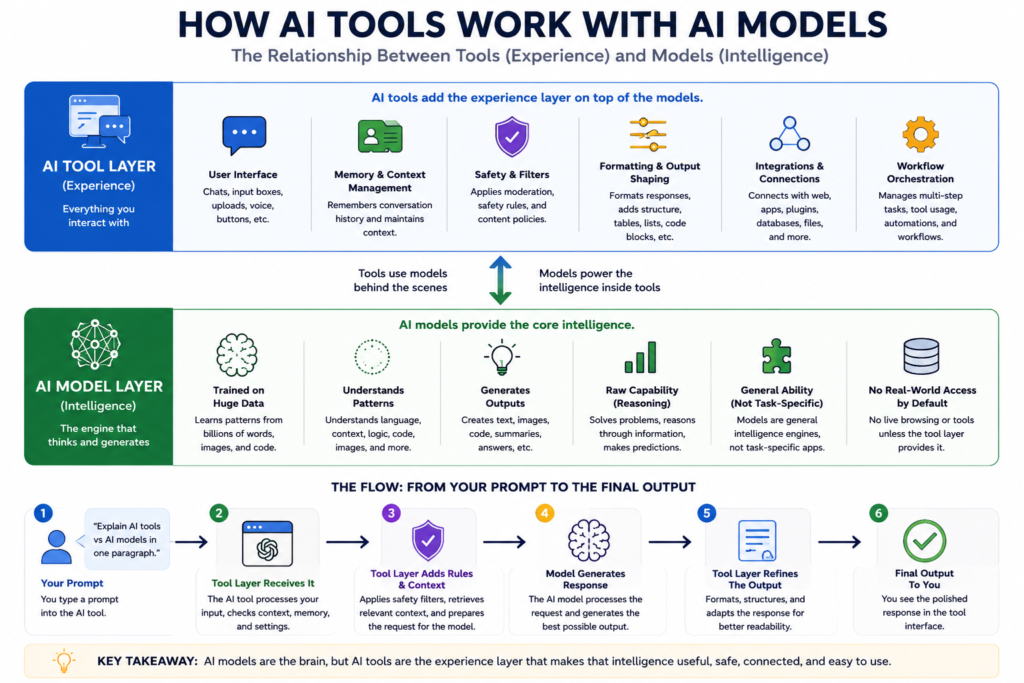
To understand why outputs vary, you need to separate the “engine” from the “car.”
- The AI Model (Engine): The core system that generates predictions — no interface, no memory, no web access by default. Examples: GPT-4o, Claude 3.5 Sonnet, Stable Diffusion 3.
- The AI Tool (Car): The full product wrapped around the model — controls prompt injection, conversation memory, and output formatting. Examples: ChatGPT, Gemini Advanced, Claude.ai, Perplexity.
When you use ChatGPT, you are using an OpenAI Tool powered by a GPT Model.
⚡ Knowledge Check: AI Model vs. AI Tool
Question: What is the key difference between an AI model and an AI tool?
💡 Core Logic for Researchers: An AI Model (like GPT-4 or Claude 3.5 Sonnet) is the core statistical engine trained on data. An AI Tool (like ChatGPT, Jasper, or an enterprise workflow engine) is the actual software wrapper, UI, and feature-set built around that model to execute specific human tasks.
Now that the core concepts are clear, let’s compare AI models and AI tools side by side.
| Feature | AI Model | AI Tool |
|---|---|---|
| What it is | The underlying AI system that generates responses. | The complete application that lets you interact with an AI model. |
| Primary role | Understands prompts and generates text, code, or images. | Manages the user experience, workflows, and access to the model. |
| Who develops it? | Built and trained by AI companies such as OpenAI, Anthropic, or Google. | Built and maintained by product teams that package AI models into usable applications. |
| Includes | Neural network, training data, model weights. | User interface, prompts, memory, retrieval, moderation, integrations, and APIs. |
| Memory handling | Depends on the model’s context capabilities. | Determines how conversations are stored, summarized, compressed, or managed for users. |
| Output formatting | Generates raw content based on the provided context. | Applies formatting, templates, presentation rules, and workflow adjustments before displaying results. |
| Knowledge source | Based on training data and the model’s learned capabilities. | May combine the model with retrieval systems, web search, uploaded files, or external knowledge sources. |
| Updates | Retrained periodically through new model releases. | Updated continuously with new features, interface improvements, and workflow enhancements. |
| Responsible for different user experiences | Provides the core reasoning and generation ability. | Shapes the final user experience through memory, retrieval, interface, formatting, and safety features. |
| Real-world examples | GPT-4.1, Claude Sonnet, Gemini 2.5 Pro (AI models). | ChatGPT, Claude, Gemini, Microsoft Copilot (AI tools). |
3 Ways AI Tools Can Change the Model’s Workflow
Why do these behavioral differences happen even when models are highly capable? An AI tool modifies context through several surrounding layers before the model generates a response.
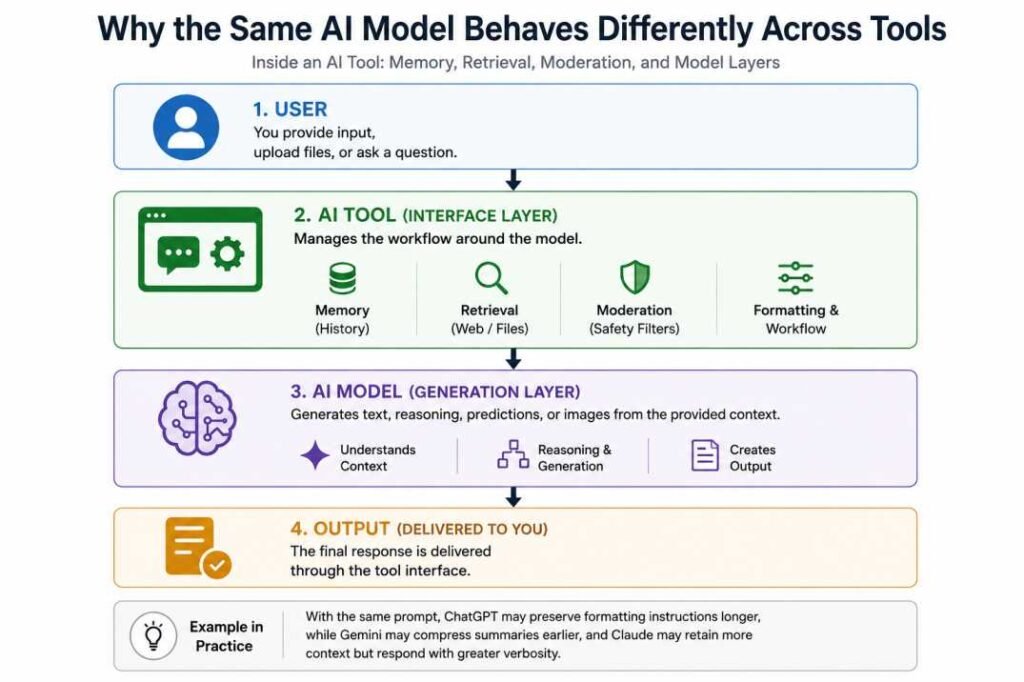
1. Context Compression (Memory Management)
AI models have context limits that determine how much input they can process within a single request. These limits are measured in tokens, and the way an AI tool manages a long conversation history varies significantly.
To verify this, we conducted EXP-002: Instruction Retention Test. Our documentation shows that when an AI suddenly “forgets” an earlier instruction, the failure is rarely due to the underlying AI model becoming less capable. Instead, it is a tool-layer problem: the tool’s context manager begins summarizing or compressing older messages to save token space, effectively erasing your original instructions from the model’s active memory.
2. Safety Filters and System Prompts
AI tools apply system-level instructions and safety policies that dictate how a request is processed. A perfectly capable AI model might be blocked from answering a query or forced to change its tone because the surrounding tool’s safety layer restricted the request before it even reached the generation phase.
3. Retrieval-Augmented Generation (Web Browsing)
A standalone AI model does not have direct web access. When an AI tool provides web-based answers, the tool itself runs the retrieval process and feeds that external context to the model. If the tool’s search engine retrieves outdated or unreliable information, the final answer will be flawed—even if the underlying model is highly advanced.
Troubleshooting Guide: Is it the Tool or the Model?
If your workflow is breaking down, use this checklist to figure out what to fix:
- “The AI forgot my formatting rules after 5 messages.”
👉 Tool Problem. The interface’s context manager is compressing your chat. - Fix: Open a new chat or pin your instructions to the system settings.
- “The answer is too generic and lacks deep analytical reasoning.”
👉 Model Problem. The underlying brain isn’t strong enough for the task. - Fix: Switch from a lightweight model (e.g., GPT-4o-mini) to a reasoning model (e.g., o1 or Claude 3.5 Sonnet).
- “The AI refused to answer a completely innocent question.”
👉 Tool or policy behavior. The request may have been restricted by the tool’s safety policies. - Fix: Review the tool’s usage policy and, where appropriate, ask for a permitted alternative or narrower version of the task.
Final Verdict & Key Takeaway
When two AI tools give different answers to the same prompt, check the workflow layer—memory, retrieval, formatting, safety filters—before blaming the model itself. As EXP-006 showed, all three models completed every task; the difference was in how each tool’s layers shaped the response.
The right tool depends on your specific task and constraints—test it directly rather than assuming.
Verified Sources & Technical Reading
- OpenAI API Documentation: Understanding Context Windows and Token Limits
- Anthropic: How Claude’s Constitutional AI and System Prompts Work
- Google DeepMind: Gemini 1.5 Pro Long-Context Architecture
Related Reading
New to this concept? Read our foundational breakdown on What Are AI Tools? The System Logic Behind AI Tools
- The 4 Prompting Moves That Fix Generic AI Output - September 12, 2026
- How to Evaluate AI Answer Reliability: A 7-Step Verification Framework - August 9, 2026
- AI Memory vs. Context Window: Why Most People Confuse Them (And Why It Matters) - July 23, 2026