
Introduction
Using ChatGPT for the first time can feel confusing — especially if you don’t know what to type or how to get useful results.
The good news? You don’t need any technical knowledge to use ChatGPT effectively.
In this guide, I’ll show you exactly how to use ChatGPT step-by-step, along with real examples, beginner-friendly prompts, and practical use cases you can try immediately.
By the end, you’ll know how to get better results from ChatGPT — even if you’re starting from zero.
Quick Summary
- Best for beginners: ChatGPT
- Main skill to learn: Writing clear prompts
- What you can do: Write, learn, generate ideas, and automate tasks
- Time to start: Less than 5 minutes
👉 Start by typing a simple question and improving it step-by-step.
Who is this for?
This guide is designed for beginners who want to start using ChatGPT without any technical knowledge. If you are new to AI tools and want simple, practical guidance, this article will help you get started.
What is ChatGPT (Simple Definition)
ChatGPT is an AI tool that helps you generate answers, write content, and solve problems by typing natural language prompts. In simple terms, ChatGPT works best when you give clear instructions—just like explaining a task to a person.
ChatGPT is an AI tool that lets you interact with information through conversation. Instead of searching and clicking multiple websites, you can simply ask a question and get a direct answer in seconds.
But here’s what most beginners don’t realize:
ChatGPT doesn’t “think” like a human or search the internet in real time. It generates responses based on patterns it has learned from large amounts of data. This means the quality of the answer depends heavily on how clearly you ask your question.
In practical use, ChatGPT works best as:
- A learning assistant (explaining complex topics simply)
- A writing helper (articles, emails, summaries)
- A productivity tool (ideas, planning, problem-solving)
From my experience, the biggest difference comes from how you use it. A vague prompt gives a vague answer—but a clear and structured prompt can produce surprisingly useful results.
“(We’ll see exactly how this works in the next step.)”
The input given by the user is commonly referred to as a prompt.
Learn more in our detailed guide on what is a prompt in AI tools.
Step-by-Step: How to Use ChatGPT
Step 1: Access ChatGPT and Understand the Interface
To begin, open ChatGPT in your browser and log in. You’ll see a simple interface with a text input box at the bottom.
This is where all interaction happens.
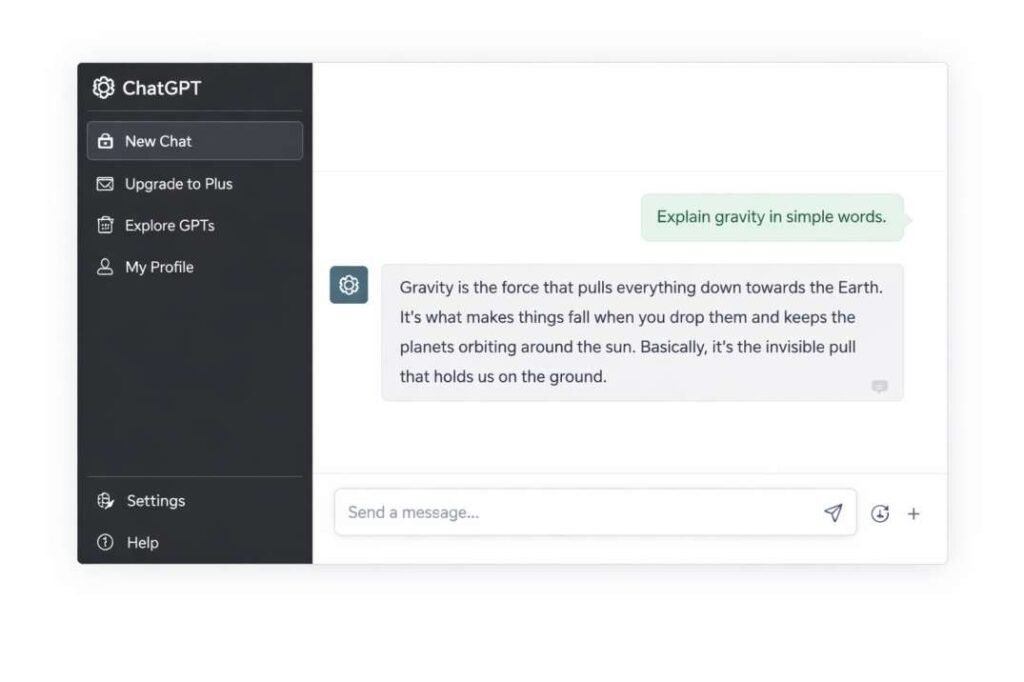
From my experience, beginners often ignore one important thing here — this is not a search engine. You don’t just type keywords like “AI meaning.” Instead, you should type complete instructions or questions.
👉 Think of it like talking to a smart assistant, not searching on Google.
Step 2: Write a Clear Prompt (This is the Most Important Step)
The input you type is called a prompt. This is the single most important factor that affects your results.
Here’s the difference I noticed in real use:
- ❌ Weak prompt: “Tell me about AI”
- ✅ Better prompt: “Explain AI in simple terms with one real-life example in 100 words”
The second prompt gives a much clearer and structured answer.
👉 A good prompt usually includes:
- What you want
- How you want it (simple, detailed, short, etc.)
- Any constraints (word limit, examples, format)
Small improvements in your prompt can dramatically improve the output.
Step 3: Generate and Understand the Response
After entering your prompt, press enter and wait a few seconds. ChatGPT will generate a response based on your input.
But here’s something important:
The first response is not always the best one.
In many cases, it gives a general answer first. The real value comes when you refine it.
👉 Instead of stopping here, treat this as the starting point.
Step 4: Improve the Output with Follow-Up Prompts
This is where most beginners fail.
They ask one question and stop. But ChatGPT works best when you continue the conversation.
For example:
- “Explain this in simpler words”
- “Give an example”
- “Make it shorter”
- “Add more details”
From my experience, this step alone can improve output quality by 2–3x.
👉 Think of ChatGPT as a tool you refine step by step—not a one-click solution.
👉 Simple Workflow Summary
To make it easier, here’s how you should use ChatGPT:
- Write a clear prompt
- Get the response
- Improve it with follow-up questions
This simple loop is the key to getting high-quality results.
Now that you understand the basic workflow, let’s see how it works in a real situation.
Real Examples of Using ChatGPT
Here are simple tasks beginners can try immediately:
1. Writing a Blog Introduction
Prompt:
“Write a beginner-friendly introduction about fitness”
👉 Result: You get a ready-to-use intro that you can edit and publish.
2. Learning a New Topic
Prompt:
“Explain SEO in simple words with examples”
👉 Result: ChatGPT explains complex topics in an easy-to-understand way.
3. Creating Social Media Content
Prompt:
“Write 5 Instagram captions for a travel page”
👉 Result: You get multiple caption ideas instantly.
4. Improving Writing
Prompt:
“Rewrite this paragraph in a more professional tone: [paste text]”
👉 Result: Your writing becomes clearer and more polished.
Weak vs Strong Prompts (Beginner Tip)
Here’s how small changes in prompts improve results:
Weak Prompt:
“Explain SEO”
Better Prompt:
“Explain SEO in simple words with a real example for beginners”
👉 Result: The second prompt gives clearer, more useful output.
Tip: Always add context, audience, and purpose to your prompt.
Complete Example: Using ChatGPT Step by Step (Real Use Case)
Let’s see how a beginner can actually use ChatGPT for a real task.
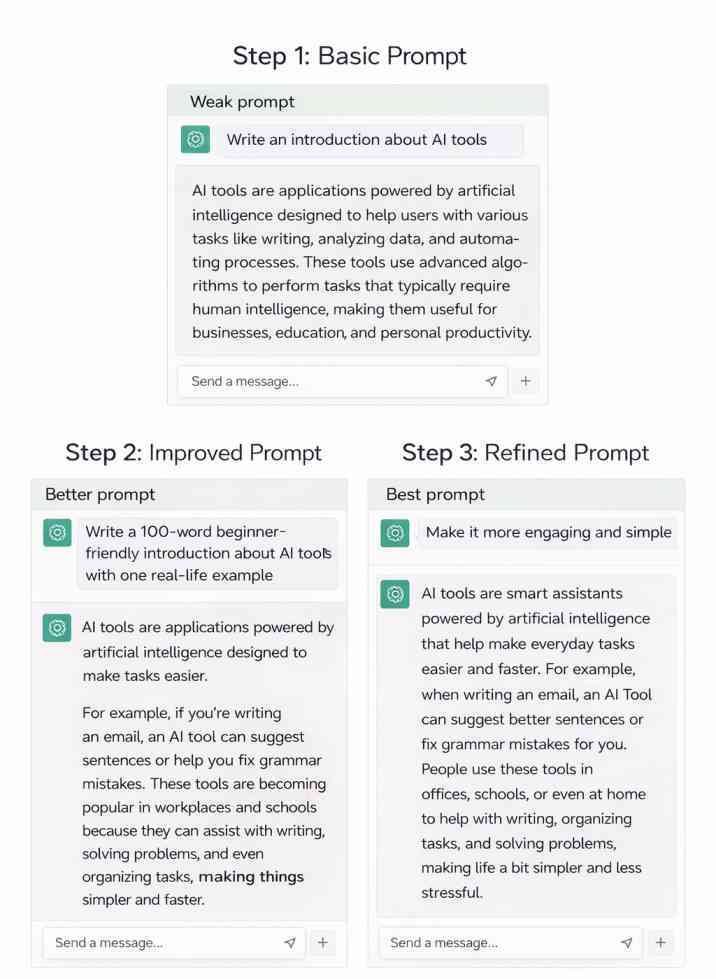
Goal: Write a blog introduction
Step 1: Write a basic prompt
“Write an introduction about AI tools”
Result: Too general and basic
Step 2: Improve the prompt
“Write a 100-word beginner-friendly introduction about AI tools with one real-life example”
Result: More structured and useful
Step 3: Refine further
“Make it more engaging and simple”
Final Output: Clear, readable, and usable content
👉 This shows how ChatGPT works in a real workflow—not just theory.
Common Mistakes Beginners Make
When starting with ChatGPT, many users don’t get good results because of simple mistakes:
- Writing very short or vague prompts like “Explain AI”
- Not giving enough context or details
- Expecting perfect answers without refining the prompt
- Not verifying important information
- Using ChatGPT without understanding its limitations
👉 Tip: The better your prompt, the better your result. Try to be specific and clear.
When NOT to Use ChatGPT
ChatGPT is helpful, but it’s not perfect.
Avoid relying on it when:
- You need 100% accurate factual or legal information
- You are making important decisions without verification
- You need real-time or highly updated data
👉 Always double-check important outputs before using them.
Real Experience Using ChatGPT
In my own usage, I noticed that when I gave vague prompts like “Write about AI,” the response was very general and not very useful. However, when I used more specific prompts like “Explain AI in 100 words with one example,” the results became much clearer and more structured.
I also found that ChatGPT works best when you ask follow-up questions. The first answer is often basic, but refining the prompt improves the quality significantly.
For example, asking “Write about AI” gives a broad answer, but asking “Write a 100-word explanation of AI for beginners with one example” produces a much more structured and helpful output.
It is also important to note that ChatGPT sometimes generates incorrect or incomplete information, so reviewing responses is necessary, especially for important tasks.
Example: Bad vs Good Prompt
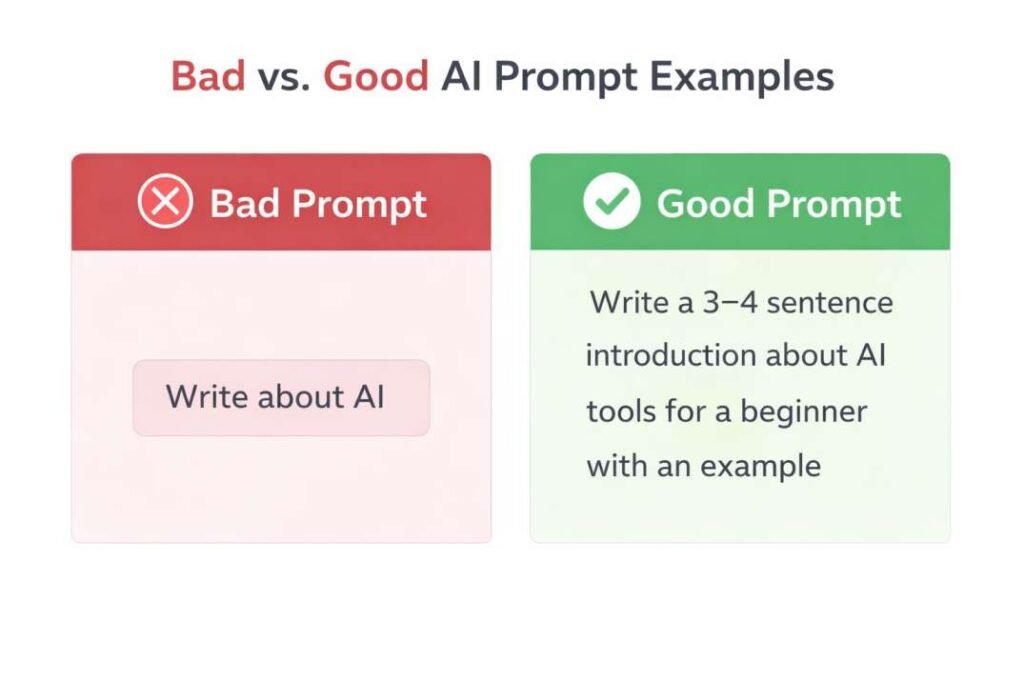
Bad Prompt:
“Tell me about AI”
Result:
Very general and not very useful.
Good Prompt:
“Explain AI in simple terms with one real-life example in 100 words”
Result:
Clear, structured, and beginner-friendly explanation.
This shows how small improvements in prompts can significantly improve output quality.
Real Examples You Can Try
Understanding ChatGPT becomes easier when you see how it is used in real situations. Below are simple examples that beginners can try directly.
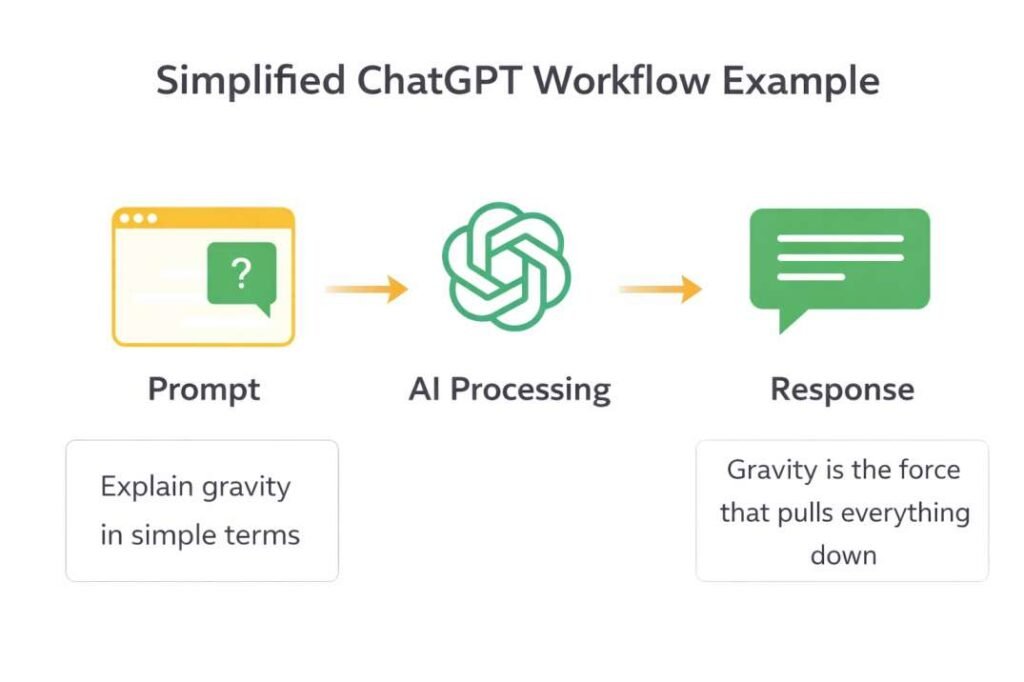
Example 1: Learning a Concept
Prompt:
“Explain gravity in simple words for a beginner with one example”
What ChatGPT does:
It gives a simplified explanation that is easier than textbook definitions.
Actual insight (important):
When I tested this, I noticed that adding “for a beginner” and “with one example” made the response much clearer.
👉 Without these details, the explanation was more technical and harder to understand.
Example 2: Writing Content
Prompt:
“Write a short introduction about online education for beginners”
What ChatGPT does:
It generates a structured paragraph that can be used as a starting point.
Important tip:
Don’t copy the output directly. Instead:
- Edit it
- Add your own examples
- Make it more human
👉 This improves both quality and SEO performance.
Example 3: Study Assistance
Prompt:
“Create a simple 2-hour daily study plan for exams with breaks”
What ChatGPT does:
It organizes time into a clear schedule.
Real observation:
When I added constraints like “2-hour” and “with breaks,” the output became more practical and usable.
Example 4: Problem Solving
Prompt:
“Give 5 practical ways to improve productivity while studying at home”
What ChatGPT does:
It generates multiple actionable ideas.
Best practice:
Ask follow-up questions like:
- “Explain point 2 in detail”
- “Give a real example”
👉 This turns general advice into practical solutions.
What Makes These Examples Work?
In all these examples, one pattern is clear:
- Specific prompts → better results
- Constraints → more structured answers
- Follow-ups → deeper insights
This is why learning how to write prompts is more important than just using ChatGPT.
Common Mistakes Beginners Make (And How to Fix Them)
When starting with ChatGPT, most problems don’t come from the tool—they come from how it’s used. Based on real usage, here are the most common mistakes beginners make and how to fix them. Many of these issues are related to how prompts are interpreted by AI systems (explained in How AI Tools Interpret Prompts).
Mistake 1: Asking Very Vague Questions
👉 Clear prompts = clear answers
Example:
“Tell me about AI”
What happens:
The response becomes too general and not very useful.
Why this happens:
ChatGPT tries to cover everything because your request is unclear.
This happens because AI systems process input based on patterns and structure (explained in AI Tools Explained — Conceptual Foundations, System Logic, and Institutional Context).
Fix:
Be specific.
✔ Better prompt:
“Explain AI in simple terms with one real-life example in 100 words”
Mistake 2: Expecting Perfect Accuracy
What happens:
Some answers may be incomplete or slightly incorrect.
Why this happens:
ChatGPT generates responses based on patterns, not real-time verification.
Fix:
- Double-check important information
- Use it as a guide, not a final source
👉 Especially important for:
Mistake 3: Not Using Follow-Up Prompts
What happens:
Users stop after the first response and miss better results.
Reality:
The first answer is often basic.
Fix:
Improve it step by step:
- “Explain this in simpler words”
- “Give an example”
- “Make it shorter”
👉 This is where the real power of ChatGPT comes in.
Mistake 4: Writing Overly Complex or Confusing Prompts
What happens:
The response becomes unclear or off-topic.
Why this happens:
Too many instructions at once confuse the system.
Fix:
- Keep prompts simple
- Break tasks into steps
👉 Simple prompts often give better results than complicated ones.
What I Learned From These Mistakes
In my experience, ChatGPT doesn’t fail randomly—it fails when the input is unclear.
Once I started writing clearer prompts and using follow-up questions, the quality of responses improved significantly.
👉 The tool is powerful, but the results depend on how you use it.
“I personally found that using follow-up prompts gives much better results than asking everything in one sentence.”
Pro Tips for Better Results
- Be specific when writing prompts
- Use follow-up questions to refine answers
- Ask for examples if something is unclear
- Break complex tasks into smaller steps
👉 Small improvements in your prompt can significantly improve the results you get.
Tips to Get Better Results from ChatGPT
Getting good results from ChatGPT is not about using complex words—it’s about using the right approach. Based on real usage, these tips can significantly improve the quality of responses.
Tip 1: Be Clear and Specific
👉 This reduces confusion and produces structured answers.
Instead of writing vague prompts, clearly define what you want.
✔ Example:
“Explain digital marketing in 100 words with one example”
If you’re new, understanding what a prompt is can help you improve results faster (see What Is a Prompt in AI Tools: Structural Definition and Input Format).
Tip 2: Use Simple Language
You don’t need technical or complicated words.
✔ Example:
“Explain this in easy English”👉 Simple inputs often produce clearer outputs.
Tip 3: Ask for Examples
Examples make responses easier to understand and apply.
✔ Example:
“Give a real-life example”👉 This turns theory into practical knowledge.
Tip 4: Break Tasks into Steps
For complex tasks, don’t ask everything at once.
✔ Better approach:
- Step 1: “Create an outline”
- Step 2: “Write the introduction”
- Step 3: “Expand point 1”
👉 This improves clarity and control over output.
Tip 5: Refine Your Prompt (MOST IMPORTANT)
If the answer is not good, don’t repeat the same question—improve it.
✔ Try:
- “Make it shorter”
- “Add more details”
- “Focus only on key points”
👉 Small changes can drastically improve results.
Advanced Tip: Use Role-Based Prompts
One powerful technique is telling ChatGPT who it should act as.
✔ Example:
“Act as a teacher and explain photosynthesis in simple terms”
✔ Another example:
“Act as a content writer and write an engaging introduction”
Why this works:
It changes the style, tone, and depth of the response.
👉 This single trick can significantly improve output quality.
This technique is closely related to how AI systems interpret instructions in prompts (explained in How AI Tools Interpret Prompts).
When ChatGPT Fails for Beginners
In my experience, ChatGPT does not fail randomly — it usually fails when the input is unclear.
Common situations where it struggles:
- When the prompt is too vague (e.g., “Write about AI”)
- When instructions are incomplete
- When the topic requires real-time or updated information
- When the user expects perfect accuracy without verification
These issues are also connected to how AI systems sometimes misunderstand user intent (see Why AI Tools Misinterpret Prompts).
For example, I once asked ChatGPT to “Explain digital marketing,” and the answer was too broad. But when I refined it to “Explain digital marketing for beginners with 3 examples,” the result improved significantly.
Understanding this pattern helps beginners avoid frustration and get better results.
Limitations of ChatGPT (Important to Know)
While ChatGPT is a powerful tool, it’s not perfect. Understanding its limitations will help you use it more effectively.
1. It Can Give Incorrect Information
ChatGPT does not verify facts in real time. Some responses may be outdated or incomplete.
👉 Always double-check important information, especially for:
- Health
- Finance
- Technical topics
2. It Depends Heavily on Your Prompt
The quality of the output is directly related to how clearly you ask your question.
👉 Vague input = vague output
👉 Clear input = useful output
3. It May Give Generic Answers Initially
The first response is often general.
👉 Better results come from:
- Follow-up questions
- Refining the prompt
4. It Does Not Replace Human Judgment
ChatGPT is a tool—not a decision-maker.
👉 You should:
- Review outputs
- Apply your own understanding
- Edit before using
Transparency Note
This guide is based on practical usage experience with ChatGPT, combined with publicly available guidelines from trusted sources such as Google Search Central.
The goal is to provide beginner-friendly, accurate, and useful information—not just theoretical explanations.
Best Prompts for Beginners
- “Explain [topic] in simple words with examples”
- “Write a short summary of [topic] in 100 words”
- “Give step-by-step instructions for [task]”
- “Explain this like I am a beginner”
👉 This increases:
- usefulness
- practical value
Start Using ChatGPT Now (Beginner Action Plan)
If you’re just starting, follow these steps:
- Open ChatGPT
- Try this prompt:
“Explain a topic I like in simple words with one example” - Ask a follow-up question:
“Make it shorter and clearer” - Repeat and improve your prompt
This simple method will help you get better results immediately.
My Experience Using ChatGPT
I regularly use ChatGPT for writing blog content, generating ideas, and simplifying complex topics.
When I first started, I noticed that the quality of results depended heavily on how I wrote the prompt. Simple, vague prompts gave average answers, but detailed prompts produced much better results.
For beginners, I recommend starting with simple tasks like writing short paragraphs or asking basic questions. As you practice, you’ll naturally learn how to refine prompts and get more accurate outputs.
In my experience, ChatGPT becomes significantly more powerful once you understand how to communicate clearly with it.
Conclusion
ChatGPT is a simple yet powerful tool that can help with learning, writing, and problem-solving. However, its effectiveness depends on how you use it.
For beginners, the key is not just using ChatGPT—but learning how to communicate with it properly.
By writing clear prompts, asking follow-up questions, and understanding its limitations, you can significantly improve the quality of results.
From my experience, even small improvements in prompts can lead to much better outputs.
👉 Start simple, experiment with prompts, and refine your approach over time.
That’s how you turn ChatGPT into a truly useful tool.
Related Articles
Once you understand how prompts work, ChatGPT becomes much more powerful and useful in daily tasks.
Frequently Asked Questions
Is ChatGPT free to use?
Yes, ChatGPT offers a free version, although some advanced features may require a paid plan.
What should I type in ChatGPT as a beginner?
Start with simple prompts like “Explain a topic in simple words” or “Write a short paragraph about…”.
Why am I not getting good results from ChatGPT?
This usually happens because the prompt is too vague. Try adding more details and context.
Can ChatGPT replace human work?
No, ChatGPT is a tool to assist you. You should always review and refine its output.
References
Google Search Central – Creating helpful, reliable, people-first content
👉 https://developers.google.com/search/docs/fundamentals/creating-helpful-content
Google Search Central – Guidance on using AI-generated content
👉 https://developers.google.com/search/docs/fundamentals/using-gen-ai-content
Google – Google Search and AI content (official blog)
👉 https://developers.google.com/search/blog/2023/02/google-search-and-ai-content
ChatGPT – General functionality and usage
👉 https://openai.com/chatgpt
Last updated: 2026 — Beginner guide tested for accuracy and usability
- Top 10 Free AI Tools for Beginners (2026 Guide) - April 3, 2026
- How to Use ChatGPT for Beginners (Step-by-Step Guide) - March 31, 2026
- Why AI Tools Fail Outside Training Conditions - March 29, 2026