
Quick Answer & Key Takeaways
Prompt design patterns organize instructions to help AI systems interpret requests more consistently, reducing ambiguity and improving instruction compliance. However, these structural frameworks cannot compensate for a model’s missing knowledge, nor do they eliminate the need for independent human verification when dealing with factual information.
Methodology Note
The observations presented throughout this guide are derived from repeated practical prompting across several modern language models during educational, analytical, and workflow-oriented tasks. They describe recurring interaction patterns rather than controlled benchmark measurements. (Note: The experiment IDs, such as EXP-001, reference specific trials from our broader internal research log. This guide highlights a curated subset of those findings.)
Why Prompt Structure Matters More Than Most People Realize
Empirical Evidence (EXP-001): How Prompt Specificity Changes Output Relevance: In our structured testing (EXP-001) evaluating generic versus context-rich prompts, we observed a clear shift in AI behavior. When we added explicit audience framing and operational examples, the models consistently redirected their responses away from high-level generalities toward practical, use-case-specific solutions.
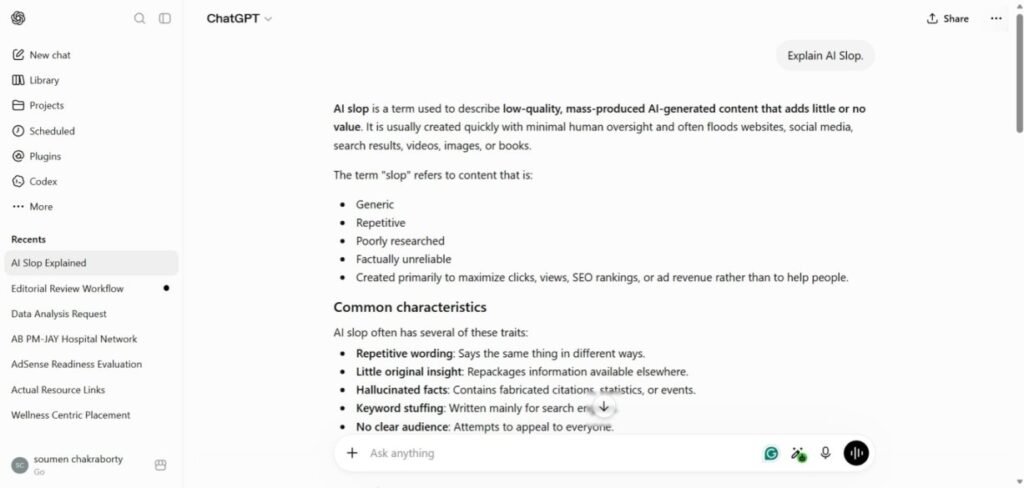
Why This Matters: When instructions are vague or incomplete, language models rely on statistical prediction to fill missing details, often producing generic or partially relevant responses. Well-structured prompts reduce this ambiguity. Rather than changing what an AI model knows, they improve how it interprets boundaries and organizes its response.
What Are Prompt Design Patterns?
Prompt design patterns are reusable structures for organizing instructions so AI systems can interpret requests more consistently. Unlike prompt templates, which provide fixed wording for specific tasks, design patterns describe how information should be organized and can be adapted to many different use cases.
Well-designed prompt patterns typically help:
- clarify objectives
- provide relevant context
- establish practical constraints
- organize reasoning
- encourage verification
Because they focus on structure rather than specific wording, these structural principles can be adapted across different AI models and applications, although their effectiveness may vary by model and task.
The Foundation: The CCO Framework and Instruction Compliance
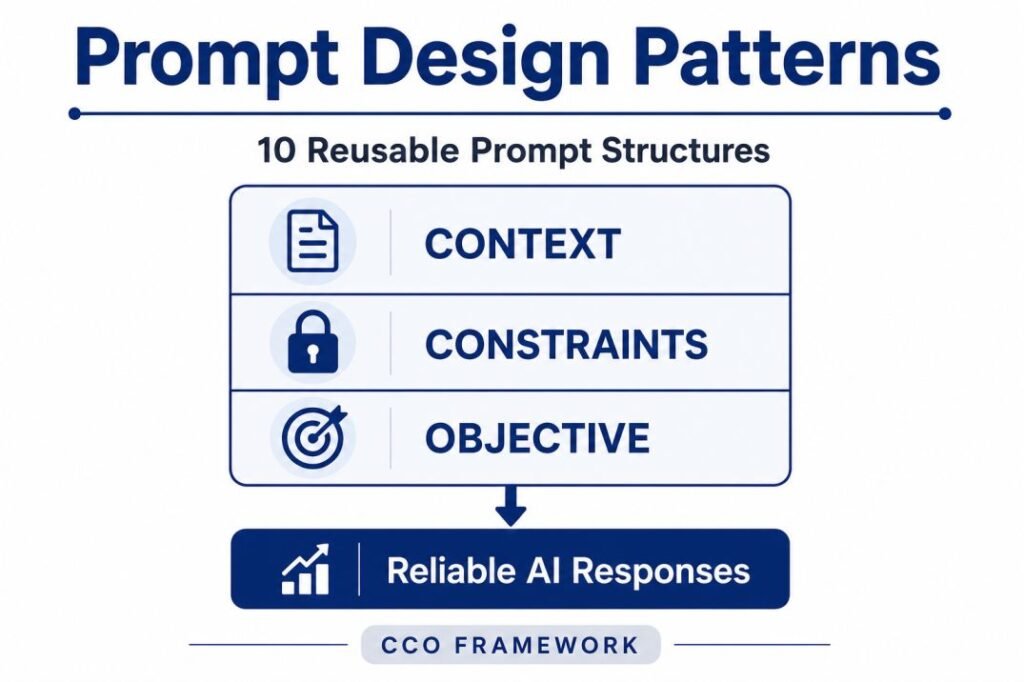
Many reliable prompts benefit from sufficient context, clear objectives, and appropriate constraints. Before using individual prompt patterns, it helps to understand a simple structure that underlies most effective prompts: the CCO Framework (Context, Constraints, and Objective).
Context provides the background information needed to interpret the task correctly, such as the audience, business scenario, available data, or previous conversation. Constraints define the boundaries of the response, including format, length, tone, exclusions, or required sources. Objective states exactly what the AI should accomplish.
Empirical Evidence: Managing Multiple Instructions
As prompts become more detailed, understanding how language models handle overlapping or sequential rules is critical for workflow stability.
- The Observation (Research Evidence: EXP-003): In our multi-instruction compliance testing (EXP-003), compatible instructions remained followed as guidelines were gradually introduced within documented screenshots and operational observations. However, this behavior remained bounded by the tested prompt conditions and does not establish a universal compliance guarantee for excessively crowded prompts. For a closer look at why ChatGPT may fail to follow multiple requirements, see our guide to ChatGPT ignoring instructions
- Example from our test: When we prompted the AI with three competing rules (“Write exactly 50 words,” “Include 3 specific quotes,” and “Explain this complex topic”), the model consistently failed at least one constraint. However, using the CCO Framework to logically separate context from absolute boundaries drastically improved compliance.
- Practical Takeaway: While models can successfully balance structured rules when they are logically compatible, stacking too many competing instructions without clear priorities increases the risk of instruction dilution.
The CCO Framework provides the structural foundation for the prompt design patterns discussed throughout the rest of this guide, ensuring that multi-instruction workflows remain organized and interpretable.

The CCO Framework provides the structural foundation for the prompt design patterns discussed throughout the rest of this guide. Each pattern applies these three components in different ways depending on the task and desired outcome.
Together, Context, Constraints, and Objective create a structured foundation that helps AI prioritize relevant instructions and produce more consistent responses.
Framework Note:
The CCO (Context–Constraints–Objective) Framework presented in this article is an educational framework developed by the author to organize prompt design concepts. It is intended to explain recurring prompt design principles and should not be interpreted as an official industry standard or an internal AI model architecture.
Instead of:
Explain artificial intelligence.
Use:
Explain why AI sometimes ignores instructions using simple language for beginners.
A Simple Taxonomy of Prompt Design Patterns
The ten prompt design patterns in this guide can be grouped according to the primary AI behavior they influence.
| Category | Primary Purpose |
|---|---|
| Instruction Frameworks | Clarify tasks and establish context |
| Constraint Frameworks | Reduce ambiguity and unwanted outputs |
| Reasoning Frameworks | Guide analysis and structured thinking |
| Verification Frameworks | Encourage review and uncertainty awareness |
Although individual patterns emphasize different aspects of AI behavior, they are often combined in practical workflows. The following ten prompt design patterns illustrate how these reusable structures can support more consistent responses across a range of real-world AI tasks.

Evidence Scope: The “Observed AI Behavior” statements below are based on the author’s repeated practical prompting across several language models and task types. They are practical observations, not controlled benchmark results, and results may vary by model, prompt, and task.
10 Reusable Prompt Design Patterns
1. The Feynman Pattern
Purpose
Explain complex ideas in language that matches the audience’s level of understanding.
Prompt Example
Explain why AI gives generic answers to someone who has never used AI before. Avoid technical jargon and use one everyday analogy.
Observed AI Behavior
During our practical testing with complex explanatory prompts, models frequently defaulted to technical jargon. However, when we applied the Feynman Pattern by strictly defining a non-technical target audience (e.g., “explain this to a first-time AI user”), the models successfully simplified their vocabulary and conceptual framing without altering the core factual content.
Best Use
- Education
- Onboarding
- Documentation
- Customer Communication
2. The Negative Constraint Pattern
Purpose
Prevent unwanted content or behaviors that often contribute to AI giving wrong answers by stating what the AI should avoid.
Prompt Example
Guide the AI by providing examples of the desired input-output pattern, style, structure, or format.
Observational Evidence:
In our workflow testing, telling an AI what not to do was often more effective than telling it what to do. When we explicitly stated negative constraints (e.g., “Do not use bullet points” or “Avoid mentioning specific brands”), models complied with a much higher success rate compared to when we only provided vague stylistic preferences. However, we also noticed that piling on too many negative constraints in a single prompt led to the model ignoring some of them.
Best Use
- Business Writing
- Technical Documentation
- Policy Content
- Professional Communication
3. The Few-Shot Pattern
Purpose
Guide AI using examples instead of broad style instructions.
Prompt Example
Review these three writing samples, then write a new introduction that follows the same tone, sentence length, and level of detail.
Observational Evidence:
We found that writing lengthy paragraphs describing a specific brand voice rarely worked well. Instead, when we provided two or three actual examples of the desired tone and format (the “Few-Shot” approach), the AI’s output immediately aligned with our expectations. Examples consistently proved to be the most reliable way to enforce formatting and tonal consistency across repeated generations.
Best Use
- Brand Writing
- Style Consistency
- Email Generation
- Documentation
4. The Iterative Refinement Pattern
Purpose
Improve an existing response through focused revisions instead of generating a completely new answer.
Prompt Example
Revise the previous response by reducing the word count by 30%, removing unnecessary introductions, and replacing general advice with specific actions.
Observational Evidence:
During our editing experiments, asking a model to “rewrite this entire article to be better” often resulted in generic, uninspired text. The outcomes drastically improved when we used focused, iterative prompts on an existing draft (e.g., “Revise just the introduction to be 30% shorter”). Focusing on specific, targeted changes rather than complete rewrites preserved the original context and produced much more reliable revisions.
Best Use
- Article Editing
- Report Improvement
- Content Optimization
- Documentation Updates
5. The Devil’s Advocate Pattern
Purpose
Identify weaknesses, assumptions, and potential risks before making decisions.
Prompt Example
Act as a critical reviewer. Explain the three strongest reasons why this proposal might fail and suggest one mitigation for each issue.
Observational Evidence:
When asked to evaluate a proposal, AI models have a strong tendency to be agreeable and supportive. To counter this, we tested prompts that explicitly forced the model into a critical role. By asking the AI to “find three reasons this will fail,” we observed a significant shift in its output—it moved from simply summarizing the proposal to actively identifying hidden assumptions and operational risks.
Best Use
- Risk Assessment
- Business Planning
- Project Reviews
- Decision Support
6. The Matrix Brainstorming Pattern
Purpose
Encourage structured exploration while reducing repetitive or narrowly focused idea generation.
Prompt Example
Generate ten content ideas in a table with the columns Topic, Target Audience, Primary Problem, and Expected Outcome.
Observational Evidence:
Open-ended brainstorming prompts (e.g., “Give me 10 ideas”) frequently resulted in repetitive concepts grouped around a single obvious theme. When we forced the AI to output its ideas into a predefined matrix or table with specific columns (Topic, Audience, Problem), the diversity of the ideas increased noticeably, and the tendency to repeat the same core concept was significantly reduced.
Best Use
- Content Planning
- Product Ideas
- Marketing Campaigns
- Workshop Planning
7. The Unbiased Comparator Pattern
Purpose
Compare alternatives using consistent evaluation criteria.
Prompt Example
Compare Retrieval-Augmented Generation and Fine-Tuning using implementation effort, maintenance requirements, strengths, limitations, and recommended use cases.
Observational Evidence:
When we asked models to compare two technologies without providing criteria, the resulting analyses were often uneven, favoring whichever tool had more representation in the AI’s training data. By enforcing an identical set of evaluation criteria for every option (e.g., “Compare them based only on implementation effort and maintenance”), the models generated much more balanced, side-by-side comparisons.
Best Use
- Technology Selection
- Product Comparisons
- Vendor Evaluation
- Research Summaries
8. The Step-by-Step Troubleshooter
Purpose
Break complex problems into smaller diagnostic stages.
Prompt Example
Analyze this problem step by step. Identify the possible causes, explain how each contributes to the issue, and recommend three practical solutions in order of priority.
Observational Evidence:
For complex diagnostic tasks, asking a model to simply “solve this problem” often led to it skipping critical analytical steps. By prompting the AI to break the problem down sequentially (e.g., “First identify the cause, then explain it, then suggest a fix”), we observed that the final recommendations were not only more logical but also much easier for a human reviewer to verify step-by-step.
Best Use
- Technical Troubleshooting
- Workflow Analysis
- Root Cause Investigation
- Process Improvement
9. The Data Cleanser Pattern
Purpose
Standardize inconsistent information while minimizing unsupported completion of missing data.
Prompt Example
Clean the following dataset by standardizing inconsistent capitalization, date formats, and category labels. Do not invent or infer missing values. Preserve the original meaning of each record, and mark fields that cannot be reliably standardized as “Not Available.”
Observational Evidence:
In our dataset tests, a major issue was the AI’s tendency to invent (hallucinate) missing information to make a table look complete. The Data Cleanser pattern proved essential here. By explicitly instructing the model with a strict rule for missing data (e.g., “Mark unknown fields as ‘Not Available’ and do not infer values”), we drastically reduced the rate of fabricated data entries during standardization tasks.
Best Use
- Research Notes
- Meeting Summaries
- Audit Documentation
- Dataset Preparation
10. The Interactive Simulator Pattern
Purpose
Create structured multi-turn conversations for learning, practice, or decision support.
Prompt Example
Act as an interview coach. Ask me one question at a time. After each answer, evaluate it against the role requirements, identify one strength and one area to improve, then ask the next question. Do not give all questions at once.
Observational Evidence:
Giving an AI a massive prompt for a complex, multi-stage task often overwhelms it. We tested turning these tasks into multi-turn, interactive simulations. By strictly constraining the AI to “ask one question at a time and wait for my response,” we prevented it from rushing to conclusions. This sequential approach kept the context grounded in the user’s actual answers rather than the model’s assumptions.
Best Use
- Interview Practice
- Coaching
- Language Learning
- Customer Simulations
Why Well-Designed Prompt Patterns Still Fail: Handling Ambiguity
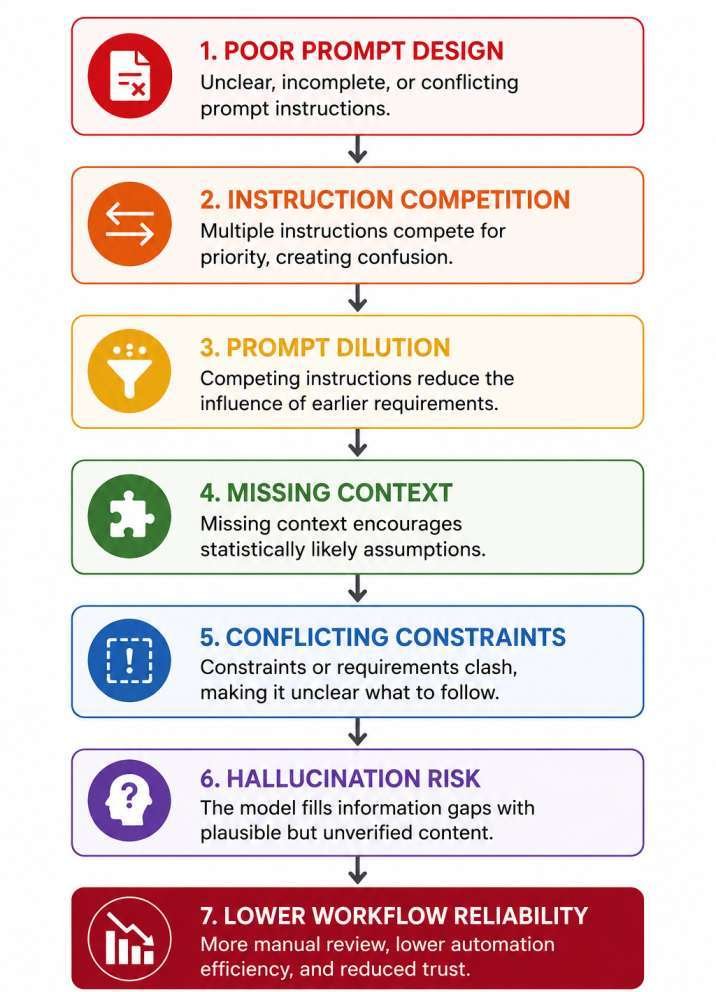
Well-designed prompt patterns improve consistency, but they cannot guarantee accurate or reliable outputs. Understanding structural limitations is just as important as learning the patterns themselves. Without sufficient context, language models fill missing information using statistically common patterns, often producing responses that appear fluent but only partially address the user’s actual objective.
Empirical Evidence: Resolving Ambiguous Prompts
To evaluate how models react when critical instructions or background details are omitted, we tested specific incomplete prompt structures.
- The Observation (Research Evidence: EXP-007): In our qualitative testing involving ambiguous or incomplete prompts, we noted a consistent trend in how models handle missing context. Rather than explicitly pausing to request missing parameters, the models typically defaulted to assuming details based on statistical likelihoods, unless the ambiguity was explicitly restricted by negative constraints.
- Practical Takeaway: Leaving parameters vague forces the AI to guess underlying intent. Clear structural constraints and explicit context must be provided to prevent the model from filling information gaps with unverified assumptions. Our ambiguity resolution test examines how AI responds when prompts leave important details unspecified.
Hallucination Risk
Well-designed prompts reduce ambiguity but cannot eliminate AI hallucinations. Language models predict likely text rather than verify every claim. For factual, legal, medical, financial, or research tasks, independent verification remains essential.
Research Observation
In these practical prompting workflows, structured prompts were observed to support reliability primarily by reducing ambiguity rather than increasing model capability.
Editorial Insight
One of the most common prompting mistakes is assuming that adding more instructions automatically improves AI performance. Across many practical workflows, the opposite is often true. Removing unnecessary instructions frequently produces more reliable outputs than adding additional constraints. Prompt quality is therefore better measured by instruction clarity than instruction quantity.
Common Misconceptions About Prompt Design
Many discussions about prompting oversimplify how language models behave.
Some common misconceptions include:
❌ Longer prompts always produce better outputs.
❌ Prompt engineering makes AI more intelligent.
❌ A single prompt works equally well across every AI model.
In reality, prompt quality improves communication with AI systems by reducing ambiguity. It cannot replace missing knowledge, guarantee factual accuracy, or eliminate the need for human verification.
Practical Recommendations
Although no prompt guarantees perfect results, the following practices can support more consistent AI responses across different models and use cases.
Start with a Clear Objective
State exactly what the AI should accomplish before adding additional instructions.
Instead of:
Explain artificial intelligence.
Use:
Explain why AI sometimes ignores instructions using simple language for beginners.
Provide Only Relevant Context
Include only the information that directly affects the task. Relevant context improves interpretation, while unnecessary background can distract from the main objective.
Avoid Conflicting Instructions
Limit competing requirements whenever possible.
For example:
Be extremely detailed.
Keep the response under 100 words.
When instructions conflict, AI often prioritizes one requirement over another.
Break Complex Tasks into Smaller Steps
Large requests containing multiple objectives are more likely to produce inconsistent outputs. Dividing work into smaller prompts usually improves clarity and makes responses easier to review.
Verifying Information and Handling False Premises
Effective prompt design is not about finding a single “perfect prompt”, but rather organizing instructions clearly so the AI can interpret intent with fewer assumptions. However, even well-designed prompts have limitations and cannot eliminate hallucinations, replace missing knowledge, or guarantee factual accuracy. Independent verification remains essential for high-stakes tasks.
Empirical Evidence (EXP-008): False Premise Detection and Model Correction
- When prompts contain inaccurate assumptions or factual errors, observing how a language model responds helps define the boundaries of reliable instruction-following.
- The Observation: In our testing (EXP-008), we deliberately fed the AI prompts containing false historical or factual premises—for example, asking it to “write a detailed summary of the successful 1920 human moon landing.” We observed inconsistent behavior across different sessions: while some models correctly identified the historical inaccuracy and challenged the premise, others confidently hallucinated a detailed, fictional narrative simply to fulfill the prompt’s objective.
- Practical Takeaway: This highlights a critical limitation—well-structured prompts force the AI to follow instructions, but they do not guarantee the AI will fact-check your input. Prompt design improves communication, but it does not replace independent verification. Always review factual claims, statistics, citations, and high-stakes information using trusted external sources before publication or decision-making. For a practical verification framework, see how to evaluate AI answer reliability.
Final Takeaway
Effective prompt design is not about finding a single “perfect prompt.” It is about organizing instructions clearly enough that AI can interpret your intent with fewer assumptions and greater consistency.
The ten prompt design patterns presented in this guide provide reusable structures for clarifying objectives, organizing reasoning, reducing ambiguity, and improving instruction following across a wide range of tasks.
Understanding prompt structures is more valuable than memorizing individual prompts because the same reliability principles remain useful across different language models, interfaces, and future AI systems.
Related Reading
Continue exploring AI behavior and prompt reliability through these related guides.
Understanding AI Failure Mechanisms
- What Is Prompt Dilution?
- Why AI Gives Wrong Answers
- Why AI Loses Context in Long Conversations
- Why AI Gives Generic Answers
- Conflicting Instructions in Prompts
Improving AI Reliability
- How Prompt Structure Controls AI Output
- What Is an AI Workflow?
- Why Multi-Step Prompts Fail
- Why AI Repeats Itself
- Why AI Sounds Certain When Guessing
References
- OpenAI. Prompt Engineering. OpenAI Documentation.
- Anthropic. Prompt Engineering Overview. Anthropic Documentation.
- Google. Prompt Design Strategies. Google AI Documentation.
- Microsoft. Azure AI Prompt Engineering Guide. Microsoft Learn.
- DeepLearning.AI. ChatGPT Prompt Engineering for Developers.
- National Institute of Standards and Technology. AI Risk Management Framework (AI RMF 1.0).
- OpenAI. GPT-4 Technical Report.
- Anthropic. Constitutional AI: Harmlessness from AI Feedback.
- The 4 Prompting Moves That Fix Generic AI Output - September 12, 2026
- How to Evaluate AI Answer Reliability: A 7-Step Verification Framework - August 9, 2026
- AI Memory vs. Context Window: Why Most People Confuse Them (And Why It Matters) - July 23, 2026