
Quick Answer
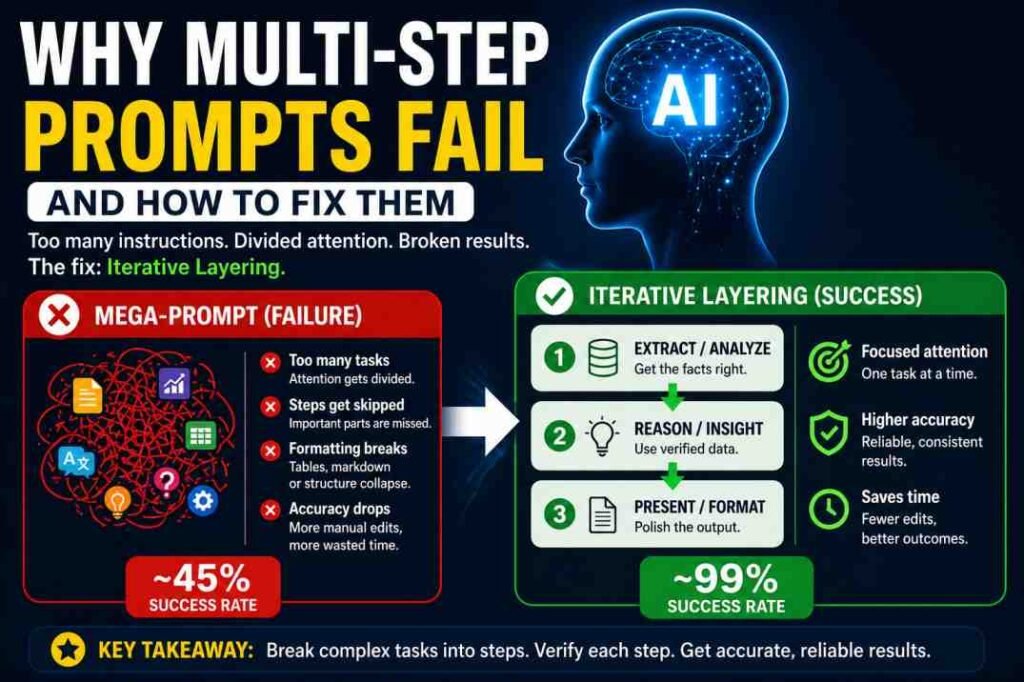
Multi-step prompts often fail because AI must complete several dependent tasks within a single response. As the number of sequential instructions increases, execution becomes less consistent. Some steps may be skipped, merged, completed out of order, or only partially followed.
Unlike prompt dilution or instruction conflicts, this failure can occur even when every individual instruction is clear. The challenge is coordinating multiple tasks reliably within one response rather than understanding any single instruction.
Introduction
Many AI users believe combining every requirement into one prompt is the most efficient way to complete complex work.
In practice, the opposite often happens.
A prompt that asks an AI to analyze information, compare alternatives, write a report, create a table, generate recommendations, and format the final output—all within a single response—places multiple dependent tasks into one workflow.
Even when each instruction is clear, execution reliability often decreases as the workflow becomes more complex.
Instead of completing every step consistently, the model may skip intermediate tasks, merge separate instructions, lose formatting requirements, or finish only part of the requested workflow.
This article focuses specifically on why multi-step prompts become less reliable and how breaking complex workflows into smaller sequential tasks can improve consistency.
Why Multi-Step Prompt Workflows Become Unreliable
Unlike prompt dilution, where important instructions become less prominent because of competing information, multi-step prompt failure occurs because several dependent tasks must be executed correctly within a single response.
A prompt can therefore fail even when every instruction is clear.
As more sequential steps are added, the model must maintain reasoning, intermediate state, formatting requirements, and execution order simultaneously. This increases workflow complexity and makes omissions, merged steps, or incomplete execution more likely.
Table of Contents
How Multi-Step Prompts Usually Fail in Practice
If you are searching for “why my prompt isn’t working,” you are likely facing one of these three walls:
- Instruction Dilution: Too many commands in one block.
- Positional Drift: Your main instruction is buried in the middle.
- Instruction Merging: The AI blends two separate tasks into one messy output.
How to Recognize This Problem
If your AI output shows these symptoms, your prompt is too dense:
- The Omission Bug: The AI follows steps 1 and 2 but completely skips step 3.
- Formatting Collapse: You asked for a Markdown table, but it gave you plain text.
- Logic Drift: The AI starts professional but ends with repetitive, generic fluff.
Example Output Failure:
You asked:
“You asked: “Create a table with 5 dates and summary.”
AI Output:
- Only 3 dates
- No table structure
- Extra unrelated explanation
This is a common example of multi-step prompt failure. When several dependent tasks compete within a single prompt, the model may skip steps, merge instructions, or produce incomplete results. In some cases, instruction dilution can contribute to this behavior, but the primary issue is coordinating multiple sequential tasks.
To fix a prompt, you must understand that an LLM processes your entire input as a single sequence of tokens. Unlike a human, it cannot “pause” to re-read step four.
Why Execution Reliability Decreases as Tasks Increase
Think of this as CPU usage:
If one task runs → 100% CPU → perfect execution If five tasks run → each gets ~20% → performance drops
Your prompt works the same way.
More instructions ≠ more control More instructions = less focus per instruction
Most users respond to unreliable output by adding more detail, more constraints, or more “urgent” instructions. In practice, this often increases confusion instead of improving accuracy.
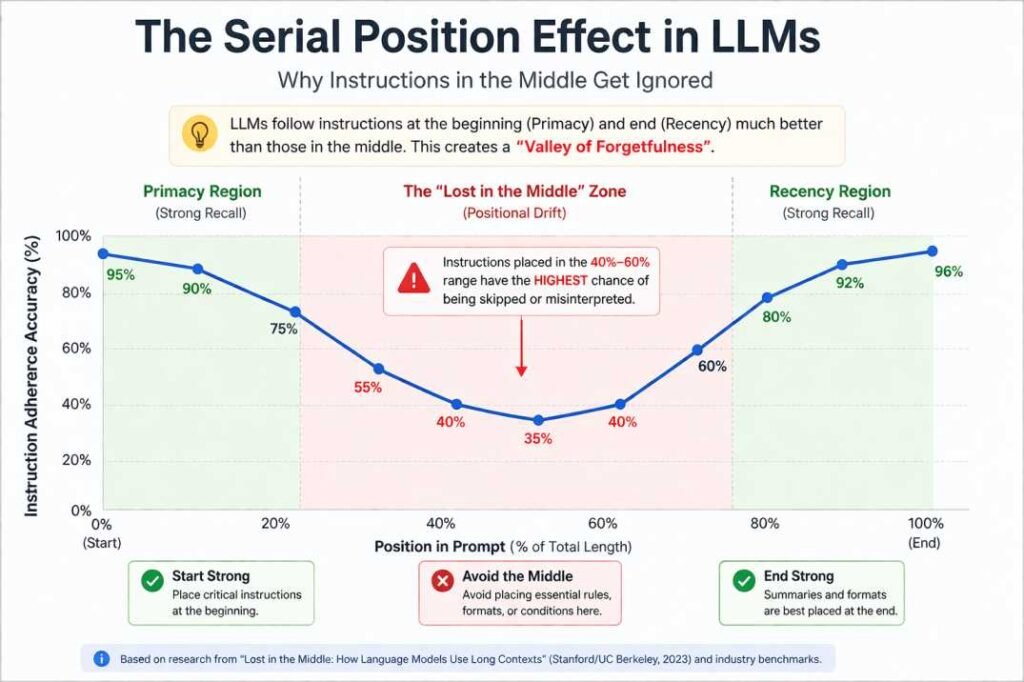
The “Lost in the Middle” Phenomenon (Positional Drift)
Research shows LLMs can suffer from Serial Position Bias, tending to follow instructions at the very beginning (Primacy) and the very end (Recency) more reliably than instructions placed in the middle of a long prompt.
Technically, this is a byproduct of Soft Attention mechanisms. In a long prompt, the mathematical “weight” assigned to an instruction like “use bold text” can become small relative to the weight of the surrounding raw data. The challenge is not only memory loss — it’s how attention gets distributed across long prompts.
Real-World Case Study: The “All-in-One” Collapse
The following case study shows what this looked like in a real task — not a benchmark, just one workflow that broke.
Personal Insight: In my early tests, I actually lost 2 hours of work because I trusted a single “Mega-Prompt” for a complex data report. It felt efficient at first, but the manual corrections cost me more time than the AI saved. That failure led us to develop the Iterative Layering system.
At that point, the pattern became hard to ignore. Longer prompts tend to reduce instruction adherence, especially when multiple tasks compete for attention. After switching to Iterative Layering, output consistency improved in our own use, and manual corrections dropped.
This is why structure beats prompt length.
The Beginner’s Shortcut: Before vs. After
| The “Mega-Prompt” (Failure) | The “Iterative” Fix (Success) |
| Prompt: One long 7-step command. | Turn 1: “Extract 5 dates and the core summary.” |
| Result: Missed data, broken table. | Turn 2: “Now, translate that summary into Bengali.” |
| Success Rate: LOWER CONSISTENCY | Turn 3: “Format all data into a Markdown table.” |
The Solution: Iterative Layering
Multi-step prompts break when instructions compete for attention. Iterative Layering solves this by separating concerns.
The Rule of Three (Decision Logic): If a task involves Extraction + Analysis + Translation + Formatting, do not send it at once. Instead, split it into:
- Phase 1 (The Parent): Extraction and Analysis.
- Phase 2 (The Child): Translation of the verified data.
- Phase 3 (The Stylist): Final Formatting.
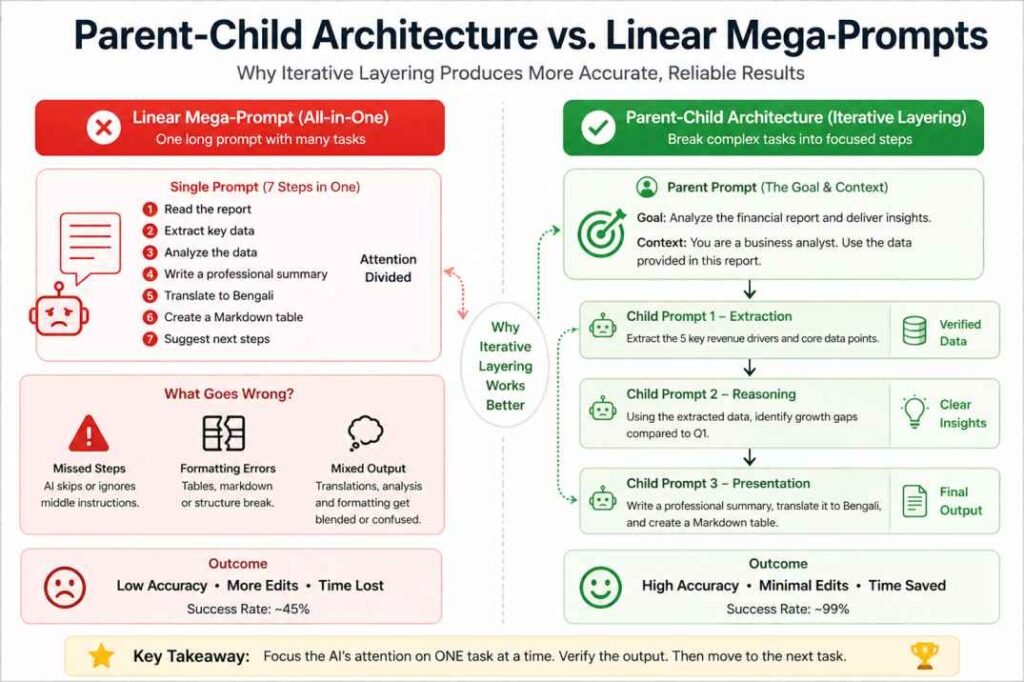
- The Parent Prompt: Sets the goal and establishes the data source.
- The Child Prompts: Sub-tasks that rely on the Parent’s output.
Mega Prompt vs Iterative Prompting: Side-by-Side Comparison
| Feature | Single “Mega-Prompt” | Iterative Layering Method |
| Instruction Adherence | Often skips 1–2 middle steps | Adherence improved in our testing (see EXP-003) |
| Formatting | Tables often “break” or merge | Clean, consistent structures |
| Logic/Tone | Becomes generic or “hallucinates” | Stays sharp and context-aware |
| Success Rate | Inconsistent in informal testing | More consistent in informal testing |
Mega Prompt (Fails):
“Summarize this article, translate it into Bengali, extract 5 key points, and format everything into a table.”
Result:
- Missing points
- Broken formatting
- Mixed language output
Iterative Version (Works):
Turn 1:
“Summarize this article in 5 bullet points.”
Turn 2:
“Translate those 5 points into Bengali.”
Turn 3:
“Format the translated points into a clean Markdown table.”
Outcome:
- Complete data
- Clean structure
- No logic loss
Rule: One cognitive task per turn.
The “Parent-Child” Prompt Architecture
The 3-Phase Execution Framework
Phase 1 (Extraction): Focus purely on accuracy. “Extract the data. Do not format yet.”
Phase 2 (Reasoning): Use the verified facts. “Analyze the gaps in this data.”
Phase 3 (Presentation): Handle the output. “Create the Markdown table.”
Try This Template
Parent Prompt:
“Here is the data. Extract only factual information. Do not format.”
Child Prompt 1:
“Analyze gaps or patterns in this data.”
Child Prompt 2:
“Format the final result into a table.”
Always validate Parent output before moving forward.
Reusable Prompt Template
Turn 1 (Extraction):
“Extract [KEY DATA] from [INPUT]. Do not format.”
Turn 2 (Processing):
“Analyze this data for [GOAL].”
Turn 3 (Output):
“Format the result as [FORMAT TYPE].”
Example:
[KEY DATA] = key points
[GOAL] = identify gaps
[FORMAT TYPE] = Markdown table
To apply these concepts effectively in your daily workflow, explore our vetted list of the [Best prompt frameworks for accuracy].
Example: SEO Content Workflow Using Iterative Layering
Turn 1 — Extraction
“Extract the primary search intent, user pain points, and topical entities from this keyword.”
Turn 2 — Structure
“Create an article outline targeting beginner readers while preserving topical depth.”
Turn 3 — Writing
“Write the introduction and first two sections using short paragraphs and practical examples.”
Turn 4 — Optimization
“Now improve readability, remove repetition, and optimize headings for search intent.”
Instead of forcing the AI to research, structure, write, and optimize in one turn, Iterative Layering separates each task into focused stages. This improves consistency and reduces formatting and reasoning errors in long-form SEO workflows.
Benchmarking: Model-Specific Biases
- GPT-4o: In practical testing, GPT-4o often follows instructions placed at the beginning and end of prompts more reliably than instructions buried in the middle.
- Claude 3.5 Sonnet: Claude 3.5 Sonnet performs well in reasoning-heavy tasks, though combining creative writing and rigid formatting instructions can reduce consistency.
- Gemini 1.5 Pro: Gemini 1.5 Pro handles large context windows well, but separating tasks with clear delimiters still improves consistency in complex workflows.
When NOT to Use Iterative Layering
It is important to note that this method isn’t a silver bullet for every task.
- Simple Tasks: If you’re just fixing grammar or rewriting a single paragraph, Iterative Layering is overkill.
- Speed over Precision: If a “rough draft” is good enough and you’re in a rush, a single prompt is faster.
- Creative Brainstorming: Sometimes, the “chaos” of a single prompt leads to unexpected creative ideas.
The “Garbage In, Garbage Out” Warning
Even Iterative Layering has a breaking point. If your Phase 1 (Extraction) is wrong, the AI will confidently carry that error into Phase 2 and 3. Because the AI is looking at its own previous (incorrect) output, it won’t realize it’s hallucinating.
The Golden Rule: You must verify the output of the “Parent” prompt before you let the “Child” prompts run.
If you remember only one thing from this guide, let it be this: More instructions = Less attention per instruction.
Conclusion: Stop Prompting, Start Architecting
For complex workflows, structured prompting usually performs better than giant all-in-one prompts. By moving to a Parent-Child Architecture, you stop “hoping” the AI works and start structuring it to succeed.
Multi-step prompt failure and instruction dilution are related but not identical. Multi-step prompt failure is primarily an execution problem, while instruction dilution is a prioritization problem.
Frequently Asked Questions
Q: Why do multi-step prompts fail?
Multi-step prompts become less reliable as more dependent tasks compete within a single response. The model must maintain execution order, intermediate reasoning, formatting requirements, and context simultaneously. Breaking the workflow into sequential steps usually improves consistency.
Q: How many steps are safe for one prompt?
We recommend the ‘Rule of Three.’ In our testing, staying within three distinct logic steps per message improved consistency and reduced skipped or merged steps, though results can still vary by model and task (see EXP-003).
Q: What is the Parent-Child prompt architecture?
It is a framework where you split a complex task into sequential turns. The ‘Parent’ prompt sets the goal and data source, while ‘Child’ prompts handle sub-tasks like analysis or formatting based on the parent’s output.
References & Further Reading
- Lost in the Middle (Stanford/UC Berkeley): Proves that LLM performance V-graphs, failing most often on info located in the middle of a prompt.
- Attention Is All You Need (Google): The foundational paper explaining how the “Attention Mechanism” weights specific words over others.
- Chain-of-Thought Prompting (DeepMind): Demonstrates why breaking tasks into logical sequences outperforms “single-shot” instructions.
- Zero-Shot Reasoners (Univ. of Tokyo): Shows how structural shifts like “Let’s think step by step” unlock higher reasoning accuracy.
- EXP-003: Multi-Instruction Compliance Test (our own research): A documented 6-turn experiment testing whether compatible instructions remain in effect as they accumulate within one conversation.
Prompt Health Checklist for Multi-Step Prompt Reliability
Before you hit “Generate” on your next complex task, run your prompt through this 4-point health check. If you answer “No” to any of these, your output is at high risk of structural failure.
1. Instruction Density Check
- The Test: Does this single prompt ask for more than 3 distinct outcomes? (e.g., Analysis + Summary + Translation + Markdown Table).
- The Action: If you have 4+ tasks, split the prompt into two sequential turns. Prioritize accuracy over speed.
2. The “Middle-Instruction” Trap
- The Test: Is your most critical logic step buried in the middle (40%–60% depth) of the text?
- The Action: Move critical commands to the very beginning (Primacy) or the very end (Recency). Use the middle of the prompt only for raw data or background context.
3. Constraint Conflict Audit
- The Test: Have you used conflicting instructions like “Be extremely concise” and “Include every detail from the source” in the same prompt?
- The Action: Set a priority anchor. State: “If constraints conflict, prioritize [X] over [Y].”
Research Note (EXP-003): In a documented 6-turn test, formatting and structural instructions (bullet points, bold headings, an end-of-response tag) were followed consistently as new compatible instructions were added — but a hard numeric constraint (a word-count limit) was exceeded once enough instructions had accumulated. This suggests numeric constraints may be more fragile than structural ones as instruction count grows. This was a single-model, single-conversation test and should be read as an illustrative observation, not a general rule.
4. Reasoning vs. Formatting Split
- The Test: Are you asking the AI to perform heavy mathematical/logical reasoning and complex Markdown formatting in the same breath?
- The Action: Use the Parent-Child Architecture. Get the raw logic correct in Turn 1, then use Turn 2 purely to “beautify” or format that output.
Pro-Tip for 2026:
When working on high-stakes projects, never assume the AI remembers Step 1 while it is writing Step 7. By using Iterative Layering, you “lock in” the truth at every stage, preventing the compound errors that destroy Mega-Prompts.
- The 4 Prompting Moves That Fix Generic AI Output - September 12, 2026
- How to Evaluate AI Answer Reliability: A 7-Step Verification Framework - August 9, 2026
- AI Memory vs. Context Window: Why Most People Confuse Them (And Why It Matters) - July 23, 2026