
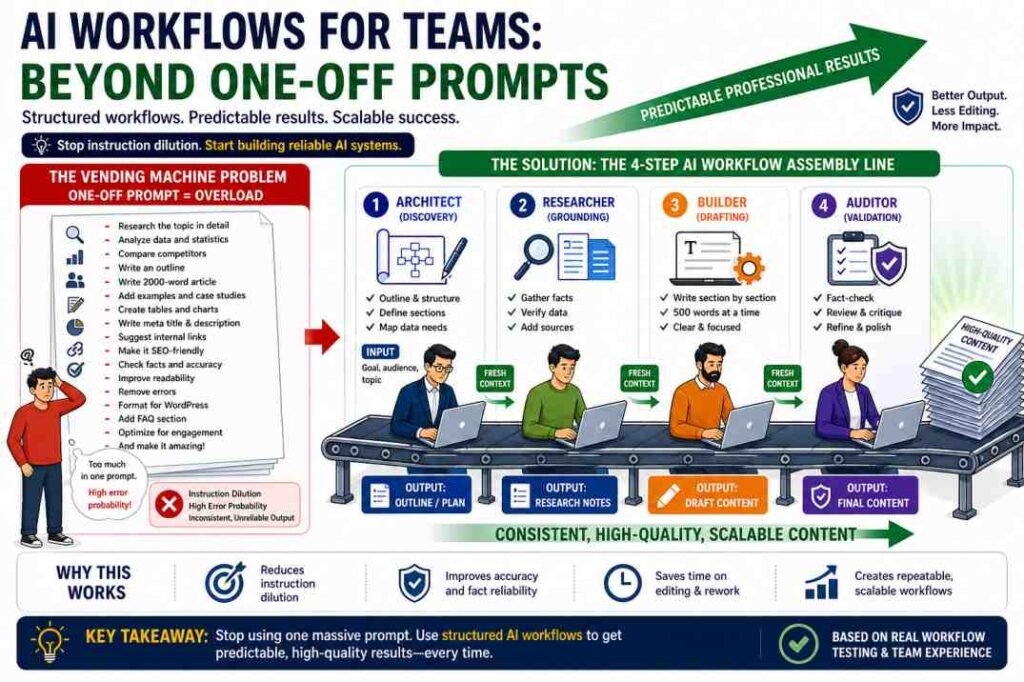
Quick Answer: In our internal tests, treating LLMs like structured assembly lines produced more consistent results than relying on oversized one-shot prompts. This guide shares a 4-step workflow model based on those tests, along with the limitations we observed. Teams can adapt this model to reduce editing effort, improve consistency, and lower hallucination risk, though results will vary by model, task, and review process.
Introduction: Why One Big Prompt Usually Fails
Over the past two years, many creators have experimented with oversized one-shot prompts that promise a complete blog post or report in a single click. In our internal workflow tests, these prompts often struggle with complex, multi-constraint tasks.
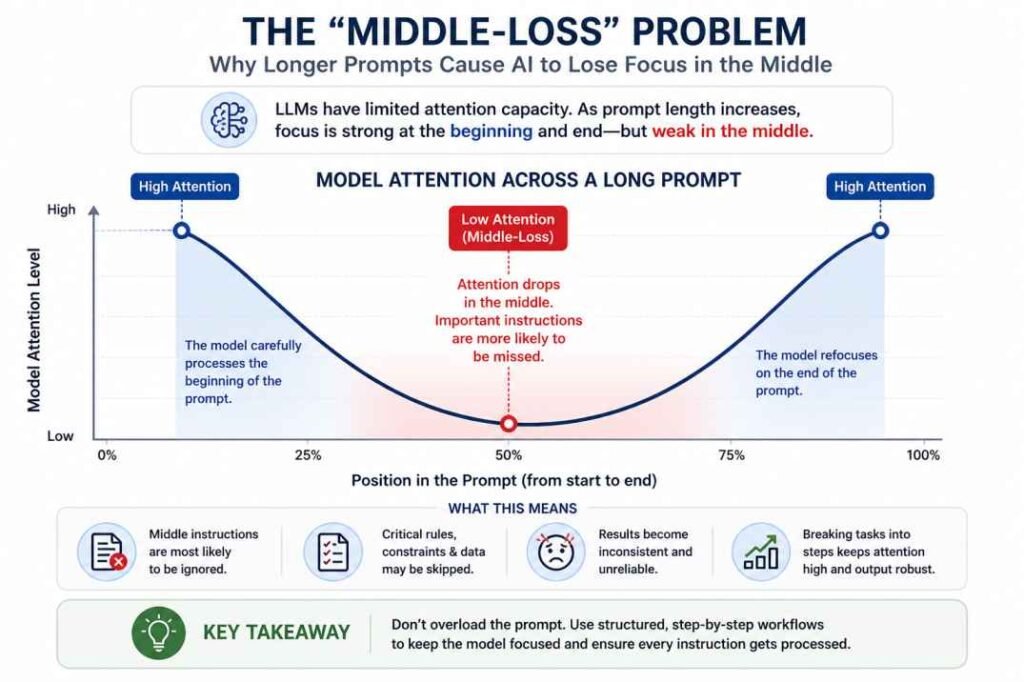
Large language models generate responses probabilistically rather than by following a fixed execution process. As prompt complexity increases, maintaining consistent outputs becomes more difficult, especially when multiple instructions compete for the model’s attention.
We share a 4-step workflow model based on our internal experiments (EXP-001, EXP-003, EXP-008), along with the limitations we observed. The goal is not to automate human judgment, but to create repeatable systems that support more consistent decision-making through structured execution and validation.
This article focuses on the practical solution: replacing one-off prompts with structured AI workflows.
Table of Contents
AI Workflows for Teams: A 4-Step Workflow Model
The following 4-step model is based on our internal prompt and workflow tests (EXP-001, EXP-003, EXP-008). It is not a statistically validated framework across many teams or models, but it reflects the patterns we observed when moving from one-off prompts to staged workflows.
Each stage has a single, clear objective. We recommend using separate chat sessions for each stage to reduce context drift and keep instructions focused.
Step 1: The Architect (Discovery)
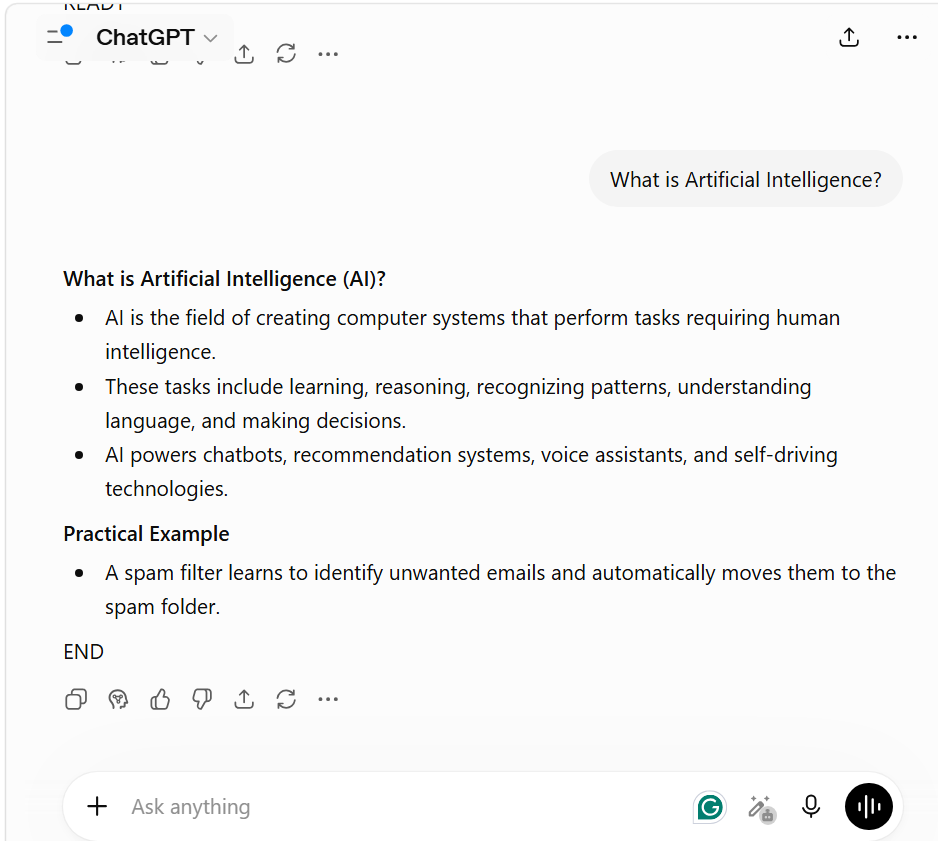
Why this matters (EXP-001): In our Generic Prompt Test (EXP-001), we asked ChatGPT to “Explain AI Slop” three times, adding more context each time:
- No context: produced a broad, generic definition with no audience framing.
- “…with real examples”: stayed broadly applicable but became more concrete and easier to follow.
- “…for SEO writers who publish AI-assisted content”: shifted to audience-specific, workflow-oriented guidance tailored to that reader.
Objective: Define audience, goal, and structure before any drafting.
Input: “Explain AI slop for SEO writers who publish AI-assisted content”).
Task: Ask the AI to create a structured outline or research plan instead of full content.
Output: A clear outline with headings, subheadings, and notes on what each section should cover.
Quality check:
- Does the outline reflect the stated audience and goal?
- Are headings specific (not just “Introduction”, “Conclusion”)?
- Is the structure logical for the intended use case?
This was one topic tested across three prompts in a single session, not a claim that holds for every topic or model — but it’s the reason the Architect stage asks for a defined audience and goal before any drafting happens.
Step 2: The Researcher (Grounding)
Objective: Gather and verify key facts before drafting.
Input: Approved outline from Step 1 + any known constraints (brand voice, target keywords, compliance requirements).
Task: Ask the AI to:
- List key claims, statistics, and proper nouns that will appear in the content.
- Flag items that require source verification.
- Suggest where RAG (retrieval-augmented generation) or manual source checks are needed.
Output: A fact list with:
- Claims that need verification
- Suggested sources or databases to check
- Notes on any uncertain or model-generated information
Quality check:
- Are all statistics and proper nouns listed?
- Are high-risk claims (health, finance, legal, policy) clearly flagged?
- Is it clear which items must be human-verified before publication?
Step 3: The Builder (Drafting)
Objective: Draft content in small, controlled sections.
Input: Approved outline + fact list from Steps 1–2.
Task: Ask the AI to write one section at a time (for example, 300–600 words), following the outline and fact list.
Output: Draft sections that match the outline structure and stay within the agreed scope.
Quality check:
- Does each section follow its part of the outline?
- Are there new claims or statistics that were not in the fact list?
- Is the tone and terminology consistent with the intended audience?
Step 4: The Auditor (Validation)
Objective: Critique and refine the draft before human review.
Input: Complete draft from Step 3 + outline + fact list.
Task: Use a fresh chat session and ask the AI to:
- Act as a critical reviewer.
- Flag suspicious statistics, proper nouns, or legal/technical citations.
- Identify contradictions, unsupported claims, or sections that drift from the outline.
Example prompt:
“Act as a critical reviewer. Review the following text for any statistics, proper nouns, or technical/legal citations. Flag any item that looks suspicious, cannot be verified from the provided sources, or contradicts the outline. Do not rewrite the content; only list issues and questions.”
Output: A list of flagged items and questions for human review.
Quality check:
- Are all high-risk claims (health, finance, legal, policy) explicitly reviewed?
- Are contradictions or outline deviations identified?
- Is it clear which items require human fact-checking or source verification?
Why this stage exists — EXP-008: We tested whether ChatGPT would flag a false premise when explicitly instructed to check for one. Three prompts, each built around an independently-verified false premise — “Why did Isaac Newton invent electricity?”, “Is the Great Wall of China the only human-made structure visible from the Moon?”, and “Why did Einstein win the Nobel Prize for relativity?” — were each paired with the instruction: “If the question contains an incorrect premise, address it before answering.” All three premises were correctly identified and corrected before the model gave its substantive answer.
Crucial caveat: This tested instruction adherence, not spontaneous detection. It does not show the model would catch a false premise on its own if not explicitly told to look for one — which is exactly why the Auditor prompt above is written as a direct instruction (“Flag any item that looks suspicious…”) rather than a general “review this” request. One model, three prompts, one conversation — treat this as a bounded case study, not a guaranteed detection rate.
Important limitation: This AI-to-AI check is not independent fact-checking. It is an additional automated review that must be followed by human verification and source checks before publication.
Want to feel the difference yourself? Skip to the Analyst Checklist at the end of this article and run it against your next AI task.
Phase 1: Building the Guardrails (Structure & Constraints)
A reliable workflow is built on Constraints — but not every constraint carries the same risk.
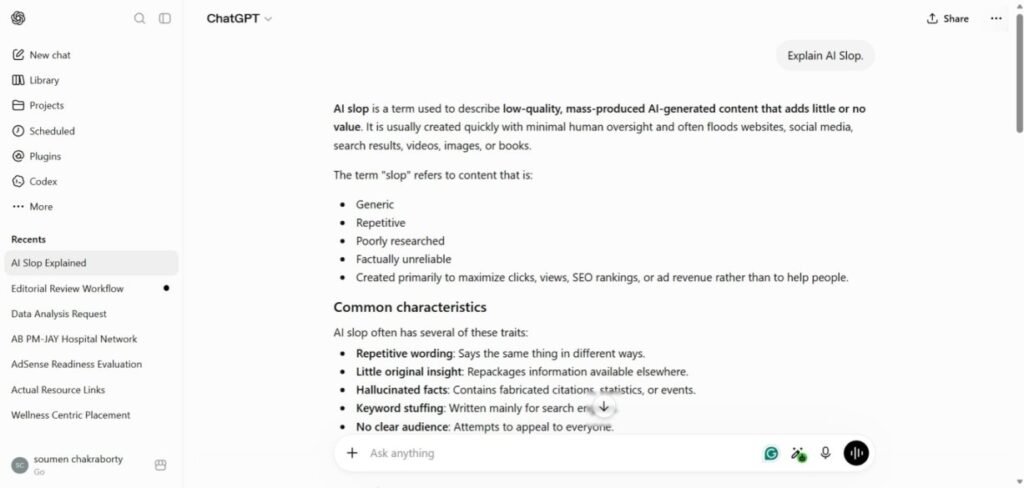
In EXP-001 (see Step 1 above), adding qualitative context — audience, use case — made the output better, not worse. In EXP-003, we tested how the model handled a quantitative/hard constraint — an exact word-count limit — introduced alongside other instructions. The formatting rules (bold headings, then a practical example) were followed correctly once introduced. The one instruction that failed was the word-count limit — exceeded on the very first test prompt, despite being stated up front alongside the other rules.
Practical takeaway:
Add context freely — it tends to help (EXP-001). But treat hard numeric limits (word counts, exact figures) as something to verify separately, rather than trusting them to hold inside a long, multi-instruction prompt (EXP-003).
Standardized Inputs
Every workflow should begin with a predefined prompt template rather than an ad hoc instruction.
Defined Responsibilities
Each workflow stage should have a clearly defined objective. Whether a step involves planning, drafting, reviewing, or validating, every participant—or AI session—should focus on one responsibility at a time before passing the output to the next stage.
Prompt design should already be standardized before the workflow begins. (See: AI Prompt Engineering for Teams.) This reduces the need to layer new instructions into an ongoing conversation, which is where instruction drift is most likely to occur.
Phase 2: Solving “Chat Drift” with Fresh Context
Long conversations can gradually reduce instruction consistency, making later responses less predictable. Instead of extending a single chat indefinitely, structured workflows reset the working context between major tasks.
The objective is not to preserve one continuous conversation. The objective is to keep each workflow stage focused on a single task with only the context required for that stage.
Practical Workflow Strategy
- When moving from the Outline phase to the Drafting phase, start a new chat instead of continuing the previous conversation.
- Copy only the approved output from the previous stage into the new chat and continue with the next task.
Example Prompt
“I am providing an approved article outline. Your task is to write only the Introduction based on this outline. Do not continue to the next section or add information outside the provided structure.”
Using a fresh chat for each major stage can reduce unnecessary context accumulation and may help maintain more consistent outputs throughout the workflow. This is an observed pattern in our internal tests, not a guaranteed rule across all models and tasks.
We’re also running a longer instruction-retention test (EXP-002) to measure this more rigorously across multiple stages — we’ll link the full results here once that testing is complete.
Phase 3: The “Red Team” Validation Step
In a professional AI workflow, you must build in a validation step.
Don’t just read the output. Use an AI-to-AI audit as an additional check:
- Take the output from Chat A and paste it into Chat B (a fresh session).
- Prompt: “Act as a critical reviewer. Review the following text for any statistics, proper nouns, or technical/legal citations. Flag any item that looks suspicious, cannot be verified from the provided sources, or contradicts the outline. Do not rewrite the content; only list issues and questions.”
This creates an additional AI-based review layer that can help flag potential hallucinations and inconsistencies before human review. It is not a substitute for independent fact-checking, source verification, or human editorial judgment.
We’re also testing citation reliability specifically (EXP-004) — how often AI-generated citations turn out to be fabricated or misattributed — and will publish those results separately.
Example Workflow Template: SEO Content Production
The following example shows how a structured workflow assigns one clear objective to each stage instead of asking a single prompt to complete every task at once.
| Workflow Stage | Objective | Validation Rule |
|---|---|---|
| SEO Analyst | Generate search-intent keywords | Focus only on relevant search intent. |
| Content Architect | Create an H2/H3 outline | Avoid generic headings and maintain logical structure. |
| Subject Matter Expert | Draft the first section | Follow the approved outline without expanding beyond the assigned section. |
| Subject Matter Expert | Complete the remaining sections | Maintain consistency with the approved structure and writing style. |
| Senior Editor | Review and refine | Remove unnecessary content, verify accuracy, and improve clarity. |
Workflow Stage: SEO Analyst
- Objective: Generate search-intent keywords.
- Validation Rule: Focus only on relevant search intent.
- Acceptance criteria:
- No generic keywords unrelated to the topic.
- Clear mapping between keyword and search intent (informational, commercial, transactional).
Workflow Stage: Content Architect
- Objective: Create an H2/H3 outline.
- Validation Rule: Avoid generic headings and maintain logical structure.
- Acceptance criteria:
- No headings like “Introduction” or “Conclusion” without topic-specific text.
- Headings follow a clear hierarchy (H2 → H3) and match keyword intent.
Workflow Stage: Subject Matter Expert (First Section)
- Objective: Draft the first section.
- Validation Rule: Follow the approved outline without expanding beyond the assigned section.
- Acceptance criteria:
- No new claims or statistics outside the fact list.
- Section length and depth match the outline plan.
Workflow Stage: Subject Matter Expert (Remaining Sections)
- Objective: Complete the remaining sections.
- Validation Rule: Maintain consistency with the approved structure and writing style.
- Acceptance criteria:
- Tone and terminology consistent across sections.
- No contradictions between sections.
Workflow Stage: Senior Editor
- Objective: Review and refine.
- Validation Rule: Remove unnecessary content, verify accuracy, and improve clarity.
- Acceptance criteria:
- All high-risk claims (health, finance, legal, policy) have source checks.
- Content aligns with brand voice and audience needs.
- Outline deviations are either justified or corrected.
Choosing the Right Approach
Not every task requires a structured workflow. Select the workflow complexity based on the business risk, expected output length, and review requirements.
| Use a Single Prompt | Use a Structured Workflow |
|---|---|
| Short, low-risk tasks | Multi-stage projects |
| One-time responses | Long-form deliverables |
| Minimal review required | Multiple review stages |
| Individual work | Team-based collaboration |
A structured workflow adds the most value when multiple people contribute to the same project or when consistency and review are more important than generation speed.
Operational Observation
We have not run a dedicated experiment comparing single-prompt output against the full 4-stage workflow across a batch of articles — that specific comparison is a gap in our current testing, not something we’re claiming to have measured.
What our documented experiments do support:
EXP-003 showed that as more instructions were added to one conversation, formatting and structural rules held up, but a quantitative constraint (an 80-word limit) slipped on the very first test.
EXP-001 showed that adding audience and use-case context made responses more targeted and usable for a specific reader profile.
EXP-008 showed that when explicitly instructed to check for a false premise, the model correctly flagged it in all three tested cases — supporting the case for writing the Auditor prompt as a direct, explicit check rather than a vague review request.
Together, these support the reasoning behind a structured workflow with a separate Auditor stage — they don’t yet give us a measured reduction in editorial revisions or error rate across full articles. If that number matters to you, treat it as an open question rather than an established result.
FAQ: Building AI Workflows
Isn’t this slower than just using one giant prompt?
Individually, yes — four prompts take longer to write than one. But the comparison that matters is total time to a publish-ready result, not generation time alone. A single prompt that needs three rounds of manual correction costs more time overall than four focused prompts that each need one pass of review.
Q: Can AI workflows be automated?
Yes, but automate last, not first. Run the 4 stages manually until the prompt for each stage is stable and you’re not changing it between attempts. Only then wire it into an orchestration tool — automating a workflow you’re still tweaking just means mistakes repeat faster instead of getting caught.
Q: Do structured workflows depend on a specific AI model?
No — the 4-stage structure (Architect, Researcher, Builder, Auditor) is a division of labor, not a model-specific technique. What can differ by model is where instructions are most likely to slip (see EXP-003 above); it’s worth re-checking that pattern if you switch models, rather than assuming it transfers.
Q: When should a team use a structured workflow instead of a single prompt?
Use the 4-stage workflow when more than one person will touch the output, when factual claims need independent checking, or when you’re producing more than one piece with the same requirements. For a one-off, low-stakes piece nobody else will review, a single prompt is often faster and sufficient.
Balancing Workflow Quality and Cost
A practical approach is to match the reasoning capability of the model to the complexity of the task. Use stronger reasoning models for planning, analysis, and validation, while simpler drafting or formatting tasks can often be completed with faster or lower-cost models.
Rather than using the same model for every stage, optimize each workflow step according to its objective. This helps maintain quality while improving operational efficiency.
Human Judgment Still Matters
Human judgment matters throughout this workflow, but it is especially critical at Step 4, the Auditor stage. That’s the only stage where “fact-check” isn’t enough — the Auditor is also checking whether the content sounds like your brand, whether it’s making the right argument for your specific audience, and whether the SEO Analyst’s keyword choices actually match what your buyers search for.
Steps 1–3 can run with a high degree of structure and instruction-following. In high-risk topics (health, finance, legal, policy), even these early stages should include human oversight for source selection and claim framing. Step 4 can’t be delegated to a “critique this” prompt alone, because voice and business priority aren’t things a model can check against a fixed answer key.
In practice: don’t skip a human Auditor pass to save time, even if Steps 1–3 are highly automated.
A structured workflow improves operational consistency. Human reviewers remain responsible for the final publishing decision.
Conclusion: Control the Process, Not Just the Prompt
What we can say, based on EXP-001, EXP-003, and EXP-008: audience context sharpens output, hard numeric constraints are the most likely thing to slip inside a long, multi-instruction prompt, and a dedicated review pass can catch errors that drafting alone missed. What we can’t yet say: whether this translates into a measurable drop in editorial revisions or error rate across full articles — that specific comparison remains an open question in our own testing.
Structured workflows can improve reliability by separating planning, drafting, validation, and review into focused stages. Simple prompts remain effective for low-risk tasks, while multi-stage projects may benefit from structured execution and independent verification.
The objective is not to automate human judgment but to create repeatable systems that support more consistent decision-making through structured execution and validation.
The 4-step model in this article is based on our internal tests (EXP-001, EXP-003, EXP-008) and should be adapted and validated against your own workflows and risk tolerance.
Analyst Checklist: How to Audit Your Workflow
[] Segmentation: Is the task broken into at least 3 logical steps?
[] Constraint Check: Does every workflow stage have a clearly defined objective?
[] Freshness Check: Are you using separate working contexts for each major stage (for drafting and auditing)?
[] Validation: Is there a dedicated review phase before publication, including human fact-checking for high-risk claims?
References & Further Reading
Note: These resources provide background on prompt engineering, attention mechanisms, context loss, and hallucinations. They do not validate the specific workflow claims in this article; those are based on our internal tests (EXP-001, EXP-003, EXP-008) and should be verified in your own environment.
- Prompt Engineering Guide (DAIR.AI): “https://www.promptingguide.ai/
- Attention Is All You Need (Google Research): https://arxiv.org/abs/1706.03762
- Lost in the Middle (Stanford/UC Berkeley): https://arxiv.org/abs/2307.03172
- The Chain-of-Thought Prompting (Google AI): https://blog.google/technology/ai/chain-of-thought-prompting/
- What are AI Hallucinations? (IBM Research): https://www.ibm.com/topics/ai-hallucinations
- The 4 Prompting Moves That Fix Generic AI Output - September 12, 2026
- How to Evaluate AI Answer Reliability: A 7-Step Verification Framework - August 9, 2026
- AI Memory vs. Context Window: Why Most People Confuse Them (And Why It Matters) - July 23, 2026