Quick Answer: AI gives wrong answers mainly for three reasons: outdated knowledge (knowledge cutoff), missing context in prompts, or hallucination where information is invented. In prompt testing across multiple AI models, missing context and outdated information appeared more often than true hallucination. Identifying the failure type is usually the fastest way to improve output accuracy.
Key Takeaway: The most common AI errors observed in testing were missing context, outdated information, and hallucinated content. Identifying the failure type usually matters more than changing the model itself.
Testing Methodology
The observations in this article come from structured prompt testing conducted during February–March 2026.
| Variable | Details |
|---|---|
| Models tested | GPT-4o, Claude 3.5 Sonnet, Gemini |
| Prompt variants | 48 total |
| Task categories | Factual recall, summarization, extraction, content research |
| Observed variables | Hallucination frequency, context sensitivity, instruction adherence, factual drift |
| Limitations | Single-researcher observations; not benchmark data |
The Problem Most Users Misdiagnose
Why AI gives wrong answers is one of the most misunderstood problems in everyday AI use — and most users diagnose it incorrectly.
When AI gives a wrong answer, most users assume the model “hallucinated.”
Across the prompt tests documented here, hallucination appeared less frequently than missing-context and knowledge-cutoff failures.
Three consistent patterns emerged across the prompt observations documented here:
- Knowledge Cutoff failures — the model confidently answered with outdated information
- Missing Context failures — the prompt was too vague, so the model filled gaps with assumptions
- True Hallucination — the model generated confident, fluent, completely invented content
Each type looks similar on the surface. Each requires a different fix.
Failure Type 1: Knowledge Cutoff
What it is
The underlying model weights do not contain information beyond the training cutoff, although some systems can supplement this through web retrieval or external tools.
When you ask about something that changed after the training cutoff, the model does not say “I don’t know.” It answers using its most recent relevant pattern — which may be months or years out of date.
What I observed in testing
During prompt testing for AI tool evaluation tasks, I ran queries about recent AI model releases and tool updates.
In several cases, the model answered confidently with version numbers and feature lists that were accurate as of 2024 — but outdated by the time of testing in early 2026. The outputs were grammatically clean, confidently stated, and factually stale.
The dangerous part: in many cases, the output did not clearly indicate the information was outdated.
Why this happens
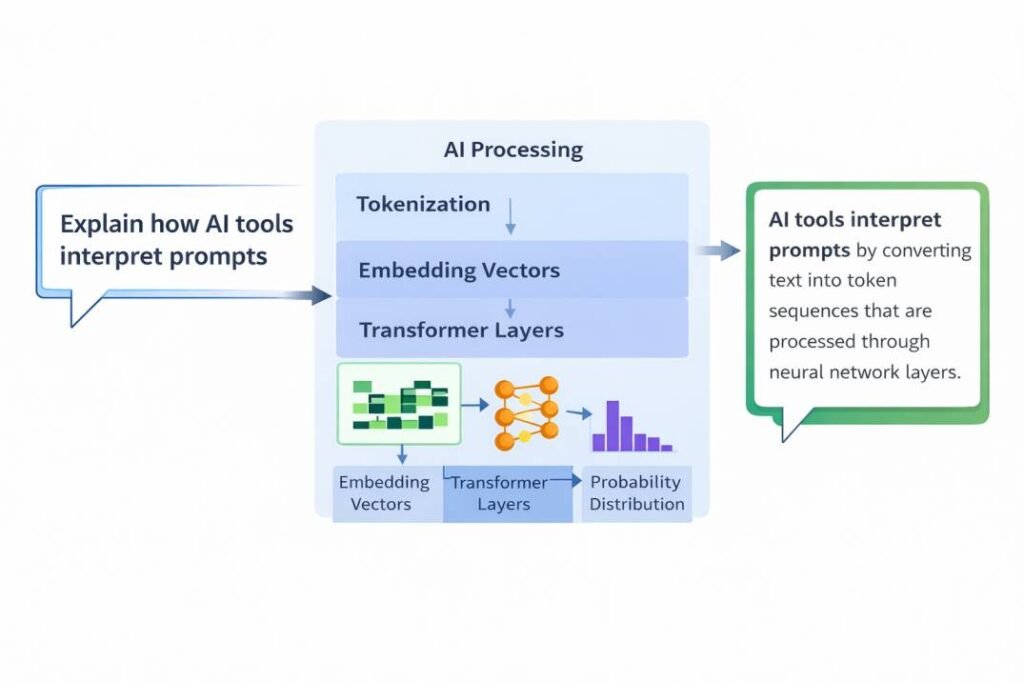
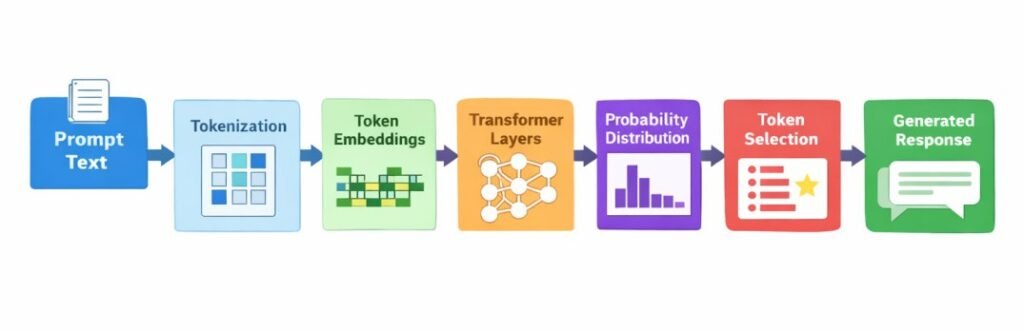
The model calculates the probability of the next token based on training patterns. If a topic appeared frequently in 2024 training data, that data dominates the response — regardless of what has changed since.
The fix
Add a temporal anchor to your prompt:
Instead of:
“What are the latest AI tools for content teams?”
Use:
“What AI tools were commonly used by content
teams as of early 2025? I will verify current
availability separately.”
If current accuracy matters, provide the source document directly — do not rely on the model’s internal memory for time-sensitive topics.
Failure Type 2: Missing Context
What it is
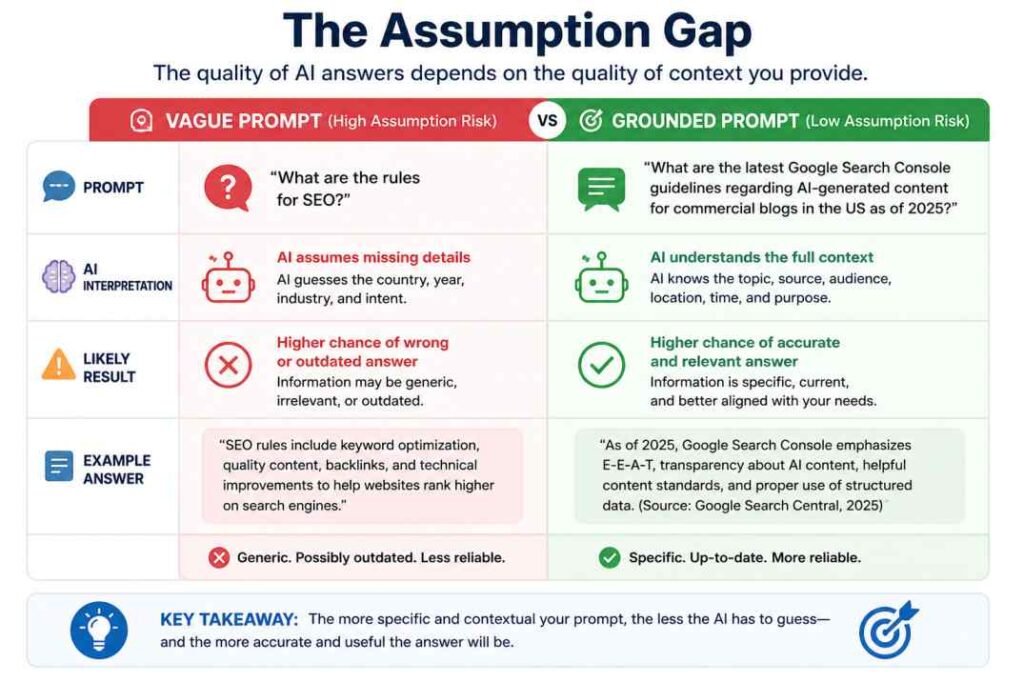
When a prompt is vague, the model fills in missing context using its most common training patterns. This produces answers that are technically plausible — but wrong for your specific situation.
What I observed in testing
In prompt testing across summarization and extraction tasks, vague prompts consistently produced answers optimized for the most common version of the question — not the specific version I needed.
Test example:
Prompt: “What are the best practices for AI content?”
The model returned general SEO-oriented content advice — because that is the most common context in which “AI content best practices” appeared in training data.
When I reran the same query with added context — “for a technical B2B workflow analysis blog focused on prompt testing” — the output shifted significantly toward operational and methodology-focused advice.
Same question. Completely different answer. The difference was context, not the model.
The Prompt Alignment Problem
| Vague Prompt | What the Model Assumes | What You Actually Needed |
|---|---|---|
| “Latest AI trends” | General consumer AI news | Enterprise workflow tools |
| “How to improve accuracy” | Generic tips | Prompt-specific testing methods |
| “Best practices for AI” | SEO content advice | Operational testing protocols |
| “Fix this output” | Style correction | Structural prompt redesign |
The fix
Define the who, what, when, and where explicitly:
Instead of:
“Summarize the key points.”
Use:
“Summarize the key operational findings
for a technical audience familiar with
AI prompt testing. Focus on workflow
implications, not general observations.”
Failure Type 3: True Hallucination
What it is
Hallucination is when the model generates content that is entirely invented — citations that do not exist, statistics that were never published, events that never happened — presented with complete confidence.
Across the prompt tests conducted for this article, hallucination appeared less frequently than missing-context and knowledge-cutoff failures.
What I observed in testing
During content research and verification tasks, I tested how models handled requests for specific citations and source references.
In several runs, models produced plausible-sounding academic citations — with author names, journal titles, publication years, and volume numbers — that did not exist. The formatting was correct. The subject matter was relevant. The sources were entirely fabricated.
This is documented in more detail in Hallucination of Authority: When AI Sounds Right but Is Wrong, which covers specific case examples from testing.
Why hallucination is different from the other two failure types
| Failure Type | Data Source | Detectability | Fix |
|---|---|---|---|
| Knowledge Cutoff | Real but outdated data | Moderate — requires date-checking | Temporal anchoring |
| Missing Context | Real data, wrong application | Easier — output feels generic | Context specification |
| True Hallucination | Invented data | Hard — output sounds authoritative | Independent verification |
The key distinction: knowledge cutoff and missing context failures use real information incorrectly. Hallucination generates information that never existed.
Why it happens
The model is trained to produce fluent, coherent responses. When it lacks the specific data needed to answer a question, it does not stop — it generates the most statistically plausible response based on surrounding patterns. Citations, statistics, and named sources all have recognizable structural patterns the model has learned to replicate.
The fix
Add an ignorance constraint to your prompt:
“If you do not have a verified source for
this claim, state ‘Source unavailable’
rather than providing an estimated reference.
Do not generate citations from memory.”
For high-stakes outputs — anything involving specific statistics, named sources, or factual claims — verify independently before publishing or acting on the information.
How to Diagnose Which Failure Type You Are Dealing With
| Symptom | Most Likely Cause |
|---|---|
| Answer is accurate but outdated | Knowledge Cutoff |
| Answer is generic, not specific to your situation | Missing Context |
| Answer contains specific stats or citations you cannot verify | Hallucination |
| Answer is confident but contradicts a known current fact | Knowledge Cutoff |
| Answer ignores key details you provided | Missing Context |
| Answer invents names, studies, or events | Hallucination |
The Verification Workflow
For any AI output where accuracy matters:
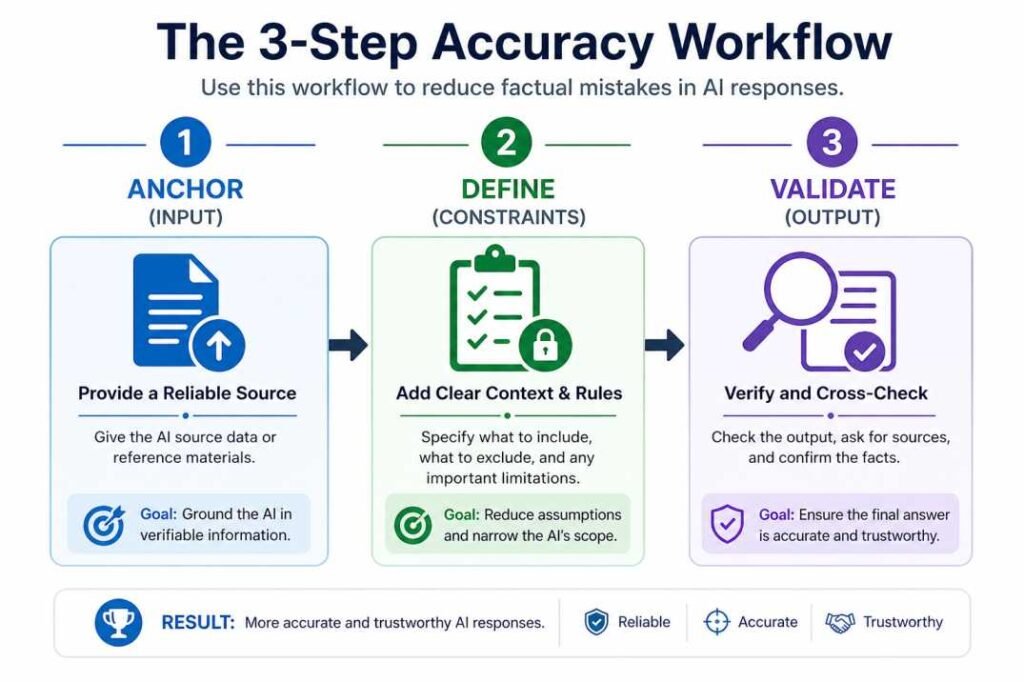
Step 1 — Identify the failure type
Does the output feel outdated, generic, or invented? Match the symptom to the table above.
Step 2 — Apply the right fix
- Outdated → add temporal anchor, provide source document
- Generic → add context specification
- Invented → add ignorance constraint, verify independently
Step 3 — Run a consistency check
Run the same prompt multiple times.
If the outputs differ substantially in structure, facts, or conclusions, the prompt likely lacks sufficient constraints or context.
Consistent outputs across repeated runs usually indicate clearer prompt structure.
Step 4 — Verify high-stakes claims independently
Do not rely on AI output alone for statistics, citations, legal information, or time-sensitive facts.
One Pattern That Repeated Across All Three Models
Across nearly every prompt category tested, specificity reduced error rates more reliably than prompt length.
Short prompts with clear constraints consistently outperformed longer prompts filled with broad instructions. In several tests, reducing ambiguity improved output quality more than adding additional detail.
This suggests that many AI accuracy problems are caused less by “insufficient information” and more by poorly constrained probability space during generation.
When NOT to Use AI for Factual Content
Based on the prompt tests conducted here, these task types produced the most consistently unreliable outputs regardless of prompt quality:
❌ Real-time pricing or market data
❌ Current legal or regulatory requirements
❌ Recent product versions or release notes
❌ Specific statistics from named studies
(without providing the study directly)
❌ Any claim requiring a verified source
you cannot independently check
For these tasks, provide the source document and instruct the model to extract only — not to generate from memory.
Failure Patterns Observed Across Prompt Tests
The patterns below appeared repeatedly across the prompt tests described in the methodology section. These are observed behaviors rather than universal rules.
| Prompt Type | Observed Failure | Observed Example | Fix That Helped |
|---|---|---|---|
| Long instruction prompts | Context dilution | Formatting rules ignored near the end of outputs | Move critical instructions closer to the generation request |
| Citation requests | Invented references | Plausible journal articles that did not exist | Require source verification instead of generation from memory |
| Recent-event questions | Outdated information | Older AI model releases presented as current | Provide current source documents or use live retrieval |
| Broad prompts | Missing context assumptions | Generic advice replacing task-specific recommendations | Add audience, objective, and output constraints |
Limitations
These observations reflect one testing environment and should not be treated as formal benchmark data
Testing conducted across AI tool evaluation and content production tasks
Conclusion
Why AI gives wrong answers comes down to three distinct mechanisms — not one.
Diagnosing which failure type you are dealing with determines which fix actually works. Applying a hallucination fix to a knowledge cutoff problem, or a context fix to a hallucination problem, wastes time and does not resolve the issue.
The practical takeaway from testing was straightforward: AI reliability improved more consistently when prompts reduced ambiguity than when prompts simply became longer. For factual claims, verification remained necessary regardless of model quality.
Frequently Asked Questions
Why does AI give wrong answers?
AI gives wrong answers mainly because of outdated training information, missing context in prompts, or hallucination where content is invented. The model predicts likely text patterns rather than verifying facts before generating a response.
What is AI hallucination?
AI hallucination happens when a model generates information that never existed, such as fake citations, invented statistics, or fabricated events, while presenting them confidently as factual information.
How can I reduce AI mistakes?
Reduce AI mistakes by providing specific context, defining the output format, adding time references when needed, and independently verifying statistics, citations, and important factual claims.
Can prompts completely prevent hallucinations?
No. Better prompts can reduce hallucinations and improve reliability, but they cannot eliminate them completely. Verification remains necessary for factual or high-stakes content.
Why do AI answers sometimes change for the same prompt?
AI models generate text probabilistically. Different token selections can produce different outputs even with identical prompts, especially when prompts are vague or generation settings allow more randomness.
How do I know if an AI answer is outdated?
If a topic involves recent events, product releases, regulations, pricing, or statistics, verify the information using current sources because the model may rely on older training data.
References
- Brown et al. (2020). Language Models are Few-Shot Learners. https://arxiv.org/abs/2005.14165
- Vaswani et al. (2017). Attention Is All You Need. https://arxiv.org/abs/1706.03762
- OpenAI (2023). GPT-4 Technical Report. https://arxiv.org/abs/2303.08774
- Google Search (2023). AI-generated content guidance. https://developers.google.com/search/blog/2023/02/google-search-and-ai-content

The founder of AI Tools Usage Guide and an independent AI workflow researcher focused on prompt reliability, hallucination risks, and operational AI behavior. His work analyzes how AI systems fail under missing context, outdated information, and verification gaps.