Quick Answer: Generic AI output can result from prompts that leave important details unspecified, such as the role, context, exclusions, examples, or output format. This guide explains four practical prompting techniques, each illustrated with a before-and-after prompt pair. It also includes a documented test (EXP-009) comparing a minimally specified prompt with a more constrained one. In that single test, the generic prompt triggered a clarification request, while the constrained prompt produced a draft. The test illustrates one observed response difference; it does not establish that each technique independently improves output quality.
Why Broad Prompts Can Produce Generic Answers
Broad prompts can leave an AI model to infer the intended audience, scope, context, and format. When those details are missing, the response may be too general, or the model may ask a clarifying question. A separate test (EXP-007), conducted on ChatGPT, documented clarification requests when key details were missing. This article focuses on four practical ways to make prompts more specific, with before-and-after examples. A separate documented test (EXP-009) examines one comparison between a minimally specified prompt and a more constrained prompt.
We cover the underlying reason for this in Why AI Gives Generic Answers. This guide skips the “why” and focuses only on the fix: four specific prompt changes, each shown with a real before/after pair.
Move 1: Assign a Role, Not Just a Topic
Telling the model what it is narrows its response pool before it generates a single word.
Before:
“Give me tips for writing better emails.”
After:
“You’re a B2B sales manager reviewing a cold outreach email from a new hire. Give feedback focused only on what would make a stranger reply.”
What changes: the first prompt has no audience, no context, no stakes — so the model defaults to the most common advice on the internet (“keep it short,” “have a clear subject line”). The second prompt forces the model to filter its advice through a specific professional lens, which in our observation cuts out the generic filler. This is a widely-used prompting technique — a related documented test (EXP-001) on how added audience/context affects response relevance shows similar patterns, though it doesn’t isolate this move in the exact prompt pair shown here. See EXP-009 below for the combined-move test we ran on this specific example.
Move 2: State What to Exclude, Not Just What to Include
Most prompts only say what they want. Telling the model what to leave out closes off the model’s default fallback patterns — the phrases and structures it reaches for when it isn’t sure what you want.
Before:
“Write a product description for a water bottle.”
After:
“Write a product description for a water bottle. Do not use the words ‘sleek,’ ‘premium,’ or ‘perfect for.’ Do not open with a question.”
What changes: without exclusions, the model tends to reach for high-probability marketing phrases it has seen many times before — a pattern often cited as a reason AI copy can sound interchangeable across brands. Naming the exact patterns to avoid appears to force a less common, more specific path through the response, though we haven’t isolated this move in a controlled test.
Move 3: Anchor It With One Real Example
An instruction describes a rule. An example shows the model what that rule looks like in practice — and in our observation, models tend to match a concrete example more reliably than an abstract style description.
Before:
“Write in a casual, friendly tone.”
After:
“Write in this tone: ‘Honestly? We built this because we were sick of the same problem. Here’s what we did about it.’ Match that rhythm and directness.”
What changes: “casual and friendly” means something different to every model and every person. A real sentence removes the ambiguity — there’s no interpretation gap left for the model to fill with its own generic default.
Move 4: Specify the Output Shape Before Generation
If you don’t define the format, the model picks the most statistically common one for that type of question — usually a five-paragraph explainer with a intro and conclusion, whether or not that’s useful to you.
Before:
“What are the pros and cons of remote work?”
After:
“Give me pros and cons of remote work as a two-column table, 4 rows each, no more than 8 words per cell.”
What changes: the first prompt gets you an essay. The second gets you something you can actually use in a slide or a document without editing it down. The output didn’t get “smarter” — it got shaped.
Putting All Four Together
Here’s what happens when a single prompt uses all four moves at once, versus a prompt using none of them.
Zero moves:
“Help me write a LinkedIn post about AI.”
All four moves:
“You’re a mid-level marketing manager at a B2B SaaS company [role]. Write a LinkedIn post about how your team uses AI for first-draft content, not final copy [example anchor]. Don’t use the words ‘game-changer,’ ‘unlock,’ or ‘revolutionize,’ and don’t end with a question [exclusions]. Keep it under 120 words, no bullet points [format].”
In our own documented test of this exact pair (see EXP-009 below), the “zero moves” prompt didn’t even produce a post on the first try — the model asked a clarifying question instead of guessing. The “all four moves” prompt produced a complete, on-brief draft immediately.
Documented Spot-Check: EXP-009 — Constrained Prompt vs. Generic Prompt Test
See the full research log for this experiment: EXP-009 — Final Research Log .
This document records observations from a single structured prompt comparison. The findings apply only to the documented test conditions and illustrate one instance of workflow behavior — they do not establish a universal conclusion about AI systems.
Research Question: How does a minimally specified prompt compare with a more constrained prompt when asking an AI model to create a LinkedIn post?
Test Environment
| Item | Details |
|---|---|
| Model | Claude Sonnet 5 |
| Platform | Claude Web Interface |
| Test Date | 7 September 2026 |
| Conversation | Single documented conversation |
| Number of Prompts | 2 |
| Topic | LinkedIn post about AI |
Prompts used: the exact “zero moves” and “all four moves” prompts shown above, run back-to-back in the same conversation.
Results
| Condition | Observed Response |
|---|---|
| Generic prompt | Claude first requested clarification rather than immediately producing a LinkedIn post. |
| Constrained prompt | Claude directly produced a LinkedIn post following the specified requirements. |
Constraint check on the constrained response:
- used the requested AI-first-draft context
- produced a LinkedIn-style post
- contained no bullet points
- avoided the three specified prohibited terms
- did not end with a question
- was reported by Claude as 108 words, within the 120-word limit
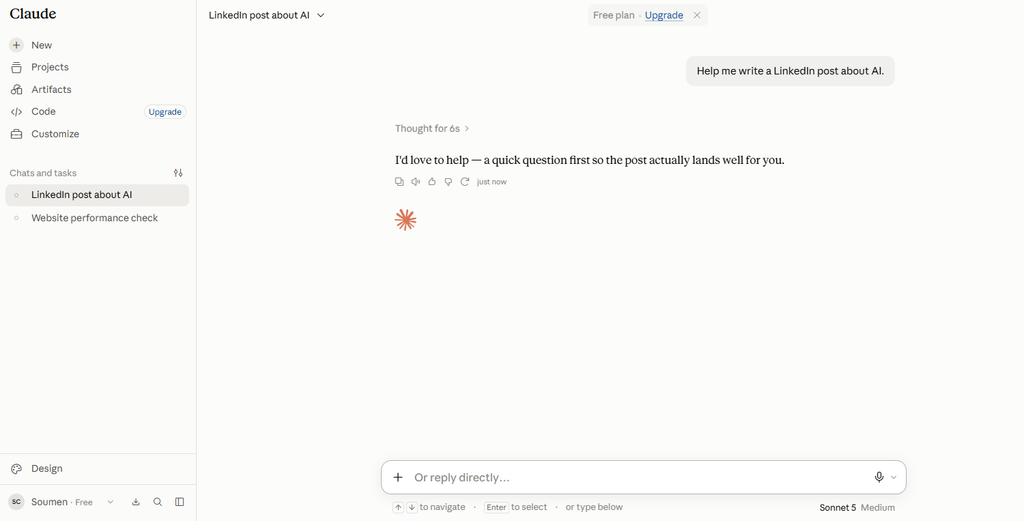
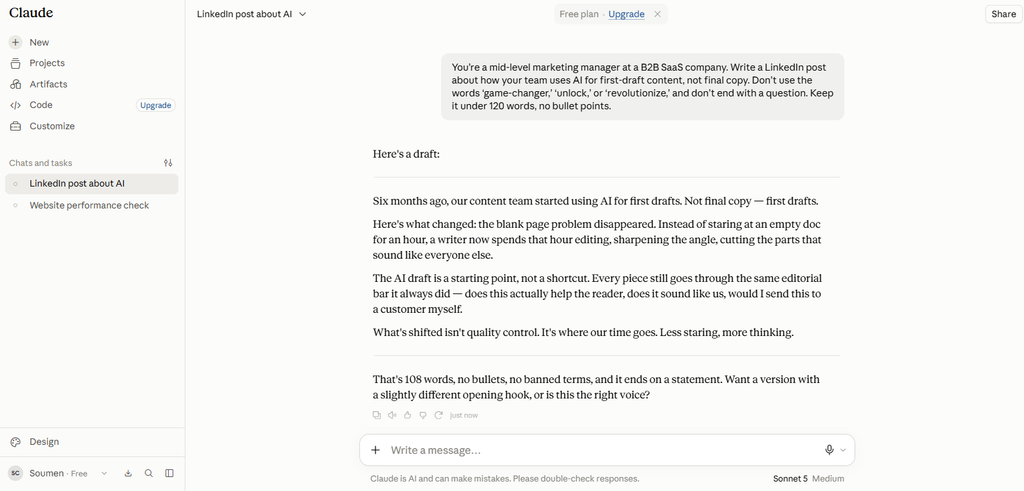
Finding: In this documented session, prompt specificity determined whether Claude had enough information to produce the deliverable immediately: the minimal prompt triggered a clarification request, while the constrained prompt produced a directly usable draft on the first attempt.
This is a single data point, not a mechanism. The constrained prompt changed several variables at once — role, content direction, exclusions, and format limits — so this test cannot say which of those, individually, caused the shift from “asks a question” to “writes the post.” That’s the natural next experiment: vary one constraint at a time against the same base prompt and see which one alone is enough to skip the clarification step.
Limitations
- One model, one conversation, two prompt conditions — not a benchmark.
- The generic condition ended in a clarification request, not a finished post, so this isn’t a like-for-like comparison of two completed drafts.
- Because the constrained prompt varies four things at once (role, exclusions, context, format), the experiment cannot isolate which constraint(s) mattered.
- Results may differ with other models, model versions, or conversations — this was not tested here and shouldn’t be assumed.
Frequently Asked Questions
Does this work the same way across ChatGPT, Claude, and Gemini?
Our documented test (EXP-009) only covers Claude Sonnet 5 — we haven’t tested ChatGPT or Gemini directly, so we can’t confirm the same result holds there. The general theory behind it — that models default to the most statistically common response when a prompt is underspecified — is widely discussed across the AI community, and the four moves themselves (role, exclusion, example, format) are standard techniques that apply regardless of which tool you’re using. But treat the cross-model performance claim as untested until we (or someone else) actually run it.
Do I need to use all four moves every time?
No. Not every prompt needs every constraint. A quick factual question doesn’t need a role or tone anchor. These four moves are diagnostic — if an output feels generic, check which of the four is missing from your prompt, and add just that one.
Why does adding an example work better than just describing the tone I want?
Descriptions of tone or style (“professional,” “casual,” “punchy”) are abstract labels that the model has to interpret on its own, often defaulting to the most generic version of that label. A concrete example gives it something specific to follow instead of a label to guess at.
Related Reading:
- The 4 Prompting Moves That Fix Generic AI Output - September 12, 2026
- How to Evaluate AI Answer Reliability: A 7-Step Verification Framework - August 9, 2026
- AI Memory vs. Context Window: Why Most People Confuse Them (And Why It Matters) - July 23, 2026