
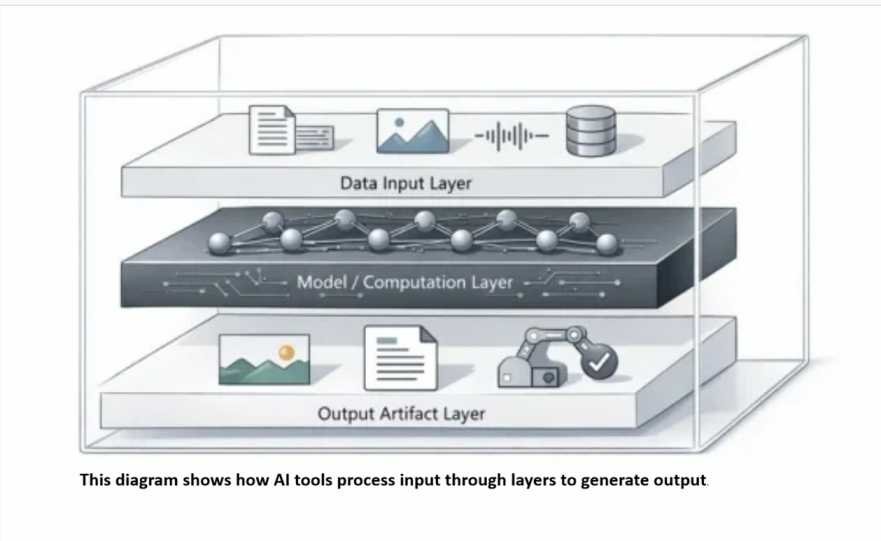
AI tools are software applications that use artificial intelligence (AI) to perform tasks such as writing, answering questions, generating images, analyzing data, summarizing documents, and assisting with coding. They use AI models or other AI-powered systems to process input and produce outputs, predictions, recommendations, or actions.
For example, an AI writing tool can help draft an article, an AI image generator can create visuals from a text prompt, and an AI research tool can summarize information from documents.
The type of task an AI tool can perform depends on its capabilities, the underlying model, the available data, and how the tool is designed.
What Is an AI Tool?
An AI tool is a software application that uses artificial intelligence to help perform a specific task or a range of tasks. Some AI tools specialize in one function, such as image generation or transcription, while others combine several capabilities in one application.
AI tools can interpret natural-language instructions, identify patterns in data, generate content, classify information, or retrieve relevant material. However, not every AI tool works in the same way, and their outputs are not guaranteed to be accurate.
For example, a user can ask an AI assistant to explain a technical concept, request an image generator to create a visual, or use an AI-powered data tool to identify patterns in a spreadsheet.
In simple terms: AI tools are applications that use AI to help people complete tasks that may otherwise require manual work, specialized software, or substantial time.
TL;DR: What Are AI Tools?
- Definition: AI tools are software applications that use artificial intelligence to perform tasks such as writing, research, image generation, coding, and data analysis.
- Examples: ChatGPT, Adobe Firefly, GitHub Copilot, and NotebookLM support different tasks.
- How They Work: AI tools process user input through an AI model or system to generate an output, prediction, summary, or recommendation.
- Important Limitation: AI-generated outputs can be incorrect or unsupported, so important information should be independently verified.
Table of Contents
Core Insight (Read This First)
AI is a structure engine, not a truth engine. Outputs are generated from learned patterns, not guaranteed facts (see ‘The Verification Rule’ below for details).
This means:
- Better constraints → more useful structure
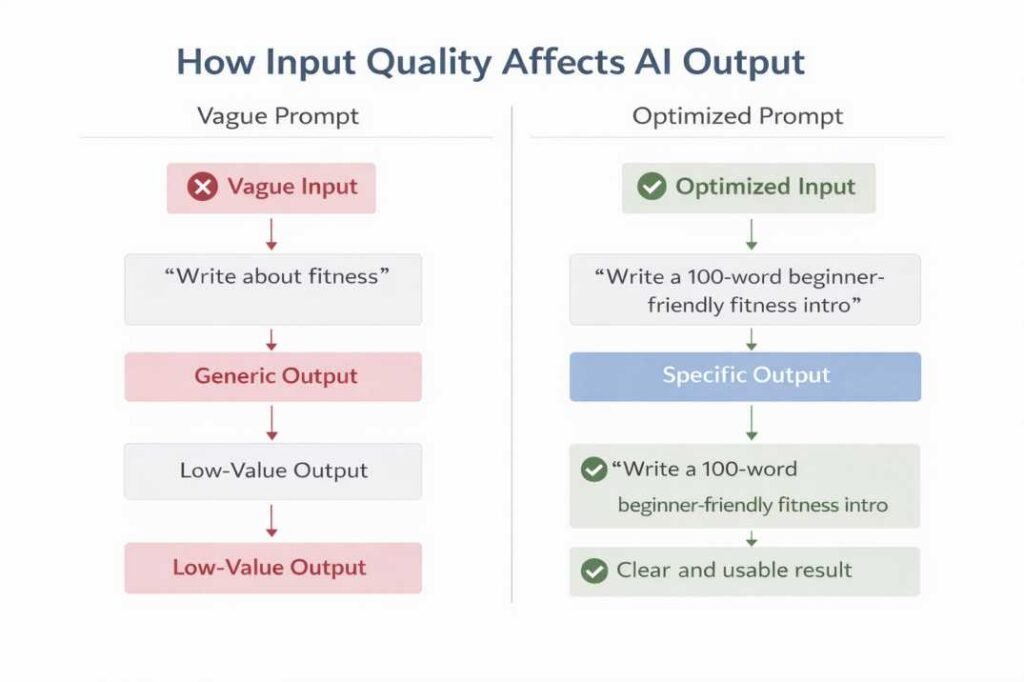
- More specific input → less generic output
- But no amount of prompting → guaranteed facts
The practical takeaway: Use AI as a structure engine, not a truth engine. It excels at drafting, organizing, and formatting. It should not be treated as an authoritative source without independent verification.
What Are AI Tools Used For?
AI tools are used for writing, research, image creation, coding, data analysis, audio processing, and other tasks involving information or digital content.
Common uses include:
- Writing and editing: Drafting articles, rewriting text, checking grammar, and summarizing documents.
- Research and learning: Explaining concepts, organizing information, and extracting key points from documents.
- Image generation and design: Creating illustrations, exploring design concepts, and editing visuals.
- Coding and software development: Explaining code, suggesting implementations, and identifying potential errors.
- Data analysis: Examining spreadsheets, finding patterns, and preparing charts or summaries.
- Audio processing: Transcribing speech, converting recordings into text, and generating audio where supported.
The right AI tool depends on the task, the required accuracy, available features, cost, privacy requirements, and the ability to verify the output.
Types of AI Tools: Examples and Uses
AI tools can be grouped by the tasks they help users complete. These categories may overlap because some applications provide multiple AI capabilities.
1. AI Writing Tools
AI writing tools help users draft, edit, rewrite, and summarize text. They can assist with outlines, explanations, emails, reports, and other written material.
Example: ChatGPT can help develop an article outline or rewrite a paragraph for clarity.
Best use: Preparing a first draft, organizing ideas, and improving readability.
Limitation: Generated text may contain factual errors, repetitive language, or unsupported claims. Review and verify important information before publication.
2. AI Image Generators
AI image generators create or modify images using text prompts or other supported inputs.
Example: Adobe Firefly supports AI-assisted image generation and editing.
Best use: Producing concept visuals, illustrations, and design variations.
Limitation: Results may contain visual inconsistencies or fail to match the intended design. Check licensing terms and suitability before using generated images commercially.
3. AI Coding Assistants
AI coding assistants help developers understand programming concepts, generate code suggestions, troubleshoot errors, and work through development tasks.
Example: GitHub Copilot can assist with code suggestions and programming workflows.
Best use: Understanding unfamiliar functions, exploring implementations, and speeding up routine coding tasks.
Limitation: Suggested code may contain bugs or security vulnerabilities. Test and review it before deployment.
4. AI Research Tools
AI research tools help users search, organize, and summarize information from available sources or uploaded documents.
Example: NotebookLM can answer questions using supplied source materials and provide source-linked citations.
Best use: Extracting key points from documents, comparing information, and organizing research notes.
Limitation: Check whether cited sources actually support the answer and whether important information has been omitted.
5. AI Data Analysis Tools
AI data analysis tools help users examine datasets, identify patterns, summarize findings, and create visualizations.
Example: ChatGPT’s data-analysis capabilities can assist with supported spreadsheets and uploaded files.
Best use: Exploring data, comparing metrics, and identifying trends that deserve further investigation.
Limitation: Incorrect data, unsuitable assumptions, or flawed calculations can lead to misleading conclusions. Validate important results.
6. AI Audio Tools
AI audio tools support tasks such as speech-to-text transcription, audio processing, and voice generation.
Best use: Converting interviews into transcripts, preparing meeting notes, or creating supported audio outputs.
Limitation: Transcription systems may misinterpret names, accents, technical terminology, or background speech. Review the results when accuracy matters.
How to Choose the Right AI Tool
Before selecting an AI tool, consider these five factors.
1. Task: Does the tool support the exact task you need to complete?
2. Accuracy: Can you verify the output using reliable sources, testing, or direct review?
3. Features and workflow: Does it support your file types, integrations, and existing workflow?
4. Cost: Are the required features available within your budget?
5. Privacy: How does the provider handle uploaded files, prompts, and other data?
Compare actual features and limitations rather than assuming that every tool in the same category works identically.
AI Tools vs. Traditional Software
AI tools and traditional software can both help users complete tasks, but they may differ in how they process input and produce results.
| Feature | Traditional Software | AI Tools |
|---|---|---|
| Input | Commands, clicks, formulas, or structured data | Natural-language prompts and other supported inputs |
| Processing | Often follows explicitly programmed rules | May use trained models to recognize patterns or generate outputs |
| Output | Often predictable for the same inputs and system state | May vary depending on the model, context, and settings |
| Common uses | Calculations, record management, and predefined workflows | Content generation, prediction, classification, and language assistance |
| Limitations | Software bugs, incorrect calculations, or unexpected behavior | These issues plus potentially inaccurate or unsupported model outputs |
This distinction is not absolute. Traditional applications can include AI features, and AI-powered applications also rely on conventional software components.
How Do AI Tools Work?
AI tools work by processing input and applying an AI model or system to produce an output. The exact process depends on the task and the technology behind the application.
A simplified workflow has three stages:
- Input: The user provides a prompt, document, image, audio recording, dataset, or another supported input.
- Processing: The AI system analyzes the input using its model, instructions, available context, or other processing components.
- Output: The application produces a response, prediction, classification, recommendation, generated image, or another result.
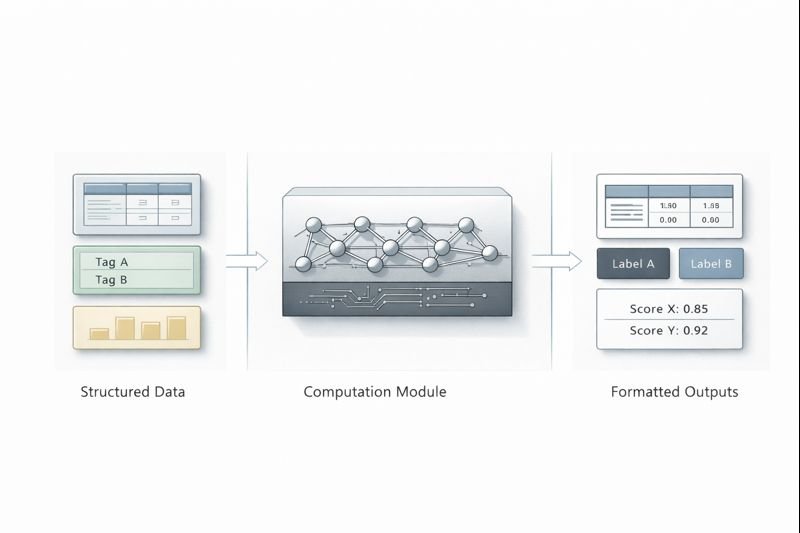
For example, when a user asks a text-generation tool to explain a concept, the system processes the prompt and available context to generate a response. An image-generation tool follows a different process to produce a visual.
Some AI tools generate new content, while others classify data, retrieve information, or make predictions. Therefore, the workflow should not be assumed to be identical across all AI applications.
Important: An AI-generated response is not automatically a verified fact. Accuracy depends on the system, input, task, and available information. Check important claims independently.
The Constraint Design Framework
One practical factor affecting the usefulness of an AI response is how you structure your input.
In this guide, I use “Constraint Design” as a practical framework for structuring AI requests. EXP-001 tests one part of this approach: how examples and audience-specific context affected response focus in a single documented session.
1. Positive Constraints — What to Include
Tell the AI exactly what you want in the output.
- “Include 3 actionable tips.”
- “Write for a complete beginner audience.”
2. Negative Constraints — What to Avoid
Negative constraints can help narrow the range of acceptable outputs by explicitly telling the AI what to avoid. This can make the requested output more specific and reduce unwanted patterns or generic phrasing.
- “Do not use the phrases ‘hidden gem,’ ‘bustling,’ or ‘vibrant.'”
- “Do not include generic advice.”
Without explicit constraints, an AI tool may interpret a request more broadly than intended or produce an output that does not match the user’s preferred style, format, or scope. The result depends on the task, model, and context.
3. Structural Constraints — How to Format
Define the shape of the output before the AI generates it.
- “Write in exactly 100 words.”
- “End with a single call to action.”
- “Use a table to compare the two options.”
Practical rule: Clearer and more complete constraints can make an AI request more specific and usable, but the effect depends on the task and system.
Documented Spot-Check: EXP-001 – Generic Prompt Test
Observation Goal: How does adding examples and audience-specific context affect the focus and practical usefulness of an AI-generated response?
Test Setup: ChatGPT | 27 July 2026 | 1 documented session | 3 prompts | Topic: AI Slop
Evaluation Focus: Specificity, Practical Value, and Audience Relevance
Exact prompts tested:
- “Explain AI Slop.”
- “Explain AI Slop with real examples.”
- “Explain AI Slop for SEO writers who publish AI-assisted content.”
Observed results: The first response provided a broad overview without audience-specific context. The second added practical examples while remaining broadly applicable. The third tailored the explanation to a specific audience and included workflow-oriented guidance relevant to SEO publishing.
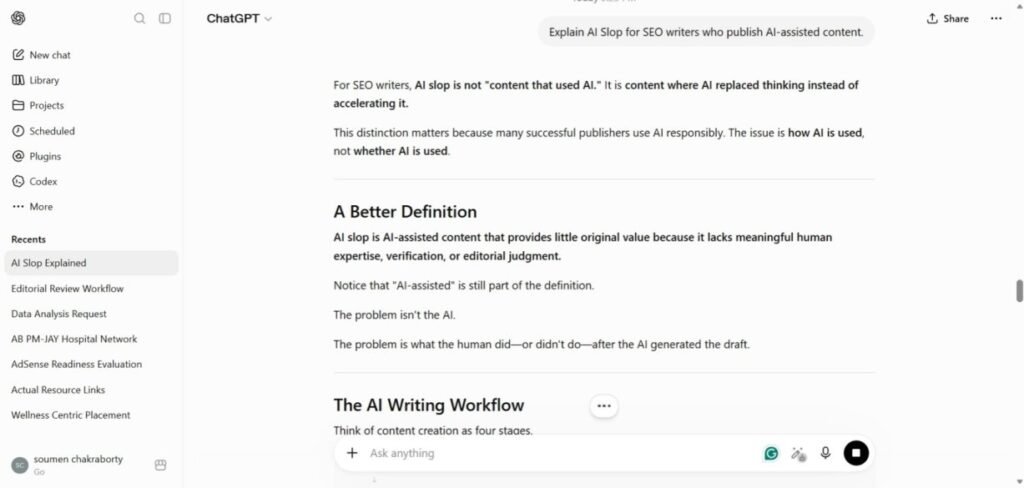
Observation: In this test session, the more specific prompts appeared to produce responses that were more targeted and actionable than the generic prompt.
Limitation: This was a single testing session using one AI model and three prompts. Results may vary with model, model version, system instructions, future updates, or prompt design. This is a documented observation from this workflow, not a universal conclusion.
View the full experiment: EXP-001: Generic Prompt Test
Key takeaway: In this documented test session, the three prompts produced responses with different levels of specificity and audience focus. The generic prompt generated a broad overview, the example-based prompt produced more concrete explanations, and the audience-specific prompt provided guidance relevant to SEO writers. These observations illustrate differences between the tested prompts but do not establish that adding context will always improve AI responses.
Common AI Mistakes & Failure Patterns
AI tools can produce weak or unreliable output in several practical situations. Avoid these common pitfalls:
- Vague or open-ended prompts: Leaves the model guessing, resulting in generic or repetitive output.
- Treating the first output as final: The first response may need review and refinement. Use follow-up instructions to clarify requirements or improve the output, then check whether the revisions meet your needs.
- Fact-heavy topics: AI-generated responses may contain factual errors or unsupported details. Independently verify important claims, figures, quotations, and references before relying on them.
- Counting and strict formatting tasks: AI models can struggle with exact word counts or rigid structural rules. Language fluency does not guarantee exact constraint satisfaction.
- Multi-step tasks without structure: Longer outputs can lose focus or drift from the original goal when the task lacks a clear outline.
AI Limitations & The Verification Rule
AI-generated outputs are not verified facts by default and should not be treated as the sole basis for high-stakes decisions.
The Rule: If AI output contains a specific date, a legal rule, a medical instruction, or a financial claim, you must verify it against reliable, independent sources before using it.
Avoid relying solely on AI output when:
- The cost of an error is high (medical, legal, financial decisions).
- You cannot verify the output independently.
- Real-time, split-second accuracy is required.
Benefits and Limitations of AI Tools
AI tools can help users organize information, generate initial drafts, explore ideas, analyze data, and automate supported tasks. They can also reduce repetitive work when used appropriately.
However, they have important limitations:
- Outputs may contain incorrect or unsupported information.
- Results may require human editing and verification.
- Performance can vary by task, input quality, and system capabilities.
- Some features may require paid access or impose usage limits.
- Privacy and data-handling practices vary by provider.
AI tools are most useful when their outputs are reviewed against the requirements of the task. They should support human judgment rather than replace necessary verification.
Conclusion
AI tools are applications that use artificial intelligence to help users generate content, process information, analyze data, and complete other supported tasks. Their capabilities vary by application, and different tools are suited to different needs.
To choose an appropriate AI tool, evaluate its features, accuracy, cost, workflow compatibility, and privacy practices. Use AI to support your work, and independently verify important outputs before relying on them.
Related Research
EXP-001: Generic Prompt Test — A documented ChatGPT experiment examining how additional examples and audience-specific context affected the focus and practical usefulness of responses.
Frequently Asked Questions (FAQ)
Does an AI tool remember my previous chats?
Answer: It depends on the AI tool and its settings. Some tools use the current conversation to maintain context, while others also offer saved memory or chat history across sessions. These features are not the same, and their availability and behavior vary by product. Check the tool’s documentation and settings to understand what it retains.
Is my personal data or input used to train the AI?
Answer: Whether your prompts or data are used to improve or train AI models depends on the provider, product, account type, and privacy settings. Some services offer data controls or opt-out options, while others have different terms for consumer, enterprise, or API use. Review the specific service’s privacy policy and data controls before submitting sensitive or proprietary information.
Can AI detection tools reliably prove if a text was written by AI?
Answer: No. AI detection tools cannot reliably prove that a text was written by AI. Their methods and performance vary, and their results may include false positives or false negatives. Treat detection scores as uncertain indicators, not definitive evidence of authorship. Consider the writing process and other relevant evidence when assessing a text.
References
OECD.
OECD AI Principles. Adopted 2019; updated 2024.
https://oecd.ai/en/ai-principles
National Institute of Standards and Technology (NIST).
Artificial Intelligence Risk Management Framework (AI RMF 1.0), NIST AI 100-1, 2023.
https://www.nist.gov/itl/ai-risk-management-framework
ISO/IEC 23894:2023.
Information technology — Artificial intelligence — Guidance on risk management.
https://www.iso.org/standard/77304.html
Note: This guide combines conceptual explanation with documented hands-on testing. One example is EXP-001: Generic Prompt Test, which records the test environment, prompts, observed response differences, limitations, and screenshots from the testing session. Other AI behaviors may vary across models, versions, tasks, and system instructions.
- The 4 Prompting Moves That Fix Generic AI Output - September 12, 2026
- How to Evaluate AI Answer Reliability: A 7-Step Verification Framework - August 9, 2026
- AI Memory vs. Context Window: Why Most People Confuse Them (And Why It Matters) - July 23, 2026