
WORKFLOW RELIABILITY
Five Workflow Failure Patterns That Reduce ChatGPT Reliability
Understanding how everyday workflow decisions influence AI consistency, instruction-following, and output quality.
Quick Answer
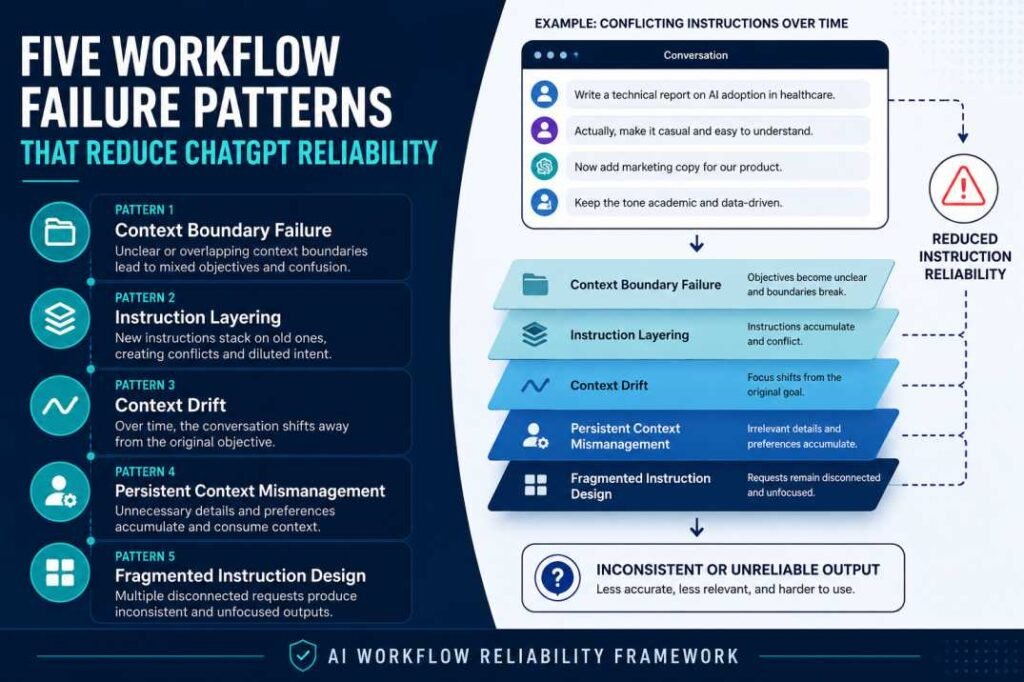
Many unreliable ChatGPT responses are influenced by how conversations are managed, not just by the prompt itself. Workflow habits such as mixing unrelated tasks, layering conflicting instructions, keeping overloaded conversations alive, repeating unnecessary context, and fragmenting requests can reduce output consistency and make responses harder to control.
This article introduces five recurring workflow failure patterns and provides a high-level framework for identifying them. Each pattern links to a dedicated research article that examines its causes, observable behaviors, and practical mitigation strategies in greater depth.
Continue Your Research
→ Why AI Loses Context in Long Conversations
Why These Patterns Matter
Many discussions about AI reliability focus on writing better prompts. While prompt quality is important, it is only one part of a larger interaction workflow.
In practice, unreliable AI outputs often emerge from recurring workflow patterns rather than from a single poorly written prompt. How conversations are organized, how instructions evolve over time, and how context is managed can all influence response consistency.
This article identifies five workflow failure patterns that frequently appear during everyday AI use. Rather than examining each mechanism in depth, it introduces a practical framework that connects to dedicated research articles covering each pattern in greater detail.
Research Evidence: EXP-001 — Generic Prompt Test
Workflow Failure Framework
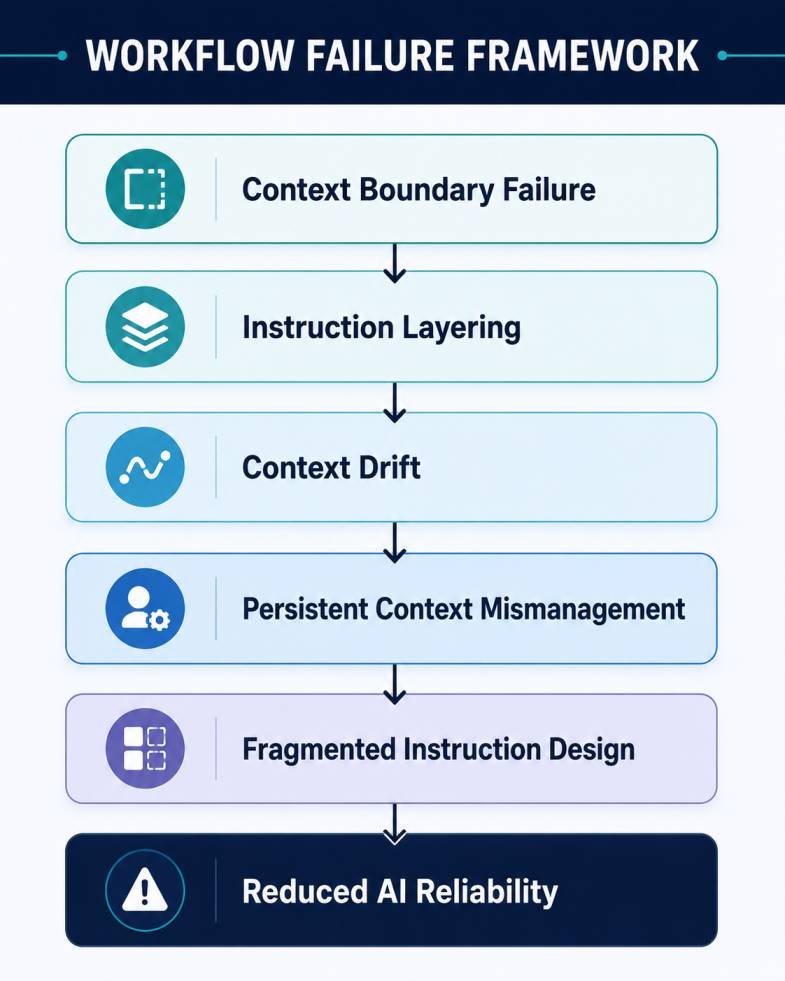
The five patterns introduced in this article are:
- Context Boundary Failure
- Instruction Layering
- Context Drift
- Persistent Context Mismanagement
- Fragmented Instruction Design
Each pattern represents a different point where AI workflows can become less reliable.
Pattern 1: Context Boundary Failure
Observable Symptoms
Users often continue unrelated tasks within the same conversation, expecting ChatGPT to separate each objective automatically.
Common signs include:
- Responses adopting the wrong tone
- Previous tasks influencing new requests
- Formatting becoming inconsistent
- Instructions appearing to be ignored
These symptoms usually emerge after multiple unrelated objectives accumulate within a single chat.
Why It Happens
ChatGPT interprets new requests using the surrounding conversation context.
When unrelated objectives remain inside the same thread, earlier assumptions may continue influencing later responses even after they are no longer relevant. As context becomes less focused, maintaining consistent responses becomes more difficult.
This pattern is referred to here as Context Boundary Failure because the conversation no longer has a clear separation between independent tasks.
Workflow Adjustment
Instead of keeping every activity inside one conversation:
- start a new chat when the objective changes,
- separate projects into different conversations,
- isolate different audiences,
- avoid mixing drafting, coding, planning, and editing in the same thread.
Maintaining clear conversation boundaries often improves consistency more effectively than repeatedly correcting later responses.
Continue Your Research
Read next:
→ Why AI Loses Context in Long Conversations
Pattern 2: Instruction Layering
Observable Symptoms
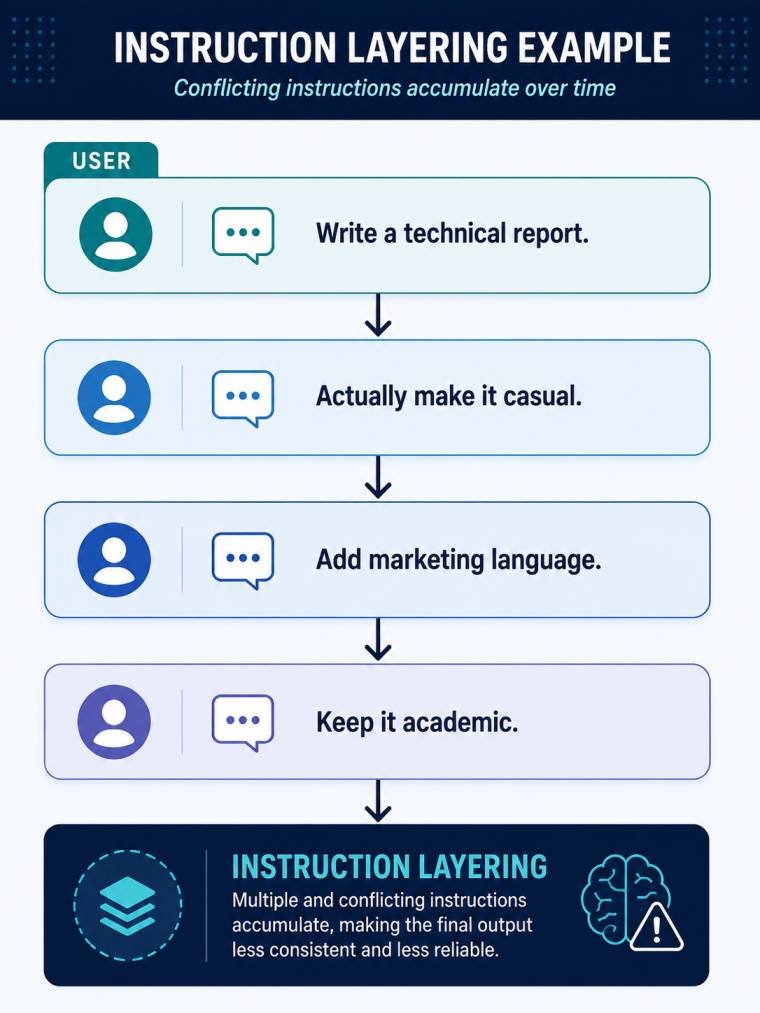
Many users improve AI responses by adding one correction after another instead of revising the original request.
Common signs include:
- Earlier instructions conflicting with newer ones
- AI partially following multiple revisions
- Formatting becoming inconsistent
- Responses becoming broader or less focused
These symptoms often appear after several rounds of incremental corrections.
Why It Happens
Each new instruction becomes part of the conversation context.
As revisions accumulate, the model may need to balance multiple versions of the same objective rather than responding to one clear instruction. This increases instruction complexity and makes prioritization more difficult.
This article refers to this pattern as Instruction Layering because successive revisions gradually build competing instruction layers within the conversation.
Note: This pattern introduces the concept only. It does not examine prompt competition or instruction prioritization mechanisms in detail.
Workflow Adjustment
Instead of appending multiple correction messages:
- revise the original objective where possible,
- remove instructions that are no longer relevant,
- combine related requirements into one clear request,
- regenerate from the updated instruction.
Reducing unnecessary instruction layers generally produces more predictable outputs than repeatedly extending an existing conversation.
Continue Your Research
Read next:
→ Instruction Conflict in AI Workflows
Pattern 3: Context Drift
Observable Symptoms
AI responses often become less consistent as conversations continue over time.
Common signs include:
- Earlier instructions being applied inconsistently
- Responses becoming shorter or more repetitive
- Formatting changing unexpectedly
- The conversation gradually drifting away from its original objective
These changes usually develop gradually rather than appearing after a single prompt.
Why It Happens
Long conversations naturally accumulate more context.
As additional requests, revisions, and clarifications are added, maintaining a clear relationship between earlier and newer instructions becomes more difficult. This can reduce consistency even when individual prompts remain well written.
This article refers to this recurring workflow pattern as Context Drift because the conversation gradually moves away from its original instructional structure.
Note: This section introduces the pattern only. The underlying mechanisms of long-context reliability are examined separately.
Research Evidence: EXP-002 — Instruction Retention Test
Workflow Adjustment
Rather than continuing a conversation indefinitely:
- restart the chat after major milestones,
- carry forward only the information that remains relevant,
- separate completed work from new objectives,
- avoid using one conversation for long-term project management.
Managing conversation boundaries proactively often produces more stable results than attempting to recover an overloaded session.
Continue Your Research
Read next:
→ Why AI Loses Context in Long Conversations
Pattern 4: Persistent Context Mismanagement
Observable Symptoms
Users often repeat the same background information at the beginning of every new conversation.
Typical examples include:
- professional role
- writing preferences
- preferred language
- formatting requirements
- recurring project information
Although this repetition appears harmless, it gradually makes workflows longer and more difficult to maintain.
Why It Happens
Some information remains stable across many AI interactions, while other information changes from one task to the next.
When permanent preferences and task-specific instructions are treated the same way, conversations become unnecessarily repetitive and harder to organize.
This article refers to this pattern as Persistent Context Mismanagement because reusable information is handled inefficiently across repeated workflows.
Note: This section focuses on workflow organization rather than platform-specific features or settings.
Workflow Adjustment
Separate information into two groups:
Persistent context
- writing preferences
- professional role
- preferred language
- recurring formatting standards
Task-specific context
- project objective
- audience
- current document
- temporary constraints
Keeping these two types of information separate reduces unnecessary repetition and makes new conversations easier to structure.
Continue Your Research
Read next:
→ AI Prompt Engineering for Teams
Pattern 5: Fragmented Instruction Design
Observable Symptoms
Some users approach AI interactions as a sequence of disconnected requests rather than a single structured objective.
Common signs include:
- multiple short prompts without shared context,
- objectives changing between messages,
- incomplete instructions,
- repeated clarification requests,
- inconsistent output across the same task.
These interactions often require additional revisions before reaching a usable result.
Why It Happens
AI systems perform more consistently when the overall objective is clearly defined.
When information is divided across multiple disconnected prompts, the model must repeatedly infer missing context instead of focusing on the intended task. This increases ambiguity and reduces workflow efficiency.
This article refers to this recurring pattern as Fragmented Instruction Design because the objective is distributed across separate prompts instead of being organized as one coherent instruction.
Note: This section identifies the workflow pattern only. Prompt structure and prompt design techniques are covered separately.
Workflow Adjustment
Before sending a request, define the complete objective.
Where appropriate, include:
- the task,
- the intended audience,
- important constraints,
- the expected output,
- any essential supporting context.
A single well-organized instruction is generally easier to interpret than multiple disconnected requests spread across a conversation.
Continue Your Research
Read next:
→ How Prompt Structure Controls AI Output
→ AI Prompt Engineering for Teams
Workflow Reliability Checklist
Before starting a new AI task, review the workflow rather than the prompt alone.
Conversation Structure
□ Does this conversation have a single objective?
□ Should this task begin in a new conversation instead?
Instruction Quality
□ Are all active instructions still relevant?
□ Have outdated requirements been removed?
Context Management
□ Is only necessary context included?
□ Have reusable preferences been separated from task-specific information?
Task Definition
□ Is the expected outcome clearly defined?
□ Are constraints, audience, and output format identified where needed?
Verification
□ Will the response require factual verification before use?
□ Is additional human review necessary for important decisions?
Following these checks before submitting a request often improves workflow consistency more effectively than repeatedly revising responses afterward.
How These Workflow Failure Patterns Connect
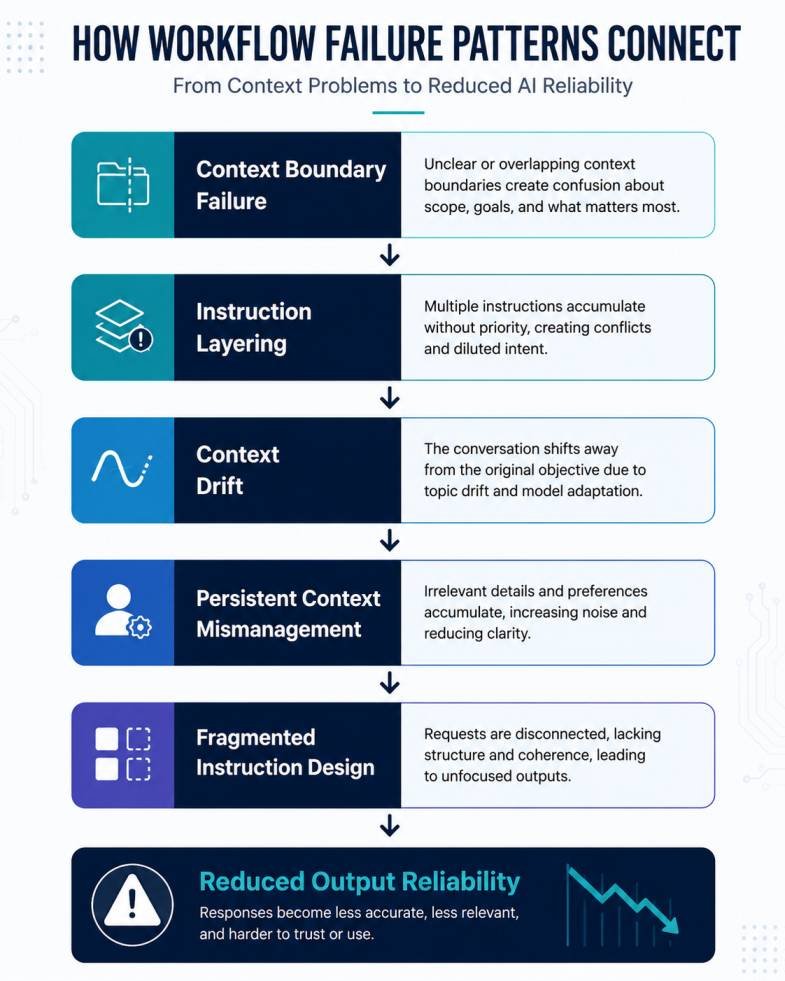
This article presents five workflow failure patterns separately, but they rarely occur in isolation.
A conversation that begins with poor context boundaries often develops additional problems as new instructions accumulate. Over time, instruction layering, context drift, fragmented requests, and repeated context management issues may reinforce one another, making AI outputs progressively less reliable.
Rather than treating these failures as isolated mistakes, it is more useful to view them as connected workflow behaviors that influence the overall reliability of an AI-assisted task.
The relationship can be summarized as follows:
Context Boundary Failure
↓
Instruction Layering
↓
Context Drift
↓
Persistent Context Mismanagement
↓
Fragmented Instruction Design
↓
Reduced AI Output Reliability
Different workflows may experience these patterns in a different order, but the interaction between them often explains why long AI sessions become increasingly difficult to manage.
Research Evidence: EXP-007 — Ambiguity Resolution Test
Final Assessment
Reliable AI interactions depend on more than writing effective prompts. They also depend on how conversations are structured, how instructions evolve, and how workflow decisions influence context over time.
The five workflow failure patterns presented in this article provide a practical framework for identifying common sources of inconsistency during AI-assisted work. Rather than treating unexpected outputs as isolated events, these patterns encourage a workflow-centered approach to diagnosing and improving AI reliability.
This article serves as an overview of the framework. Each workflow failure pattern is explored in greater depth through dedicated research articles that examine the underlying mechanisms, practical examples, and workflow adjustments associated with each pattern.
Frequently Asked Questions
Does a better prompt always produce better AI responses?
No. Prompt quality is only one factor affecting AI reliability. Conversation structure, context management, instruction consistency, and workflow organization also influence the quality of the final response.
Should every new task start in a new conversation?
Not always. A new conversation is generally helpful when the objective, audience, writing style, or project changes significantly. Keeping unrelated work separate reduces unnecessary context accumulation.
Are these workflow patterns unique to ChatGPT?
No. Although this article uses ChatGPT as the primary example, similar workflow patterns can affect interactions with other large language models because they relate to how instructions and context are organized rather than to one specific platform.
Can these workflow adjustments eliminate AI errors?
No. Even well-structured workflows cannot prevent every incorrect or incomplete response. Human review and appropriate verification remain important whenever accuracy matters.
Where can I learn more about each workflow pattern?
This article provides a high-level framework. Each workflow failure pattern links to a dedicated research article examining its causes, observable behaviors, and mitigation strategies in greater detail.
Continue Your Research
The five workflow failure patterns introduced in this article are explored in greater detail below.
| Workflow Pattern | Detailed Research |
|---|---|
| Context Boundary Failure | Why AI Loses Context in Long Conversations |
| Instruction Layering | Instruction Conflict in AI Workflows |
| Instruction Layering | What Is Prompt Dilution? |
| Persistent Context Mismanagement | AI Prompt Engineering for Teams |
| Fragmented Instruction Design | How Prompt Structure Controls AI Output |
Related Research
Readers interested in workflow reliability may also find these articles useful:
- What Is an AI Workflow?
- AI Workflows for Teams
- Why Humans Overtrust AI Outputs
- Why AI Gives Wrong Answers
References
- OpenAI – Prompting Fundamentals — Official guidance on writing clear instructions, structuring prompts, and improving AI responses.
- OpenAI – Best Practices for Prompt Engineering — Official recommendations on instruction ordering, context organization, and prompt design.
- Anthropic – Prompt Engineering Best Practices — Guidance on prompt clarity, instruction hierarchy, prompt chaining, and reducing hallucinations.
- Google Cloud – Prompt Engineering Overview and Guide — Overview of prompt engineering concepts, workflow design, and practical prompting techniques.
- Liu, N. F., et al. (2024). Lost in the Middle: How Language Models Use Long Contexts. Transactions of the Association for Computational Linguistics (TACL). https://doi.org/
- Brown, T. B., et al. (2020). Language Models are Few-Shot Learners. NeurIPS. https://arxiv.org/abs/2005.14165
- White, J., et al. (2023). A Prompt Pattern Catalog to Enhance Prompt Engineering with ChatGPT. arXiv:2302.11382. https://arxiv.org/abs/2302.11382
- The 4 Prompting Moves That Fix Generic AI Output - September 12, 2026
- How to Evaluate AI Answer Reliability: A 7-Step Verification Framework - August 9, 2026
- AI Memory vs. Context Window: Why Most People Confuse Them (And Why It Matters) - July 23, 2026