

Introduction
Prompt dilution occurs when a prompt contains more information or requirements than the model can effectively prioritize, making the primary request less focused. In our documented EXP-001 test, we examined how adding relevant context affected the specificity, practical usefulness, and audience relevance of AI-generated responses.
Using three prompts about AI Slop, the test progressed from a generic request to one with real examples and finally to an audience-specific request for SEO writers. As relevant context increased, the responses became more concrete, practical, and targeted to the intended audience.
This isn’t the same as writing a long prompt. Length isn’t the problem — irrelevant length is. A dense, well-structured 500-word prompt can be useful; a padded prompt with unnecessary information can make the primary instruction harder to follow.
In this guide, you will learn what prompt dilution is, how competing or unnecessary information can affect instruction focus, and how to structure prompts for clearer, more targeted outputs. If you are new to AI prompting, start with our guide on AI Tools vs. AI Models: Why ChatGPT, Gemini, and Claude Give Different Answers.
What Our Testing Revealed
Research: EXP-001 — Prompt Specificity Test
Setup: A controlled prompt experiment conducted in ChatGPT on 27 July 2026, using three prompts about AI Slop. The prompts progressively added context to examine how additional context affected response specificity, practical value, and audience relevance.
Prompts tested:
- “Explain AI Slop.”
- “Explain AI Slop with real examples.”
- “Explain AI Slop for SEO writers who publish AI-assisted content.”
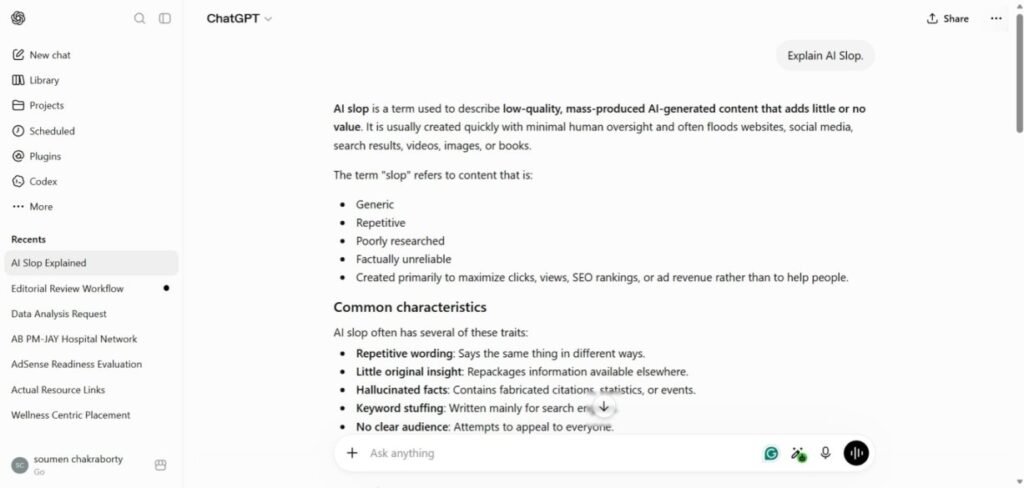
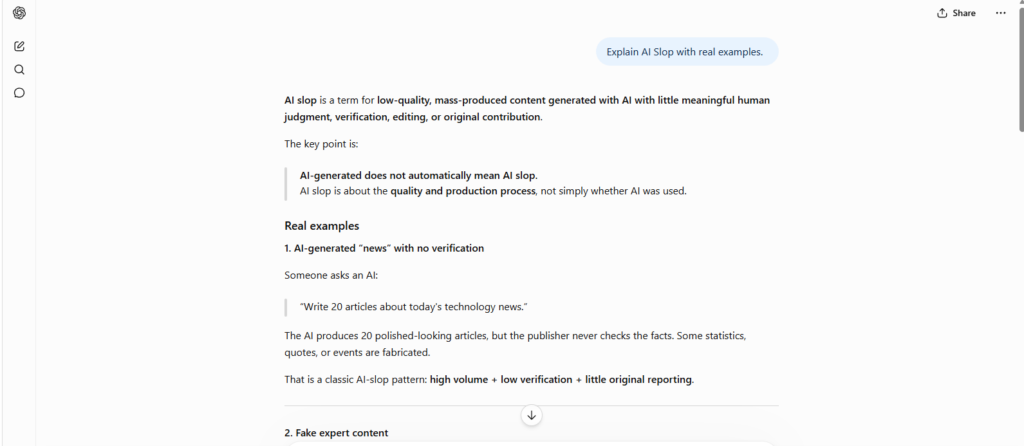
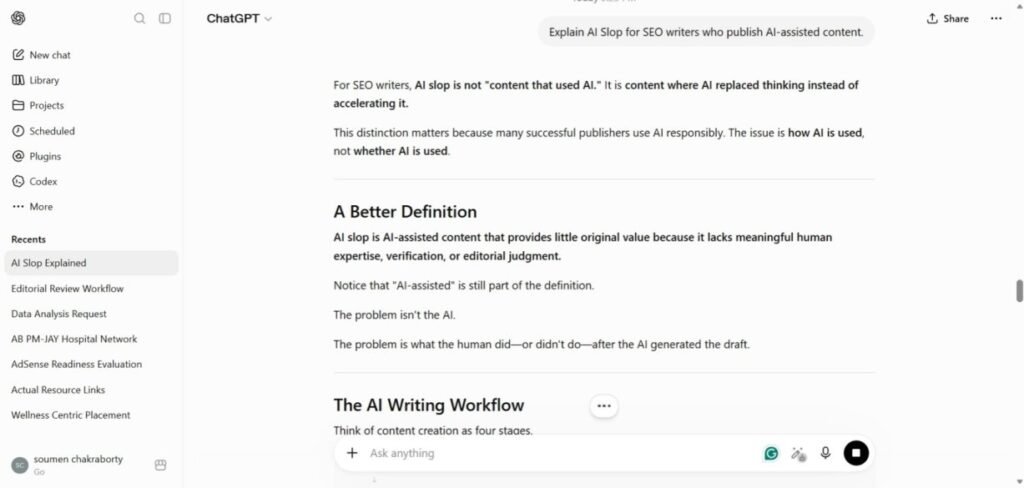
Results: The generic prompt produced a broad definition and general characteristics. Adding real examples made the response more concrete and easier to understand. Adding audience-specific context produced a more targeted explanation with workflow-oriented guidance relevant to SEO publishing.
Key Finding: In this documented test session, responses became progressively more focused as additional context was added. The first response was broadly suitable for general readers, while subsequent responses became more concrete, practical, and aligned with the defined audience and workflow requirements.
Limitation: This was a single testing session using one AI model and three prompts. The observation should be treated as documented workflow evidence rather than a universal conclusion; results may vary with model, model version, system instructions, or prompt design.
Research: EXP-003 — Multi-Instruction Compliance Test
A related question EXP-001 doesn’t answer directly: if a prompt’s multiple instructions don’t conflict — they’re just stacked — does the model hold onto all of them as the conversation continues?
Setup: A single ChatGPT conversation, 6 turns. The model was given three standing instructions up front (end every answer with “END,” use bullet points where possible, keep every answer under 80 words) and told to apply them to all following questions unless told otherwise. Two more compatible instructions (bold every heading; include one practical example) were added mid-conversation. Three topic questions were then asked in sequence.
Result: Formatting and structural instructions (bullets, bold headings, the “END” marker, the worked example) were followed consistently across all three answers. The one instruction that slipped was the length limit — the first answer went over the 80-word cap; the later two stayed within it.
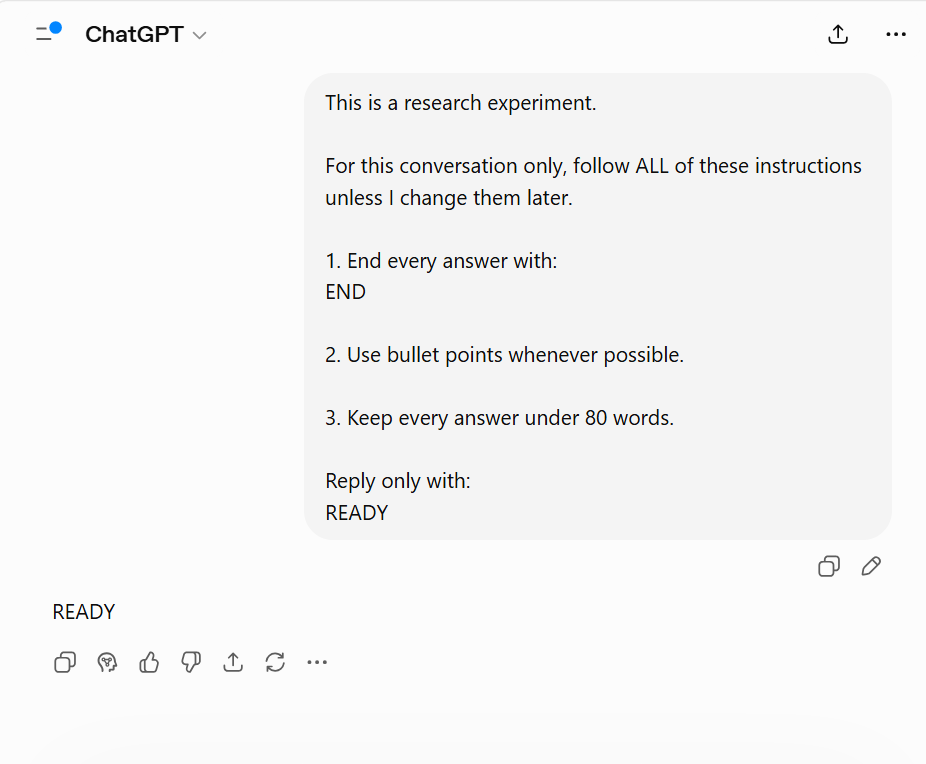

What this adds to the picture: even when instructions don’t compete for priority — they’re all compatible, none contradicts another — a numeric constraint (a word count) was the one that lapsed first, while formatting and structural instructions held. That’s a narrower and different finding than EXP-001:
EXP-001 is about instructions competing for priority; this one suggests that even without competition, some instruction types are more fragile than others over a multi-turn conversation. Worth testing further before generalizing — this was one model, one conversation, three follow-up prompts.
Research: EXP-007 — Ambiguity Resolution Test
Setup: Three separate, deliberately underspecified prompts sent to ChatGPT in one conversation — a meeting request with no time given, a “send the report” request with no report or recipient named, and a “please fix it” request with no antecedent for “it.”
Result: In all three cases, the model asked for the missing detail (what time, which report/recipient, what does “it” refer to) rather than guessing and proceeding. All three were scored as passing on that criterion.
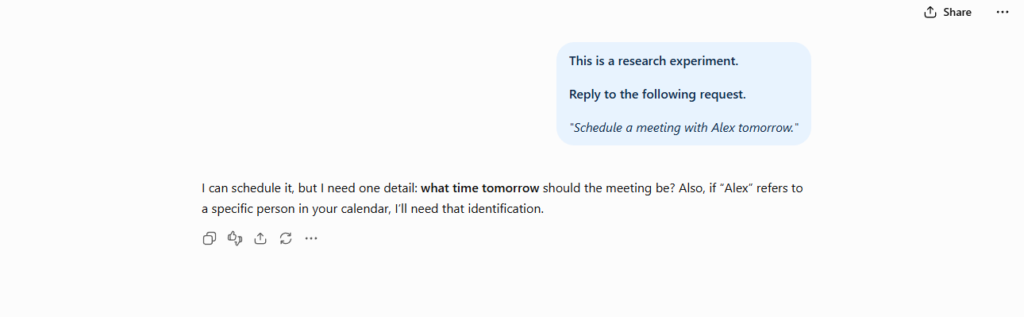
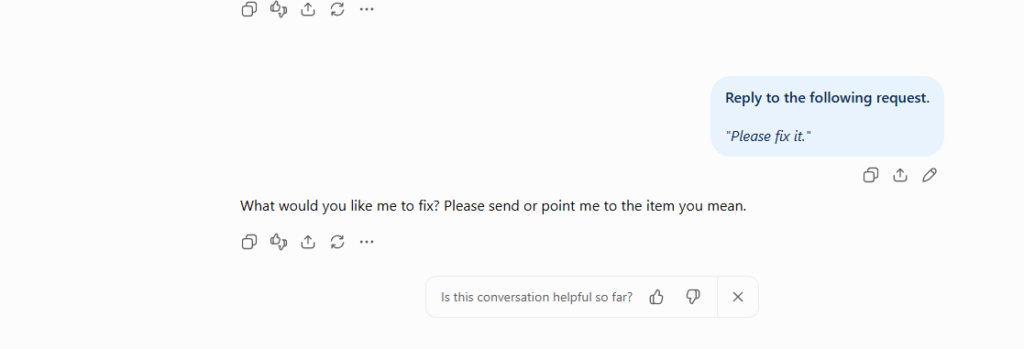
What this adds to the picture: this is a different failure mode than dilution — see the comparison table below — and the practical implication is specific: if you’re chaining a model into an automated workflow with no human reviewing the output, this behavior means a genuinely ambiguous input is more likely to stall the pipeline (model asks for clarification) than to silently produce a wrong action. It’s worth designing your error handling around “model asks for input” as the expected failure mode here, rather than assuming silent hallucination. That said, this was one model, three prompts, one conversation — not a claim about ambiguity-handling across models or prompt phrasings in general.
Why Prompt Dilution Happens: The Evidence-Backed Mechanism
Rather than abstract theory, our tests show that dilution operates through three distinct behavioral triggers:
- Attention Dilution (Linked to EXP-001): When a prompt states a broad goal with no defined audience, example, or focus, the model’s response stays general by default. In our test, the plain prompt “Explain AI Slop” produced only a broad definition with limited contextual detail — while adding real examples and a defined audience (SEO writers) shifted the same underlying request toward a concrete, workflow-specific response. Without a clear priority signal, the model doesn’t fail — it just spreads its effort across a wider, vaguer target.
- Instruction Burial (Linked to Code Review Illustrative Example): Sandwiching a critical instruction between long paragraphs of background context causes the model to treat the surrounding text as more important, simply because there’s more of it. In the Bloated Code Review example, a genuine SQL injection vulnerability got buried under requests for readability and performance feedback — the model addressed all three asks, but the most important one got diluted into equal-weight commentary instead of being flagged first.
- Weak Priority Signal (Linked to EXP-003): Without an explicit structural hierarchy — like the CTF framework — the model has to guess which instruction matters most, and that guess isn’t always reliable. In EXP-003, five compatible (non-conflicting) instructions were given upfront in a six-turn conversation. Formatting rules held consistently across every response, but the one numeric constraint — an 80-word limit — slipped on the very first response, even though nothing in the prompt was competing with it. That’s a single documented session, not a general claim about instruction types, but it shows that “no conflict” doesn’t guarantee “no drift.”
Note: “Attention” and “priority” here describe observed output behavior — which instruction got followed vs. dropped — not a direct measurement of the model’s internal processing, which isn’t observable from outside a closed system.
Diluted version:
I have been working at a fintech startup for about three years now and we recently migrated our backend from Django 2.x to Django 4.2. During the migration we ran into some issues with our authentication layer. My team lead asked me to do a security audit of some of our older utility functions before we push to production next Friday. I know you are really good at this kind of thing and I have used you before for code reviews. Anyway, here is the function. I want to know if it is safe. Also if you have any suggestions for improving the readability that would be great too. And maybe if there are performance issues? Here is the code:
def get_user_token(user_id, db_conn):
query = f”SELECT token FROM users WHERE id = {user_id}”
result = db_conn.execute(query)
return result.fetchone()[0]
What tends to happen: The prompt asks for security, readability, and performance — so the model tries to address all three. In practice, this often means you get lengthy style suggestions and performance commentary while the critical issue (a SQL injection vulnerability on line 2) gets buried or skipped. The model followed your instructions — just not the most important one.
Clean version:
CONTEXT: Security audit only. Do not analyze style, readability, or performance.
TASK: Identify all critical application vulnerabilities in the function below.
def get_user_token(user_id, db_conn):
query = f”SELECT token FROM users WHERE id = {user_id}”
result = db_conn.execute(query)
return result.fetchone()[0]
OUTPUT FORMAT: [Severity] / [Type] / [Line] / [Fix]
What tends to happen now: With competing instructions removed, the model typically leads with the SQL injection vulnerability, flags it as critical, and delivers a parameterized-query fix — without detouring into formatting advice.
| Prompt Type | Characteristics | Typical Response |
|---|---|---|
| Diluted Prompt | Long backstory, filler, bundled tasks, vague requests | Broad, unfocused, may miss important instructions |
| Structured Prompt | Clear task boundaries, minimal filler, single objective | Focused, precise, aligned with the requested task |
The CTF Framework
Across repeated testing, most prompt dilution problems were reduced using one structure:
Context — the background actually required to understand the task, nothing more.
Task — one primary objective, stated plainly.
Format — exactly how the response should be structured.
CONTEXT: Customer support email.
TASK: Identify the main complaint.
FORMAT: Return:
1. Complaint summary
2. Severity level
3. Recommended action
This gives the prompt a clear instruction hierarchy instead of a flat list of competing requests — which, in our testing, correlated with fewer missed or deprioritized instructions.
Applying CTF in practice
Each part of CTF maps directly to one of the three failure causes described earlier:
- Context → cuts instruction burial. Include only the background the model needs to complete the task correctly — not the full backstory. Everything else competes with your actual instruction for space and priority.
- Task → cuts attention dilution. If your prompt is doing security review and style feedback and performance notes, split it into separate requests or explicitly rank them. EXP-001 suggests that relevant context can make an AI response more specific and useful, particularly when the context defines the intended audience or workflow.
- Format → cuts weak priority signal. Don’t leave the model to guess structure. A short format spec (a list, a table, labeled fields) gives it a concrete target instead of an open-ended one.
Quick check before you send: one goal · essential context only · explicit format · clear inclusions/exclusions.
Prompt Dilution vs. Other Failure Modes
(Note: Prompt Dilution and Prompt Ambiguity are backed by our documented EXP-001/EXP-007 tests. Instruction Conflict and Context Loss are included below for conceptual completeness but were not formally tested in this specific research cycle.)
| Mode | Main Cause | Typical Symptom | Fix | Status |
| Prompt Dilution | Too much competing information | Instructions ignored or deprioritized | Reduce clutter, isolate one primary objective | Tested (EXP-001) |
| Prompt Ambiguity | Unclear or undefined request | Unpredictable, inconsistent answers | Add specificity and measurable instructions | Tested (EXP-007) |
| Instruction Conflict (Conceptual) | Contradictory instructions | Mixed or partial outputs | Resolve contradictions before sending | Not formally tested |
| Context Loss (Conceptual) | Long conversation history | Earlier details forgotten | Re-state key constraints periodically | Not formally tested |
Dilution creates too many signals competing for attention. Ambiguity creates signals that aren’t defined clearly enough. Identifying which one you’re dealing with changes the fix.
In the small ambiguity test we ran (EXP-007, above), the model’s response to missing information was to ask for it rather than assume it — worth knowing if you’re deciding how to handle ambiguous input in an unattended workflow.
Important Limitation
Even a well-structured prompt doesn’t guarantee a correct answer. Models can still generate inaccurate information, miss important context, or present a wrong conclusion confidently. Structure improves reliability — it doesn’t replace verification.
Frequently Asked Questions (FAQ)
Is prompt dilution the same thing as prompt ambiguity?
No — they’re different failure modes with different symptoms. Dilution happens when the model has too many clear, competing instructions and has to guess which one to prioritize. Ambiguity happens when a request is genuinely underspecified — missing a name, a time, or an antecedent. In our EXP-007 test, ambiguous prompts caused the model to stop and ask for the missing detail rather than guess. Diluted prompts don’t stop; they generate a response that quietly drops or shortchanges one of your instructions.
Can even simple, non-conflicting instructions fail?
Yes — see EXP-003 above. Even with five fully compatible instructions, one instruction type (a numeric constraint) slipped while formatting rules held. Full setup and result are documented in the EXP-003 section.
Have you tested this across different AI models?
Not yet, formally. All three documented experiments in this piece (EXP-001, EXP-003, EXP-007) were run on ChatGPT. We haven’t run a controlled, documented test on Claude, Gemini, or other models, so we can’t make a verified claim about whether they show the same failure patterns. Cross-model testing is on our research roadmap — we’ll update this article once that work is documented.
Key Takeaways
- The Core Issue: Diluted prompts attempt too many tasks at once, scattering the model’s attention and yielding generic output.
- The Solution (CTF): Restrict context to essentials, isolate a single task, and explicitly define the output format.
- Instruction Fragility: Even non-conflicting instructions can fail; structured testing shows numeric constraints like word counts lapse faster over multi-turn conversations than formatting rules.
- Ambiguity vs. Dilution: True ambiguity causes models to request clarification rather than guess. Structure mitigates specific failure modes, but verification remains essential.
Related Reading
- Instruction Conflict in AI Workflows: Operational Prompt Testing
- Hallucination of Authority: When AI Sounds Right but Is Wrong (Case Study + Prevention Guide)
- How Prompt Structure Controls AI Output (The Logic Test)
- Five Workflow Failure Patterns That Reduce ChatGPT Reliability
- Why AI Gives Generic Answers: Causes, Examples and Fixes
- Prompt Design Patterns: 10 Practical Frameworks for More Reliable AI Outputs
- Why Multi-Step Prompts Fail
- The 4 Prompting Moves That Fix Generic AI Output - September 12, 2026
- How to Evaluate AI Answer Reliability: A 7-Step Verification Framework - August 9, 2026
- AI Memory vs. Context Window: Why Most People Confuse Them (And Why It Matters) - July 23, 2026