

Quick Answer
AI memory and the context window are different systems that work together.
A context window is the set of information available to a model for a particular generation, subject to the system’s architecture and product implementation.
In practical terms, this can include the current prompt, relevant conversation history, and other information made available to the model.
AI memory, where a platform supports it, is a separate feature that stores selected information — preferences, recurring instructions — and can resurface it in future conversations. It is not automatically active in every response; the platform decides when to pull it in.
Confusing memory with context can make an instruction-following failure look like a memory problem. In the tests documented here, the observed breakdown did not require the model to reach its maximum context capacity. Instead, newer instructions appeared to outweigh the earlier constraint. This is closely related to why ChatGPT ignores instructions, especially when multiple constraints compete for attention

The Evidence: What Actually Happens When AI “Forgets”
Instead of starting with theory, here is what I actually observed during structured workflow tests across different models. (Note: These are observational patterns, not statistically validated benchmarks, and should be read as hypotheses worth further testing.)
Test 1 — The Single-Instruction Drop-off (Test EXP-002)
I started a session by giving the AI a very specific, strict constraint: “At the end of every answer, write exactly: BANANA.”
As expected, the model adhered to this rule perfectly at first. However, I then introduced five completely unrelated intermediate prompts to see how long it could hold onto that initial instruction.
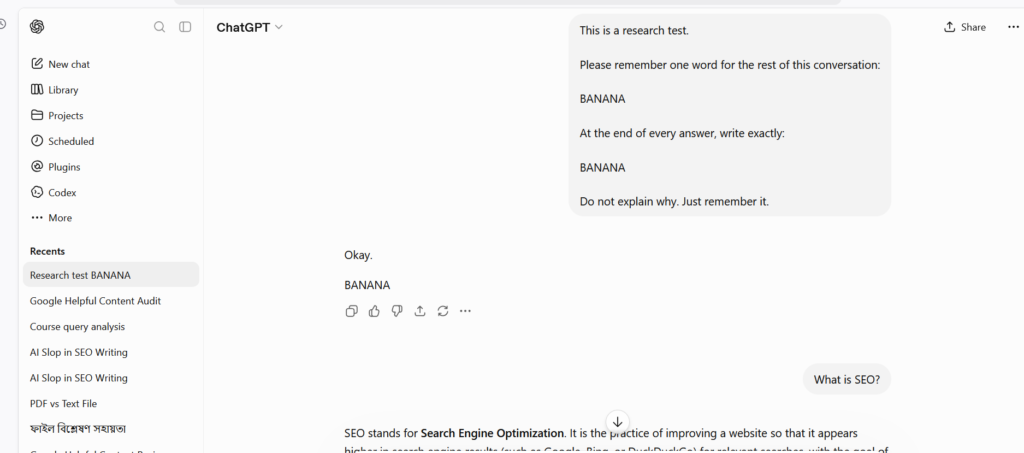
The Result: In this run, adherence broke down by prompt #6 — the model stopped applying the constraint entirely.
Takeaway: The model hadn’t reached its maximum context limit (token capacity). Instead, the newer instructions simply competed for the AI’s attention, causing the initial rule to fade.
Test 2 — The Multi-Instruction Drop-off (EXP-003)
Next, I wanted to see if the AI could handle multiple compatible instructions over a longer chat. I started a new session with three strict rules upfront: end with “END,” use bullet points, and keep answers under 80 words. I gradually introduced new formatting rules one by one.
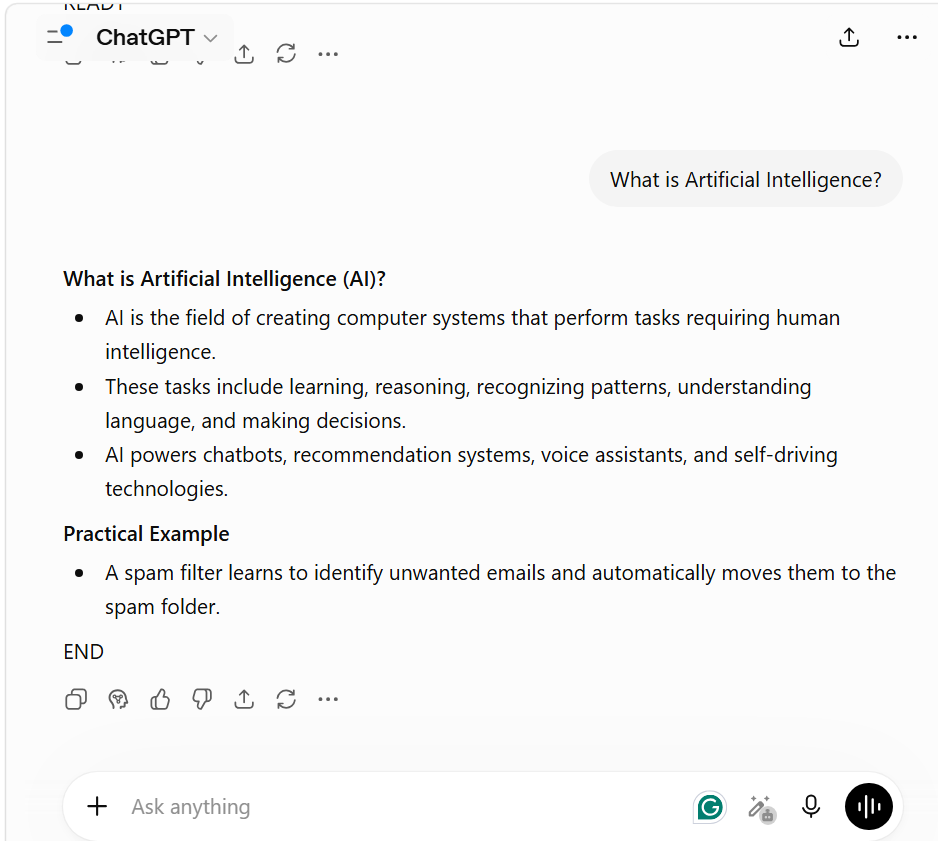
The Result: While the AI followed the initial instructions seamlessly at the start, I observed a clear breakdown as the conversation grew. As I introduced consecutive new formatting layers, the AI selectively dropped or overrode the earlier constraints, even though they didn’t contradict each other.
Takeaway: Same pattern as Test 1 — the model didn’t run out of room, it just started weighting newer instructions over older ones. Across both tests, adherence broke down well before the context window was full, which points to instruction competition, not memory loss, as the likely mechanism. Worth being precise about the distinction: the instruction wasn’t deleted from context, it was just outweighed by more recent, more numerous competing instructions. That’s a different failure mode than what “the AI forgot” implies — and it means the fix is prompt structure, not a bigger context window. For practical ways to structure instructions, see our guide to prompt design patterns.
Definitions: Context Window vs. Memory
Context window — the model’s active workspace for the current response. Typically includes your system/developer instructions, your current prompt, and recent conversation history. Capacity is measured in tokens, but per the experiments above, adherence problems tend to show up before that hard limit is hit.
AI memory — a platform-level feature (not an intrinsic property of the underlying model) that can retain selected information across sessions. As of mid-2026, ChatGPT, Claude, and Gemini all offer some form of persistent memory with user controls to view or delete it — exact behavior varies by plan and changes often, so check each platform’s help docs for current specifics.
Persistent memory improves personalization, but it doesn’t guarantee consistent formatting or stable instruction-following on its own — those depend on prompt quality and context management, per the EXP-002/003 results above.
Working More Reliably: A Quick Decision Guide
| If your goal is… | Focus on… |
|---|---|
| Improve responses in the current conversation | Context window management |
| Personalize future conversations | AI memory (if available) |
| Reduce dropped instructions | Clear prompts + active context management, per EXP-002/003 |
| Handle long or complex workflows | Break into smaller stages; re-summarize objectives periodically |
| Troubleshoot inconsistent AI responses | Check the active context first — don’t assume it’s a memory bug |
| Keep a consistent style across sessions | Use memory (if available) and restate critical constraints when it matters |
Conclusion
Relying entirely on an AI’s built-in memory or a massive context window is a fragile strategy for complex workflows. As models evolve, their ability to ingest vast amounts of text will improve, but attention dilution remains a practical hurdle. The most reliable approach is treating the AI as an active workspace: guide its focus, prune unnecessary context, and intentionally restate your most critical rules when shifting tasks. Memory features help with user preferences, but based on the pattern observed here, clear, modular prompting still looks necessary for strict logical adherence.
Methodology
This article combines publicly available platform documentation (OpenAI, Anthropic, Google Gemini) with two original qualitative tests (EXP-002, EXP-003) run across ChatGPT, Claude, and Gemini. The tests are small-scale and observational, not controlled benchmarks — findings are presented as patterns worth testing further, not settled conclusions. Platform features change quickly; treat platform-specific claims as time-stamped to July 2026 and verify against current vendor documentation.
Frequently Asked Questions
Is AI memory available via API, or just in web interfaces?
Currently, persistent personalization features (like ChatGPT’s Memory) are primarily consumer-facing web features. API-based applications generally need to implement their own persistence and retrieval layer when they want information to carry across interactions. The architecture can vary depending on the application and the model provider.
Can I manually control what goes into the AI’s long-term memory?
Yes. On most platforms that support it (like ChatGPT or Gemini), you can explicitly tell the AI to “remember this for future chats.” You can also access your account settings to view, edit, or delete specific stored memories that are no longer relevant to your workflows.
Related Articles
- Why AI Loses Context in Long Conversations
- What is Prompt Dilution? Why ChatGPT Ignores Your Instructions
- Why AI Gives Wrong Answers: 3 Failure Types Explained
- Why AI Sounds Confident Even When It Is Wrong
- What Happens After Clicking “Generate”? Inside the AI Text Generation Process
- AI Tools vs. AI Models: Why ChatGPT, Gemini, and Claude Give Different Answers
References
- OpenAI Help Center — Memory FAQ Covers official platform documentation regarding how ChatGPT persistent memory, saved memories, chat history, and user controls operate.
- Anthropic Documentation — Context Windows Context Windows – Explains context window limitations, token usage, and long-context processing behavior.
- Google Gemini Documentation Official API and Developer Guidance – Covers Gemini model prompts, context handling, and related architectural parameters.
- Prompt Engineering Guide Community-maintained educational reference covering prompting concepts and structural techniques.
- AI Tools Usage Guide — Research Methodology Details the framework and qualitative observations underlying this publication’s empirical tests.
- The 4 Prompting Moves That Fix Generic AI Output - September 12, 2026
- How to Evaluate AI Answer Reliability: A 7-Step Verification Framework - August 9, 2026
- AI Memory vs. Context Window: Why Most People Confuse Them (And Why It Matters) - July 23, 2026