

Quick Answer
ChatGPT may not follow instructions consistently when a prompt contains conflicting requirements, unclear priorities, or too many constraints. Long conversations and conflicts between Custom Instructions and task-specific prompts can also affect the result. To troubleshoot the problem, identify which instruction was missed, simplify competing requirements, and state the most important rules clearly.
Why Is ChatGPT Not Following Instructions?
Not every instruction failure has the same cause. If ChatGPT ignores one rule in an otherwise correct response, the problem may be a competing constraint. If several rules fail at once, the prompt may be overloaded or unclear. If a rule works early in a conversation but later stops being followed, conversation context may be contributing. And if a Custom Instruction is not reflected in a specific task, the task-specific prompt may not align with that standing preference.
| What you see | What to investigate first |
|---|---|
| One rule fails | Conflicting or competing constraints |
| Several rules fail | Too many requirements |
| Rule works, then stops | Conversation/context effects |
| Custom Instruction fails | Custom vs task-specific instructions |
| Format works but word limit fails | Selective instruction compliance |
In EXP-001 (Generic Prompt Test), adding audience and context details improved response relevance and practical usefulness under the tested conditions. This result reflects the prompts evaluated in this test and does not establish that structured prompts always outperform vague ones.
Key Takeaway: In many cases, instruction-following failures are related to prompt structure, competing requirements, or conversation context—not intentional ‘disobedience.’
This article documents practical prompt-structure observations from repeated testing. In the tested workflows, the “Three-Layer Structure” was associated with more consistent output and less manual editing.
Why ChatGPT Sometimes Ignores Custom Instructions
Custom Instructions help guide ChatGPT across conversations, but they are not absolute rules.
The model still considers your current prompt, conversation context, and higher-priority instructions when generating a response. If your prompt contains conflicting requirements, unclear priorities, or instructions that compete with your saved Custom Instructions, the model may not follow every preference consistently.
For more reliable results:
- Keep Custom Instructions focused on long-term preferences.
- Put task-specific requirements directly in your prompt.
- Avoid conflicting instructions between your prompt and your saved preferences.
- Use clear execution rules, especially for formatting and output length.
Think of Custom Instructions as background guidance rather than guaranteed commands.
Why ChatGPT Ignores Instructions in Real Workflows
In many workflow cases, the problem is less about the model itself and more about prompt structure.
“Write a LinkedIn post about AI tools. Make it funny, professional, short, and suitable for CEOs.”
I ran this prompt five times. In each run, the output compromised between the requested characteristics: it was professional enough to feel stiff, short enough to feel incomplete, and did not consistently produce the intended humorous tone.
I kept tweaking the wording. That did not help.
The wording mattered less than the way the instructions were organized.
Research at a Glance
Research type: Practical workflow testing
Testing scope: Drafting, rewriting, summarization, structured prompting
Focus: Instruction-following reliability
Method: Repeated prompt comparison across multiple AI systems
Evidence type: Workflow observations (not a formal benchmark)
5 Common Mistakes That Make ChatGPT Ignore Instructions
OpenAI’s current prompting guidance recommends making requests clear and specific, providing necessary context, and breaking complex workflows into smaller, focused prompts when appropriate.
What this test actually showed
Instruction-following was not simply “working” or “failing.” Under the tested conditions, the model maintained some instructions while failing another. Formatting and ending requirements were preserved across the tested responses, while the 80-word limit was exceeded once.
Research Evidence: EXP-003 — Multi-Instruction Compliance Test
In this documented test, three compatible instructions were given at the start of a conversation: end with “END,” use bullet points, and keep responses under 80 words. The model then answered three unrelated follow-up prompts.
The results suggest that instruction-following reliability can vary across individual requirements, even within the same prompt. However, this small test does not establish a universal rule about how ChatGPT prioritizes instructions.

Building on the instruction-following behavior described above, five recurring prompt problems can make instruction-following more difficult during actual workflows:
Mistake 1: Overloading the Prompt With Too Many Constraints
When a prompt contains several requirements, the response needs to accommodate multiple conditions at the same time. If those requirements are not clearly organized, some parts of the requested output may need additional correction or editing.
Mistake 2: Combining Conflicting Requirements
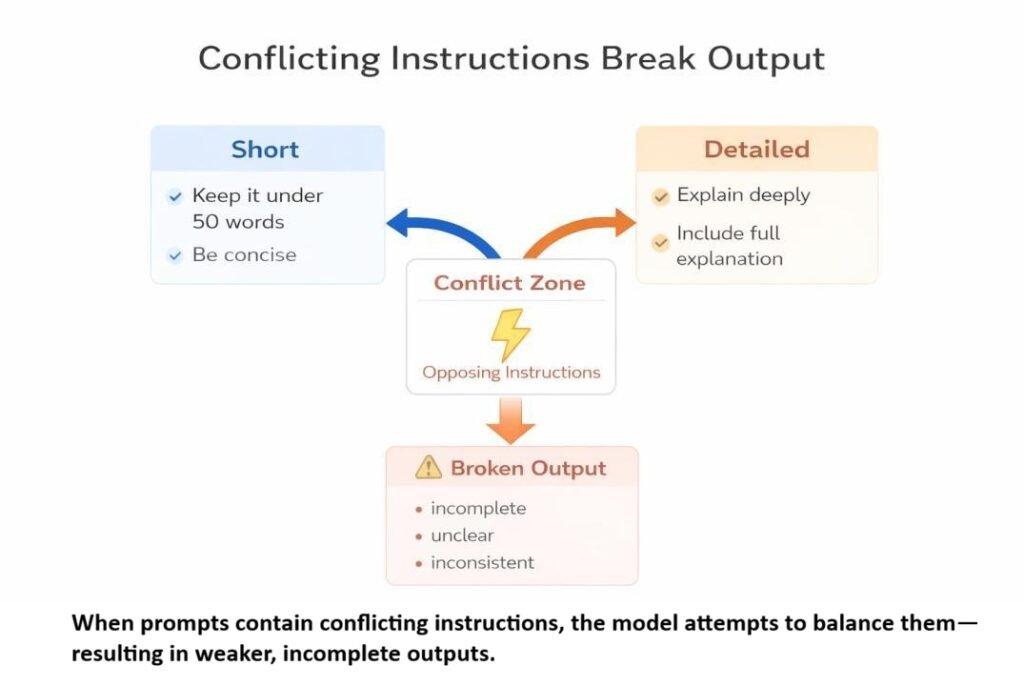
Prompts combining requirements such as “short + detailed” or “formal + funny” can create competing goals. In such cases, the output may require further refinement to balance the requested characteristics.
Mistake 3: Burying Key Instructions in the Middle
When important requirements are buried among background details, it can become harder to communicate which constraints matter most. In our instruction-placement tests, some requirements placed in the middle were followed less consistently than those placed at the beginning or end. This was an observation from our tested prompts, not a universal rule about how ChatGPT prioritizes instructions.
Practical fix: State the task and context clearly, then group the essential output requirements in a separate section. If a requirement is still missed, test it independently before adding more constraints.
Mistake 4: Letting Custom Instructions Conflict With Task Prompts
Many users set up Custom Instructions once and assume ChatGPT will always follow them. But when your current prompt contains requirements that differ from your saved Custom Instructions, the resulting response may not consistently reflect the saved preference. This is one possible reason users may experience ChatGPT as “stopping” its previously configured preferences.
Mistake 5: Sending Unstructured Prompts
When context, input data, and execution rules are mixed together, it can become harder to communicate which requirements should receive the most attention. In our workflow testing, separating these elements into distinct layers was associated with more consistent output.
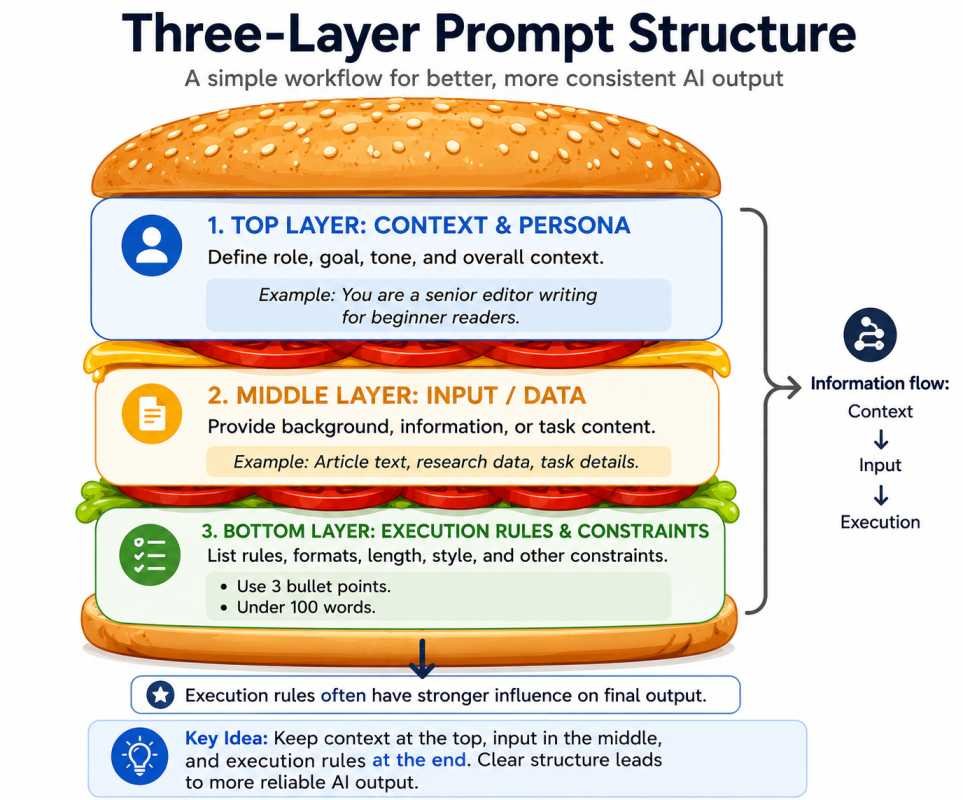
One practical approach is to separate the prompt into three distinct layers rather than combining everything in one paragraph.
How Instruction Placement Affects ChatGPT Responses
Here is something I did not expect when I started testing.
Changing only the position of an instruction — without changing the wording — produced noticeably different outputs.
Test prompt:
“Write a formal article about AI ethics. Use an academic tone. Keep it detailed. Make it casual and fun.”
In many runs, the final line appeared to override earlier formal instructions. Most runs shifted toward casual language despite the earlier academic directive.
The effect was noticeable even in this short prompt. I had expected instruction placement to matter more in longer prompts, but the tested four-line prompt also showed differences in output depending on where the instruction appeared.
Placement test results:
| Instruction Position | Observed Behavior |
|---|---|
| Beginning | Establishes framing and context |
| Middle | In our tests, some instructions were followed less consistently |
| End | In our tests, often influenced final formatting and execution |
This pattern is related to the broader ‘Lost in the Middle’ research, which examines how language models use information positioned within long contexts.
One unexpected pattern: strengthening earlier instructions often did not improve later compliance. In several runs, front-loading the most important rule did not improve compliance. The final instruction still appeared to have a stronger effect on the output in those tests. In these observations, instruction placement appeared to influence output consistency more than simply emphasizing earlier instructions.
Important distinction: Our instruction-placement test was a practical workflow test, not a direct replication of the “Lost in the Middle” research. The findings are related, but our test does not establish that the same mechanism caused the observed instruction failures.
The Three-Layer Prompt Structure for More Consistent AI Responses
After observing placement and constraint failure patterns, I started organizing prompts into a structured workflow that separates context, input, and execution rules into three distinct layers.
- [TOP BUN] → Context \& Persona
- [FILLING] → Input data or background
- [BOTTOM BUN] → Execution rules \& constraints
Before vs After: Structured Prompt Example
Before — unstructured prompt
“Write an email that is persuasive, formal, emotional, under 50 words, technical, beginner-friendly, and humorous.”
Observed Output Patterns
- conflicting tone instructions reduced consistency
- multi-constraint prompts required heavier editing
After — Three-Layer Prompt Structure
[TOP BUN]
- Act as a senior B2B sales writer.
- Your goal is to write a persuasive cold email
- for a technical SaaS product.
[FILLING]
- The product helps engineering teams reduce
- manual testing time by 40%.
- Target reader: VP of Engineering at a
- mid-size software company.
[BOTTOM BUN]
Follow these rules strictly:
1. Under 60 words
2. Professional tone — no humor
3. End with one clear call to action
4. Start directly — no introduction
In the repeated runs described here, formatting rules placed at the end (Bottom Bun) were followed more consistently, and the structured version produced more stable formatting.
In these tests, the structured version followed the core constraints more consistently, produced more stable formatting, and generally required less manual revision. The difference was noticeable within the first few test runs, suggesting that prompt organization may have contributed to the observed improvement.
After testing multiple drafting, summarization, and rewriting workflows, a recurring pattern emerged: separating context from execution rules was associated with more consistent output in the tested workflows than repeatedly rewording the same prompt.
Why the Three-Layer Structure Works
| Failure Mode | Unstructured Prompt | Three-Layer Structure |
|---|---|---|
| Constraint competition | All rules in one layer | Rules isolated to Bottom Bun |
| Placement confusion | Mixed throughout | Context first, rules last |
| Audience ambiguity | Implied or missing | Defined in Filling layer |
| Tone conflict | Multiple tones competing | One tone in Bottom Bun |
The table summarizes the main differences observed between unstructured prompts and the Three-Layer Structure. These results reflect the workflows tested in this article; they do not establish that placing instructions at the bottom will improve every response.
When You Should NOT Use Complex Prompt Structures
Not every task needs structured prompting.
For a short summary or a quick rewrite, adding structure often creates friction without improving output.
A rough guide based on testing:
Simple tasks with few constraints → a plain prompt may be sufficient.
Tasks with several interacting requirements → a structured prompt may be useful.
Complex or multi-step tasks → the Three-Layer Structure can provide a clearer way to organize requirements.
These are practical heuristics from the workflow described in this article, not universal thresholds. The appropriate level of structure depends on the task and the number and interaction of its requirements.
One thing I got wrong early: I assumed more structure always helped. It does not. Over-structuring simple tasks sometimes made outputs feel mechanical and over-formatted. The framework is a tool for complexity — not a default for everything. In some creative tasks, heavier structure also reduced output flexibility.
Copy-Paste Template
[TOP BUN: Context \& Persona]
Act as a \[Role].
Your goal is to \[Specific Goal]
while maintaining a \[Tone].
[FILLING: Input or Background]
Here is the content or context:
\[Paste your text, data, or notes here]
[BOTTOM BUN: Execution Rules]
Follow these instructions strictly:
1. Use \[Format]
2. Keep each point under \[X words]
3. Include \[Specific requirement]
4. Avoid \[Restriction]
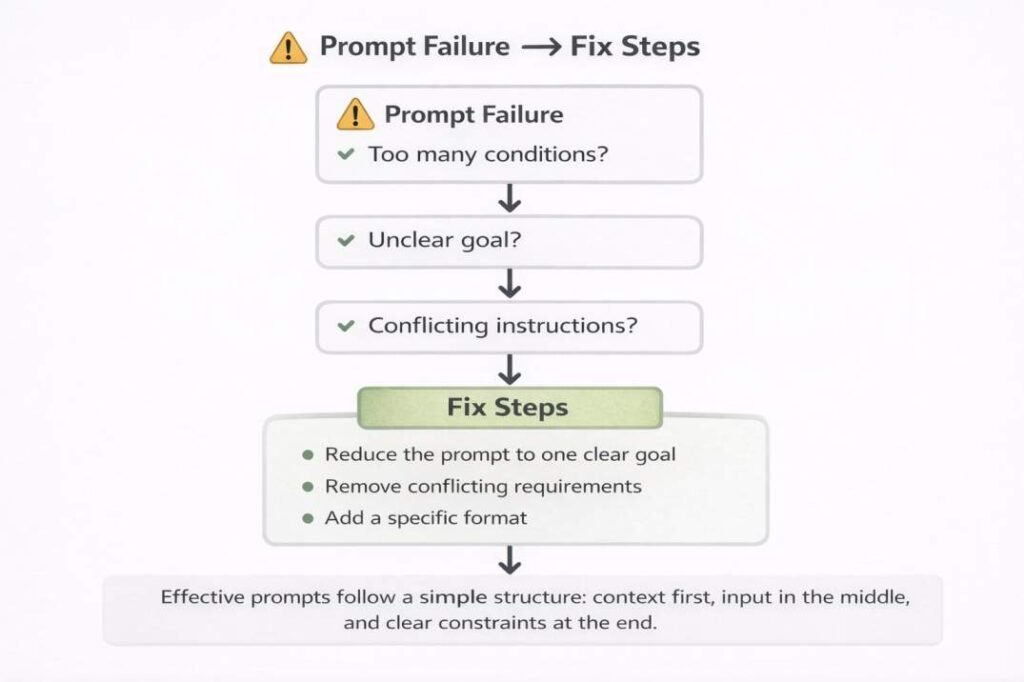
Practical note: If the model still ignores rules after using this structure, the issue is usually too many competing constraints in the final instruction layer. Reduce to 2–4 rules and retest before changing anything else.
The examples below are practical troubleshooting heuristics based on general workflow observations.
How to Diagnose Prompt Instruction Problems
| Symptom | Likely Cause | Fix |
|---|---|---|
| Output wrong length | Word count buried in middle | Move to Bottom Bun |
| Wrong tone throughout | Tone conflicts with persona | Set one tone in Top Bun |
| Formatting rules ignored | Format instruction placed too early | Move to Bottom Bun |
| Output shifts mid-response | Audience conflict | Define one audience in Filling |
| Generic despite specific request | Too many constraints | Reduce to 3 core constraints |
Limitations
- Testing conducted across LinkedIn drafting, AI workflow writing, summarization, and rewriting tasks on the default web UI
- Results varied by task complexity — simpler tasks showed stronger compliance improvements
- The Three-Layer Structure was associated with fewer observed instruction failures in our tested workflows, but it does not eliminate variability.
- API-level parameter control may produce different results
- These observations reflect one workflow environment — not a formal benchmark
What This Means in Practice
Across the observed workflows, two adjustments repeatedly appeared helpful:
1. Reduce simultaneous constraints to a small set of core rules—roughly 3–4 when practical.
2. Separate structure — context first, execution rules last.
In the workflows I tested, these changes often reduced editing time more than repeatedly rewording the same prompt.
Related Experiment
Prompt structure can support more consistent instruction-following, but reliable AI workflows also depend on whether important instructions remain active throughout a conversation.
EXP-002: Instruction Retention Test documents a real multi-turn workflow showing that a persistent instruction remained active across several unrelated prompts under the tested conditions. The findings complement this article by illustrating how instruction persistence can support more consistent AI behavior after prompts have been properly structured.
→ View EXP-002: Instruction Retention Test
Research Summary
The ideas in this article are based on repeated workflow observations rather than a formal benchmark study. I compared prompt behavior across drafting, rewriting, summarization, and structured instruction tasks to identify common instruction-following failure patterns. These observations were reviewed alongside published guidance from OpenAI and Anthropic. For a detailed explanation of the testing process, see the AI Prompt Testing Methodology page.
Research Approach
The testing focused on identifying recurring instruction-following problems across structured workflows and examining how prompt characteristics were associated with those outcomes.
Testing Scope
The observations included prompts containing conflicting instructions, excessive constraints, ambiguous wording, long-context conversations, and varying prompt structures. The goal was to identify recurring instruction-following patterns rather than measure model performance.
Limitations
The findings are observational rather than statistical. Results may vary across AI models, versions, and future updates. For a detailed explanation of the evaluation process, see the Research Methodology page.
Related Prompt Engineering Guides
- Why AI Gives Wrong Answers
- Why AI Loses Context in Long Conversations
- What is Prompt Dilution?
- Why Multi-Step Prompts Fail
- How Prompt Structure Controls AI Output
Frequently Asked Questions
Why Is ChatGPT Not Following My Instructions?
If ChatGPT is not following instructions, identify the specific requirement it missed before rewriting the entire prompt. Check whether your instructions conflict, whether the expected output is clearly defined, and whether essential context is missing. Then simplify the prompt and test the failed requirement separately. If the problem continues, compare the original request with the response to identify exactly what was missed. These steps can help diagnose the issue, but they cannot guarantee perfect instruction-following.
What Should I Do If ChatGPT Is Not Following My Custom Instructions?
First, check whether your saved Custom Instructions conflict with the current prompt. Make sure the relevant preference is clear, then restate any essential task-specific requirement in your current request. If the problem persists, test the same request in a new conversation to see whether earlier context may be contributing. Custom Instructions guide responses but do not guarantee that every preference will be followed in every situation.
Does instruction order matter in prompts?
Yes. Instruction order can affect how ChatGPT interprets a prompt, particularly when requirements conflict. For reliable results, state the task and relevant context clearly, then make the essential output requirements explicit. The effect can vary by prompt and model, so instruction order alone does not guarantee compliance.
Why do conflicting instructions confuse ChatGPT?
Conflicting instructions can make it difficult for ChatGPT to satisfy every requirement at once. For example, asking for an extremely short but highly detailed response creates competing goals. Specify which requirement matters most, then adjust the others to support that priority.
Evidence Note
The recommendations in this article are based on repeated workflow observations and are intended as practical guidance. Results may vary depending on the AI model, prompt complexity, and system updates.
Related Resource
Improve AI Writing Quality
Once your prompts become more reliable, the next challenge is improving the quality of AI-generated writing.
If you want to reduce repetitive AI phrasing and make AI-assisted content sound more natural, explore New York Times bestselling author Joshua Lisec’s AI writing masterclass.
It presents a practical editing workflow designed to help transform AI-generated drafts into clearer, more human-sounding content.
Recommended Resource:
The Best Way to Edit AI & Re-Human Your Writing
Disclosure: This section contains an affiliate link. If you make a purchase through it, we may earn a commission at no extra cost to you.
References
- OpenAI. “Prompt Engineering.” OpenAI Developer Documentation. https://platform.openai.com/docs/guides/prompt-engineering
- Anthropic Prompt Engineering Documentation — Guidance on prompt formatting and instruction design. https://docs.anthropic.com/en/docs/build-with-claude/prompt-engineering/overview
- Lost in the Middle: How Language Models Use Long Contexts — Research on how language models prioritize information within long contexts. https://arxiv.org/abs/2307.03172
Last reviewed: July 2026
This article will be updated as AI models and prompt engineering guidance evolve.
If inconsistent instruction-following is affecting a production workflow, you can request an evidence-based investigation of the observed behavior.
Discuss an AI Reliability Investigation →
- The 4 Prompting Moves That Fix Generic AI Output - September 12, 2026
- How to Evaluate AI Answer Reliability: A 7-Step Verification Framework - August 9, 2026
- AI Memory vs. Context Window: Why Most People Confuse Them (And Why It Matters) - July 23, 2026