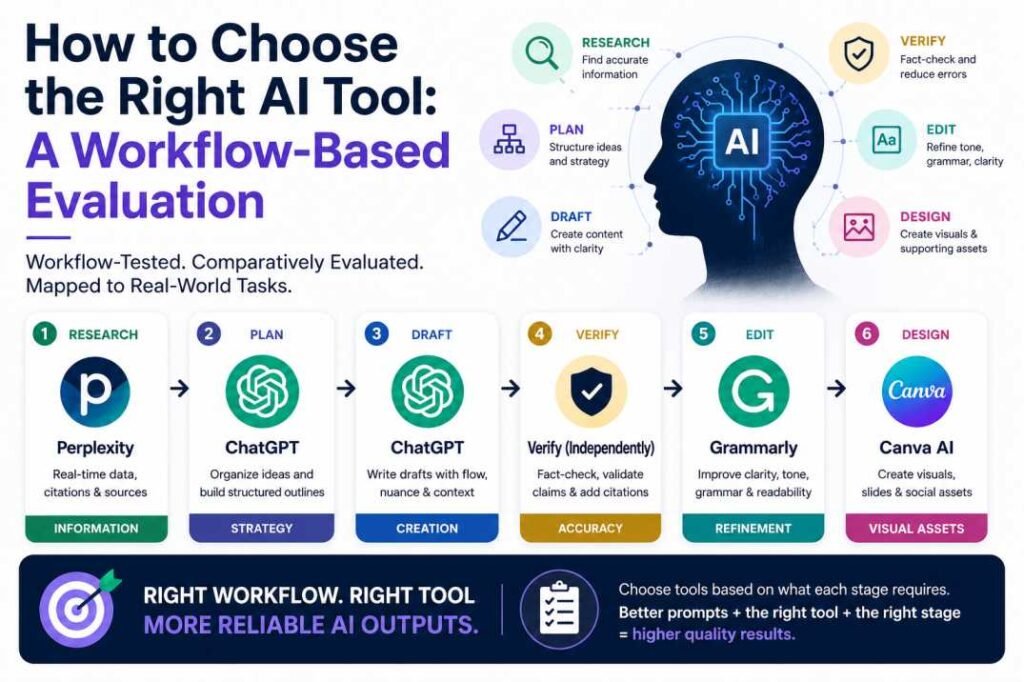
Choosing an AI tool based on popularity or a generic “Top 10” list is a strategic mistake. In the current landscape, the effectiveness of an Artificial Intelligence application is not determined by its raw power, but by its alignment with specific stages of a professional workflow.
Quick Answer
No single AI tool is “best” for every task. Our workflow testing demonstrates that research, drafting, verification, and Visual Design each require distinct specialized capabilities. Success depends on selecting a tool based on its functional fit within a workflow rather than brand popularity. Choosing the right tool for each workflow stage often has a greater impact on output quality than simply using a more advanced model.
The most reliable results came from combining multiple AI tools rather than relying on a single platform throughout the entire workflow.
Why Most AI Tool Comparisons Mislead Users
Most online comparisons focus on feature lists: “Tool A has a 128k context window, while Tool B has a 200k window.” While technically accurate, these metrics rarely translate to user success in a practical environment.
The Feature vs. Workflow Gap
Real work does not happen in a vacuum; it happens in sequences. A researcher needs accuracy and citations; a creative writer needs nuance and stylistic flexibility; a data analyst needs logic and precision. When a comparison says “ChatGPT is better than Gemini,” it ignores the context. Is it better for coding? For creative writing? For real-time news?
The Wrong Question vs. The Better Question
- Wrong Question: “Which AI tool is the best overall?”
- Better Question: “Which tool fits the specific requirements of the ‘Verification’ stage of my workflow?”
By shifting the focus from the tool to the task stage, users can build a specialized AI workflow that minimizes errors and improves efficiency.
Research Objective
We conducted an extensive evaluation of five widely used AI tools. The goal was not to crown a winner, but to map each tool to a specific stage of a standard content and research pipeline. We sought to understand:
- Which workflow stage each tool performs best in.
- Where specific tools consistently fail or produce “hallucinations.”
- When switching tools actually improves the final result.
- When tool-switching becomes a counter-productive distraction.
Research Evidence: EXP-006 — Model Comparison Test
Testing Methodology
To maintain objectivity, we used the following parameters during our evaluation.
| Item | Method |
| AI Tools Evaluated | ChatGPT (OpenAI), Gemini (Google), Perplexity, Grammarly, Canva AI |
| Subscription Plan | Free versions only (to test baseline accessibility) |
| Testing Period | February – April 2026 |
| Core Tasks | Academic research, structural outlining, drafting, fact-checking, editing |
| Evaluation Metrics | Fact-checking accuracy, logical consistency, and manual editing effort |
Note: This evaluation is based on comparative workflow testing using identical tasks and evaluation criteria. It is intended to compare workflow suitability rather than provide laboratory benchmark results.
Results may vary depending on prompts, task complexity, model updates, and user experience.
Workflow Stages Evaluated
We broke down the standard professional output process into six distinct stages. This hierarchy ensures that the AI is used as a specialized assistant rather than a “magic box.”
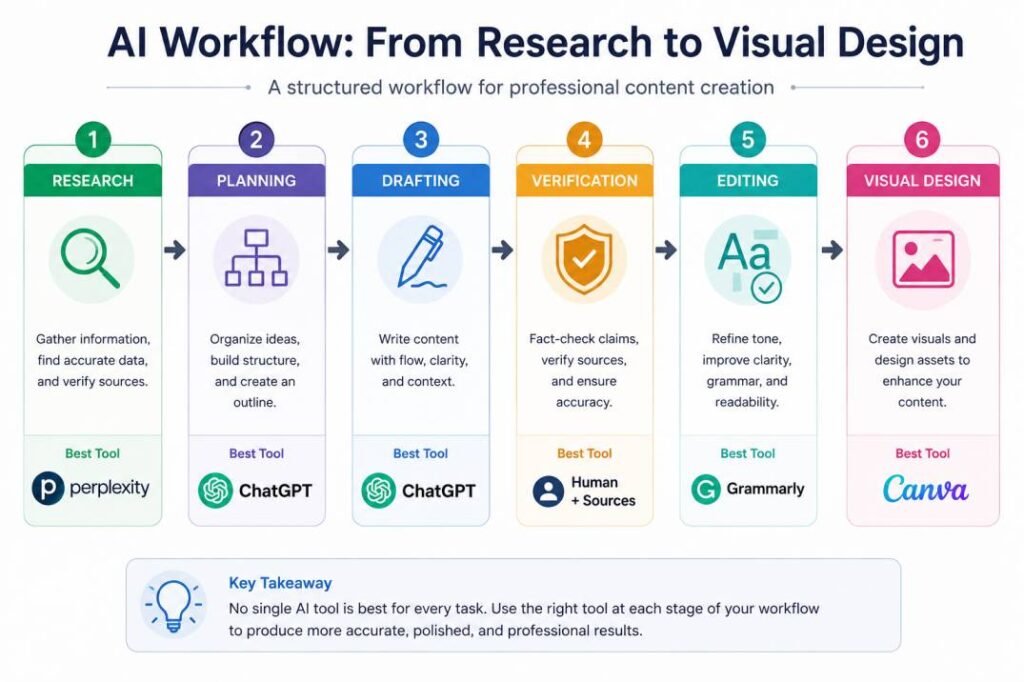
The Workflow Sequence:
- Research: Gathering data and verifying sources.
- Planning: Creating a structural hierarchy and logical flow.
- Drafting: Converting the plan into prose or code.
- Verification: Auditing the draft for factual errors.
- Editing: Refining tone, grammar, and clarity.
- Visual Design: Creating assets to support the text.
Stage-by-Stage Evaluation
1. Research
Best Tool: Perplexity
In the research phase, the biggest risk is “hallucination” (AI making up facts).
- Strengths: Perplexity functions as a “search-augmented” engine. It provides cited answers and links to supporting sources when available.
- Limitations: It is less effective at creative synthesis. If you ask it to “write a story” based on research, the prose is often dry and robotic.
- Typical Failure: May confidently summarize low-quality or weak sources if they are not independently verified.
2. Planning
Best Tool: ChatGPT
Planning requires a tool that understands hierarchy and broad context.
- Strengths: ChatGPT (specifically models like GPT-4o) showed a superior ability to organize “brain dumps” into coherent outlines. It follows complex structural instructions better than Gemini or Perplexity.
- Workflow Fit: Use it to create your H1s, H2s, and bullet points before you start writing.
- Typical Failure: Can organize weak ideas into convincing structures, making poor assumptions appear logical.
3. Drafting
Best Tool: ChatGPT
Drafting is about flow, transition, and tone.
- Strengths: ChatGPT currently leads in linguistic nuance. It handles “Personas” effectively (e.g., “Write this in the style of a technical architect”). It produces fewer repetitive sentence structures compared to its competitors.
- Limitations: Without a strong outline, ChatGPT drafts tend to drift off-topic (Prompt Dilution).
- Typical Failure: May gradually repeat phrases or drift from the original objective in long conversations.
4. Verification (The Audit)
Best Tool: Perplexity
Never let the tool that wrote the draft be the tool that verifies the draft.
- Strengths: During our comparative testing, independent verification consistently identified factual issues that were missed during drafting.
- Limitations: Gemini occasionally performed well here due to its “Google It” integration, but Perplexity’s source-first interface was more reliable.
- Typical Failure: Cannot verify information that has no reliable supporting sources.
Independent verification should become a standard step before publishing AI-generated content.
Research Evidence: EXP-004 — Citation Reliability Test
5. Editing
Best Tool: Grammarly
Standard LLMs (ChatGPT/Gemini) often over-edit, changing the author’s meaning.
- Strengths: Grammarly focuses on the mechanics of writing—clarity, conciseness, and tone—without rewriting the core ideas. It is essential for maintaining a “human” feel while ensuring professional polish.
- Typical Failure: May remove the author’s unique writing style if applied too aggressively.
6. Visual Design
Best Tool: Canva (Magic Design)
- Strengths: While Midjourney or DALL-E produce better art, Canva AI simplifies the creation of presentation-ready visual assets. It integrates the AI-generated image directly into a usable template (social media posts, presentations, headers).
- Workflow Fit: Use this for the final step of turning a written article into a multi-channel content package.
- Typical Failure: Templates may prioritize aesthetics over communication clarity.
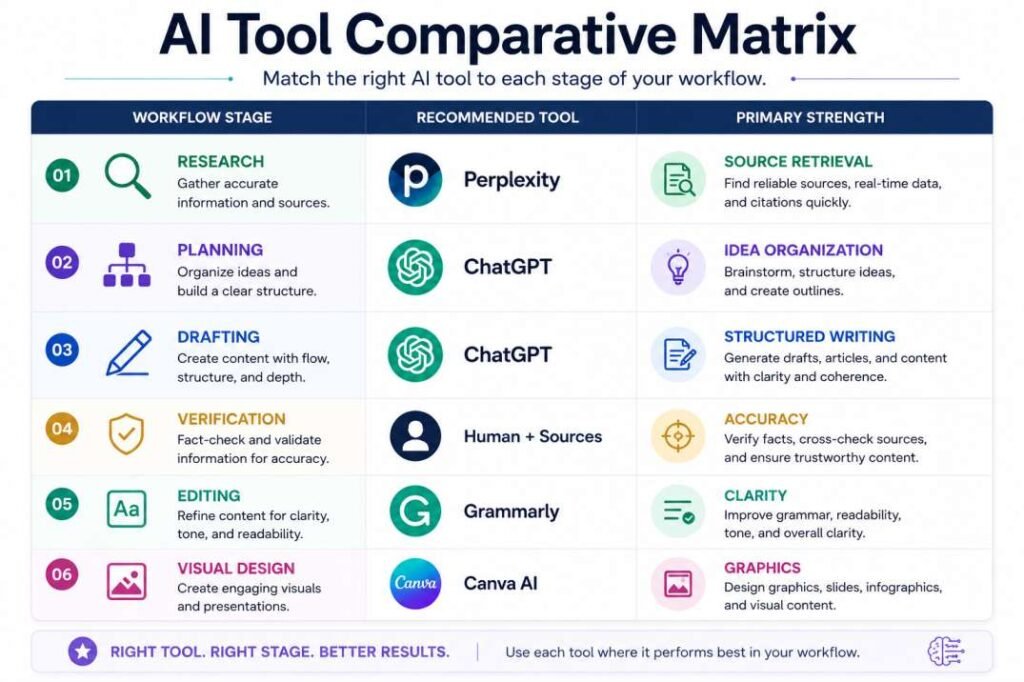
Comparative Evaluation Summary
| Workflow Stage | Best Tool | Primary Strength | Common Failure |
| Research | Perplexity | Source-backed information retrieval | Poor creative writing ability. |
| Planning | ChatGPT | Excellent hierarchical logic and brainstorming. | Can hallucinate dates/stats. |
| Drafting | ChatGPT | Most natural language flow and persona adoption. | Wordiness and “AI-isms.” |
| Verification | Perplexity | Cross-references claims against live web data. | May struggle with very long texts. |
| Editing | Grammarly | Enhances readability without losing original intent. | Limited to grammatical/tonal fix. |
| Visual Design | Canva | Best integration of AI art into functional layouts. | Lower artistic quality than Midjourney. |
What the Testing Revealed
Our evaluation period led to four major insights that contradict common AI “productivity hacks.”
Better Prompts Beat Better Tools
A perfectly phrased prompt in a “weaker” tool usually outperformed a vague prompt in a “stronger” tool. The tool is a multiplier of the instruction’s quality.
Research Evidence: EXP-001 — Generic Prompt Test
Tool Switching is Not a Silver Bullet
If your instructions are vague, switching from ChatGPT to Gemini will not fix the output. Most users blame the tool when the problem is actually “Instruction Conflict” or “Prompt Dilution.”
Research Evidence: EXP-002 — Instruction Retention Test
The “Verification” Gap
This was the most critical finding. Using a secondary tool (Perplexity) to audit the primary tool (ChatGPT) is the only way to achieve professional-grade reliability.
Multi-Tool Workflows Win
Content produced by a single tool felt “AI-generated.” Content that moved through the Research → Drafting → Editing pipeline required substantially fewer manual revisions before publication.
Common AI Tool Selection Mistakes
Many users fail to see results because they fall into these traps:
- Choosing by Popularity: Using ChatGPT for everything just because it’s the most famous.
- Ignoring Workflow Fit: Using a creative drafting tool (ChatGPT) to do deep academic research (a task better suited for Perplexity).
- Skipping the Human-in-the-Loop: Expecting the AI to deliver a “Final Product” rather than a “First Draft.”
- The “One Tool” Illusion: Trying to find one AI tool that does research, writing, and design perfectly. This tool does not exist yet.
- Over-reliance on Generative Features: Using AI to generate text when you only needed it to organize your existing thoughts.
AI Tool Selection Framework: The Decision Tree
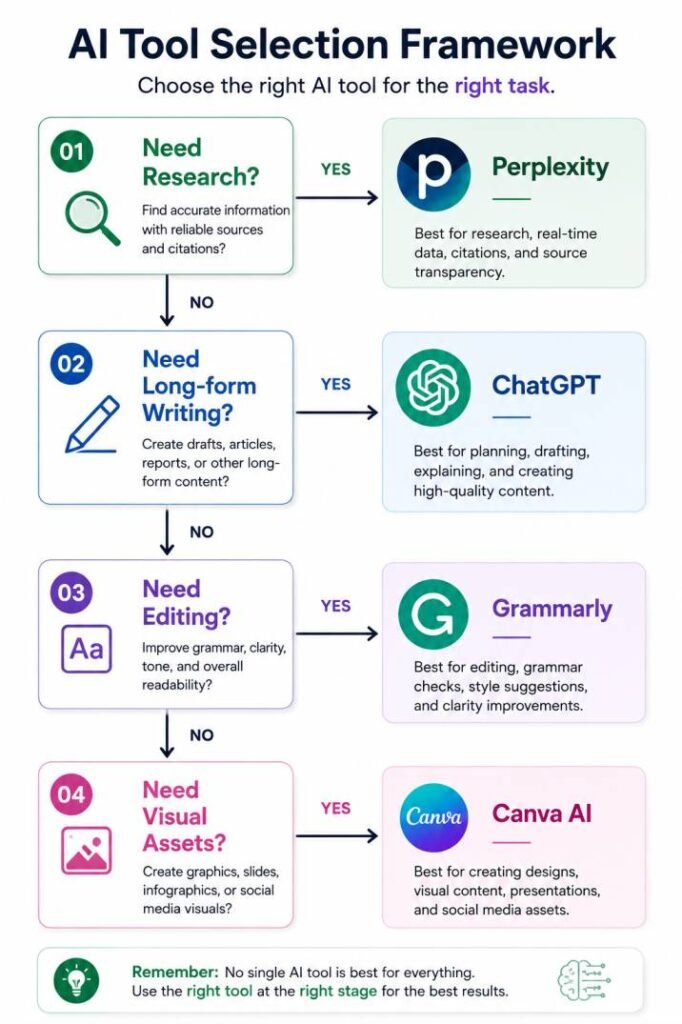
If you are unsure which tool to open, follow this logical path:
- Do you need to find facts or verify data?
- Yes: Use Perplexity.
- Do you need to structure a large project or brainstorm ideas?
- Yes: Use ChatGPT.
- Do you need to write a long-form draft with a specific tone?
- Yes: Use ChatGPT.
- Do you have a draft that needs professional polishing?
- Yes: Use Grammarly.
- Do you need to turn text into a presentation or social graphic?
- Yes: Use Canva AI.
When You Should NOT Change AI Tools
Sometimes, “upgrading” to a different tool or switching models is a waste of time. Changing tools rarely fixes the following issues:
- Poor Prompts: If you haven’t defined the goal, the tool doesn’t matter.
- Missing Context: If you haven’t provided the necessary background data, every AI will guess (and fail).
- Instruction Conflicts: If you give the AI two contradictory commands, it will produce a “muddled” middle ground.
- Unclear Objectives: If you don’t know what a “good” result looks like, you won’t recognize it in any tool.
Before switching tools, check if your problem is actually Prompt Dilution (too many unnecessary words) or an Instruction Conflict (contradictory rules). Many output problems originate from workflow design rather than the AI tool itself.
Frequently Asked Questions
Which AI tool should I use for professional work?
No single AI tool is best for every task. Choose tools based on your workflow—use Perplexity for research, ChatGPT for drafting, Grammarly for editing, and Canva AI for visual design. Combining specialized tools usually delivers the most reliable results. Your workflow should determine your tool—not the other way around.
Do I really need multiple AI tools?
For casual use, no. For professional output where accuracy and style matter, a “multi-tool” approach (e.g., ChatGPT + Perplexity) is highly recommended.
For many everyday tasks, a single AI tool is sufficient. Multi-tool workflows become most valuable when accuracy, verification, and publication quality are priorities.
Can one AI tool replace an entire workflow?
Not currently. While “Agents” are being developed to do this, they still require significant human oversight at each stage to ensure quality.
Why do different AI tools produce different answers to the same prompt?
Each tool uses a different “Model” (the brain) and different “Data” (the memory). Some are optimized for creativity, while others are optimized for factual retrieval.
Is switching AI tools better than improving prompts?
Usually, no. Improving your prompt architecture (providing context, examples, and clear constraints) provides a better ROI than searching for a “perfect” tool.
Final Verdict
The secret to mastering AI is not in finding the “most advanced” model. It is in building a structured workflow.
The most reliable outputs observed during our comparative workflow testing came from assigning the right tool to the right workflow stage. Perplexity for the facts, ChatGPT for the structure and prose, and Grammarly for the final polish.
Treat AI tools like a specialized team of assistants, not a single all-knowing oracle. Build your workflow first; choose your tools second. The right workflow often has a greater impact on output quality than the most advanced AI model.
Key Takeaways
✔ No single AI tool performs best across every workflow stage.
✔ Better prompts outperform switching tools.
✔ Verification should be independent of drafting.
✔ Workflow design influences output quality more than tool popularity.
Related Resources
- What Are AI Tools? – A foundational look at the software landscape.
- AI Tools vs. AI Models – Understanding the engine vs. the car.
- What Is an AI Workflow? – How to connect multiple tasks into one system.
- What Happens After Clicking Generate? – The technical process of output creation.
- Why AI Gives Wrong Answers – Understanding the logic behind hallucinations.
- Prompt Dilution – Why adding more words can sometimes ruin your result.
- Instruction Conflict – How to avoid confusing your AI tool.
- Why Multi-Step Prompts Fail – The limitations of complex instructions.
Selected References
- OpenAI – Prompting Fundamentals
- Microsoft Learn – Prompt Engineering Techniques
- Google Cloud – Prompt Engineering: Overview and Guide
- NIST AI Risk Management Framework (AI RMF 1.0)
- OWASP Top 10 for Large Language Model Applications
- Anthropic – Prompt Engineering Overview
Editorial Note: This article combines official AI documentation, publicly available technical guidance, and independent comparative workflow testing conducted by AI Behavior Research.
- The 4 Prompting Moves That Fix Generic AI Output - September 12, 2026
- How to Evaluate AI Answer Reliability: A 7-Step Verification Framework - August 9, 2026
- AI Memory vs. Context Window: Why Most People Confuse Them (And Why It Matters) - July 23, 2026